
Record Sales of Tobacco Calculating GST on the Taxable Value Derived from RSP
TallyPrime Release 7.1 and later supports GST calculation for tobacco products in accordance with CGST Notification No. 20 dated 31st December 2025, effective from 1st February 2026. To know more, refer to our blog.
As per the notification,
- Compensation Cess removed for tobacco products.
- GST revised to 40% for cigarettes/tobacco products and 18% for bidis.
- GST is calculated on RSP-based taxable value.
Calculate GST on Tax-inclusive MRP in TallyPrime

- Set Enable Goods and Services Tax (GST) to Yes in F11 (Features).
- Configure GST applicability in sales ledger.
- Create relevant GST ledgers: SGST and CGST for local sales, and IGST for interstate sales.
- Set up the required GST details for your tobacco products in the Stock Item or update them in bulk from the GST Rate Setup report.
- While recording the sales voucher in Item Invoice mode, enter stock item, quantity, and rate of sale.
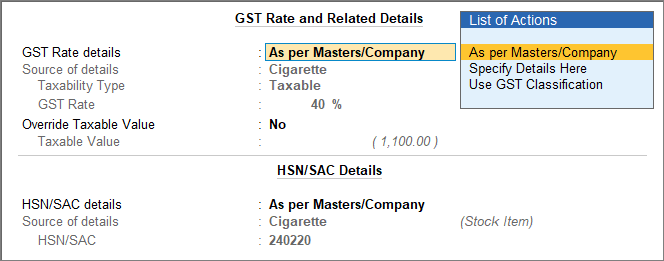
The GST Rate and Related Details screen shows the sales value of the item, while the tax is calculated based on the tax-inclusive MRP.
For TallyPrime 7.2 or later, you can view the tax-inclusive MRP used for GST calculation in the Deemed Taxable Amount field.
- Select the appropriate tax ledger in the sales voucher.
- Press Alt+A (GST – Tax Analysis) to view the tax breakup.
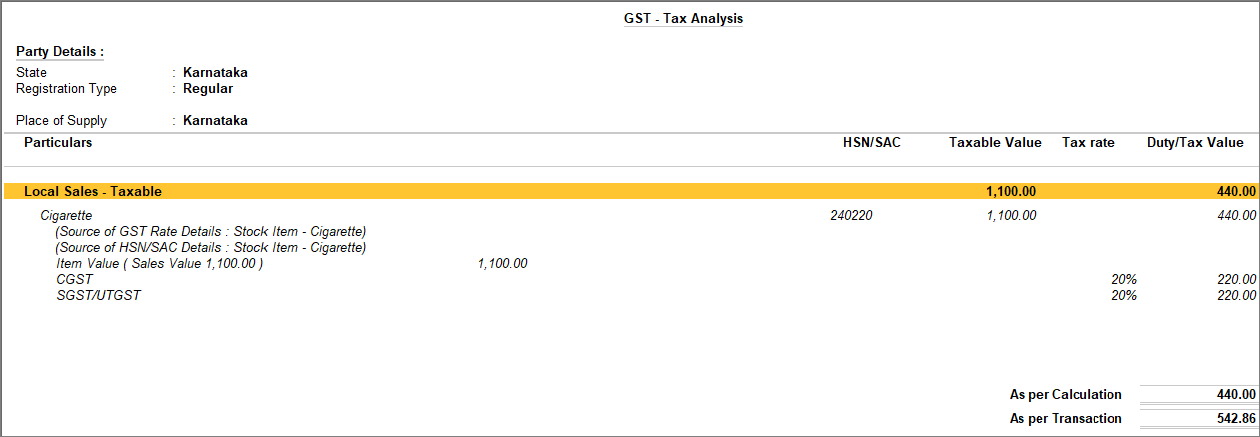
You can see the selling price of the item under Taxable Value, while the GST is calculated on the tax-inclusive MRP.
For TallyPrime 7.2 or later, you can view the tax-inclusive MRP under the Deemed Taxable Amount column. - Press Esc to return to voucher creation screen.
- Press Ctrl+A to save the voucher.
You can view the recorded transactions in GST reports such as GSTR-1, GSTR-3B, Annual Computation, GSTR-1 Reconciliation, GSTR-2A Reconciliation, and GSTR-2B Reconciliation under the relevant sections, and proceed with return filing as usual.
Across all reports, the sales value will be reflected under Taxable Value; however, the tax will be calculated based on the tax-inclusive MRP.
For TallyPrime 7.2 or later, you can view the tax-inclusive MRP under Deemed Taxable Amount column.
To include Deemed Taxable Amount column, press F12 (Configure) > enable Show Deemed Taxable Amount.
Calculate GST on Tax-inclusive MRP Using Plug-Ins
Step 1: Enable the Plug-In for your License
- Open TallySolutions.com to enable the plug-in for your TallyPrime license.
- Enter your Tally Serial Number and click Check Eligibility.
An OTP will be sent to your License Administrator’s registered e-mail ID.
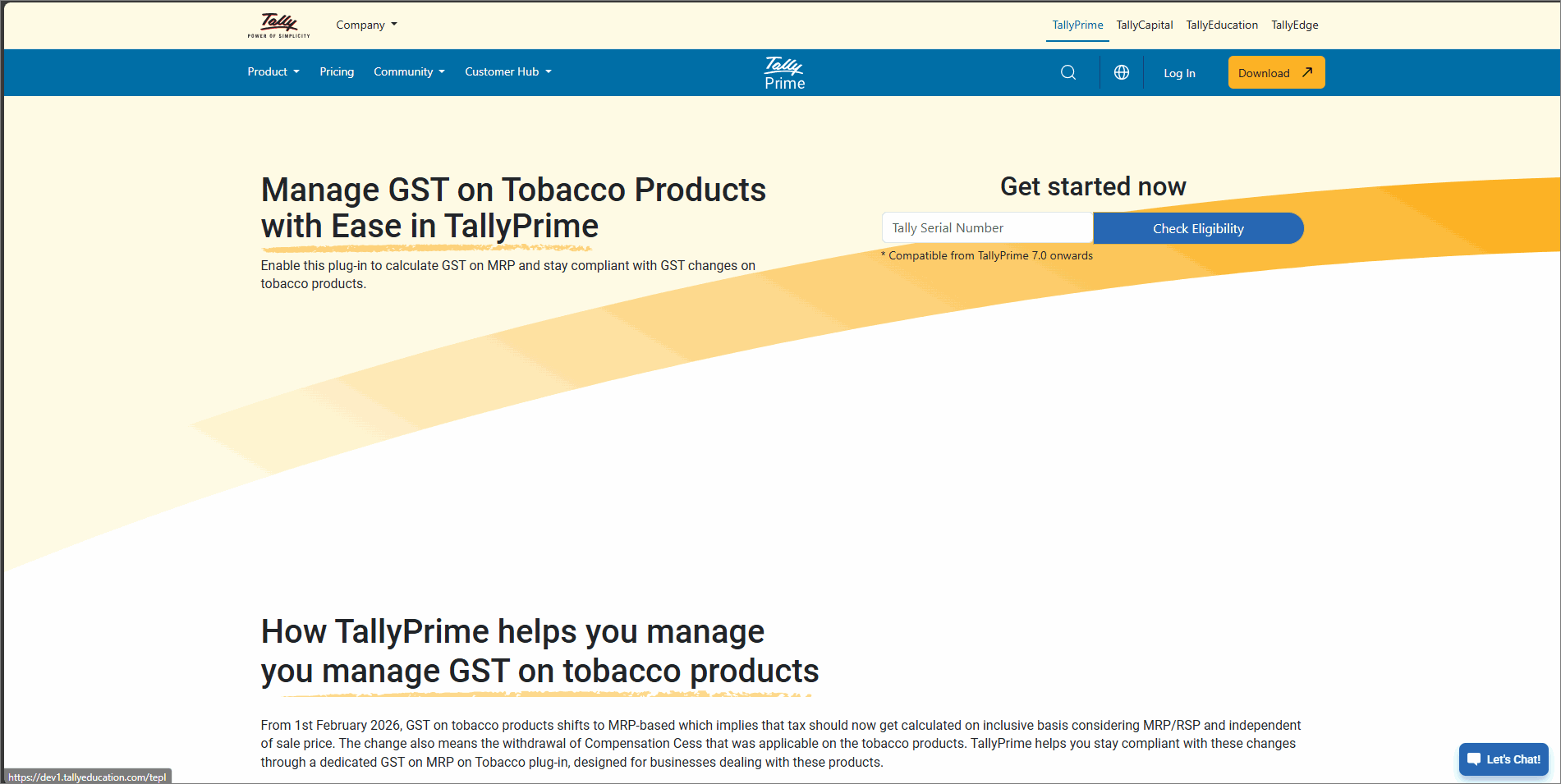
- Enter the OTP and click Submit.
Once the serial number is successfully linked, a confirmation message appears. Additionally, you receive a confirmation e-mail at your registered e-mail ID.
- Update your TallyPrime License.
- Press F1 (Help) > Settings > License > Manage License > F5 (Update).
- In the Update License screen, enter your Tally.NET ID and Password.
- To view the enabled Plug-In, press F1 (Help) > Tally Plug-Ins.
Step 2: Update the GST rate in the Stock Item
- In the Stock Item Alteration screen, update the GST Rate.
For cigarettes and other tobacco products, GST Rate is 40% and for bidis it is 18%.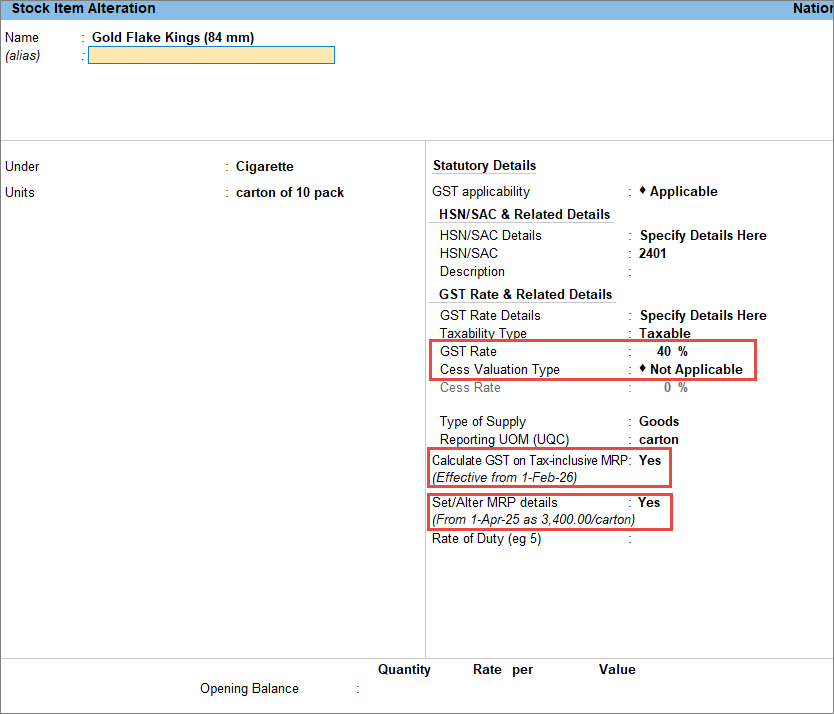
If you have multiple stock items, then you can bulk update the GST Rate from GST Rate Setup. - Set Cess Valuation Type to Not Applicable.
- Enter the Effective Date as 1st February 2026.
- Enable Calculate GST on Tax-inclusive MRP.
- Enable Set/Alter MRP Details.
- In the MRP Details screen, if the MRP Rate is blank, then update the MRP rate with effective date as 1-Feb-26.
Step 3: Record the sales transaction
- In the sales voucher, enter the stock item, quantity, and rate of sale.
The GST Rate and Related Details screen appears.
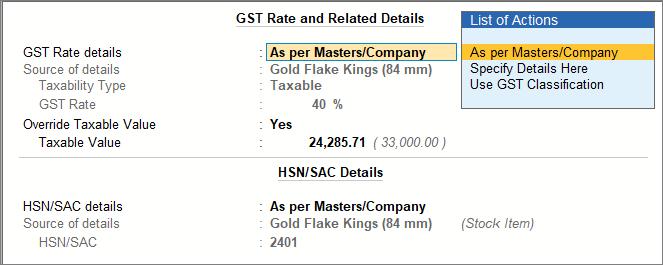
In the GST Rate and Related Details screen, TallyPrime automatically calculates the Taxable Value based on the tax-inclusive MRP. - Select the appropriate tax ledger in the sales voucher.
- To view the tax breakup, press Ctrl+O (Related Reports) and select GST – Tax Analysis.
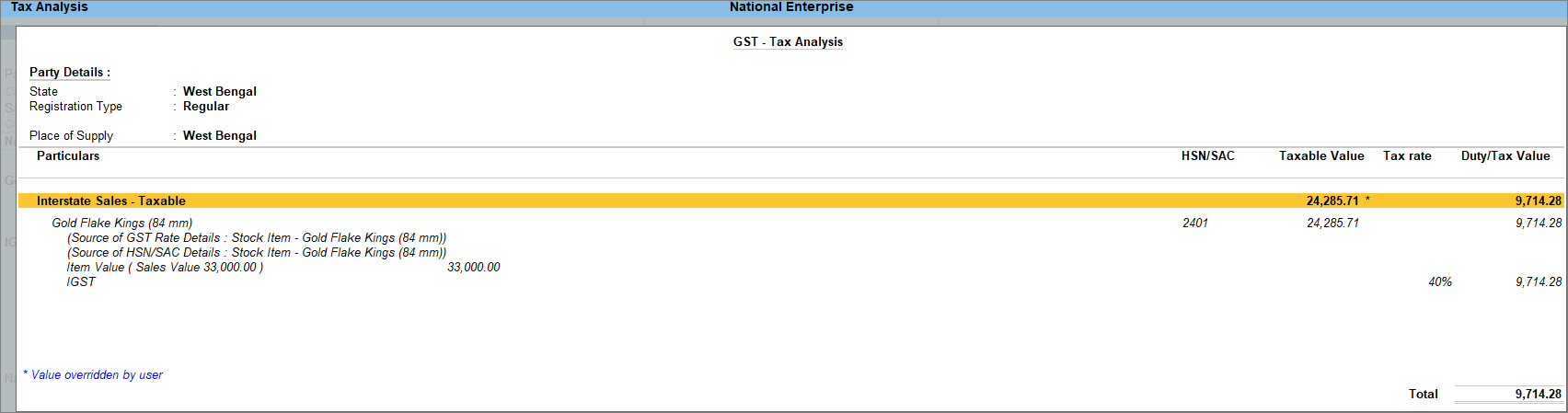
You can see that GST calculation uses the taxable value derived from the MRP, and not the selling price. - Press Ctrl+A to save the voucher.
These transactions will appear in GSTR-1 as Included in Return. You can also verify them under Exception Reports, then drill down from Transactions Accepted as Valid and then from Transactions accepted as is.
If you are using an earlier release of TallyPrime, you can still record sales of tobacco products and calculate GST based on the tax-inclusive MRP.
To know more, click here. The MRP Rate is not defined for the stock item. The Calculate GST on MRP (Incl. Tax) option is disabled in the configuration hierarchy. Items are not selected at the time of recording the transaction in As Voucher mode. Ensuring these settings are correctly configured will allow GST to be calculated on the MRP as expected. Taxable Value = MRP − GST Amount GST Amount is extracted from the MRP Total Transaction Value = MRP Therefore, GST is calculated and accounted for, while the final transaction value remains equal to the MRP. The accepted HSN codes are as follows: 2106 90 20 – Pan Masala 2401 – Unmanufactured tobacco; tobacco refuse (other than tobacco leaves) 2402 – Cigars, cheroots, cigarillos and cigarettes, of tobacco or of tobacco substitutes 2403 – Other manufactured tobacco and manufactured tobacco substitutes; “homogenised” or “reconstituted” tobacco; tobacco extracts and essences (other than biris) 2404 11 00 – Products containing tobacco or reconstituted tobacco intended for inhalation without combustion 2404 19 00 – Products containing tobacco or nicotine substitutes intended for inhalation without combustionCalculate GST on Tax-inclusive MRP (Workaround)

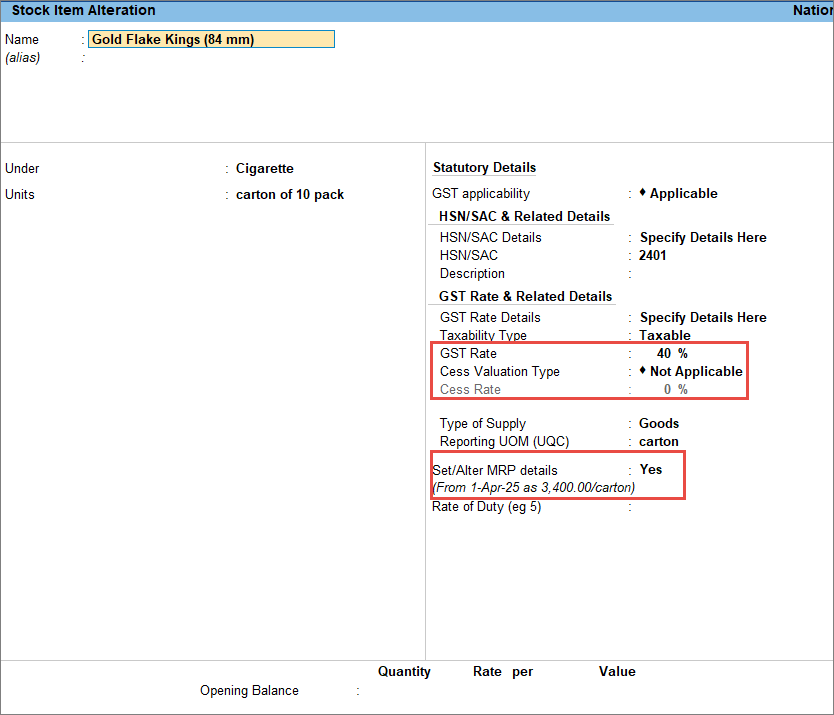
Step 1: Update GST rate in Stock Item
Step 2: Record the sales transaction
The MRP is filled from the stock item, but you can alter it if required.
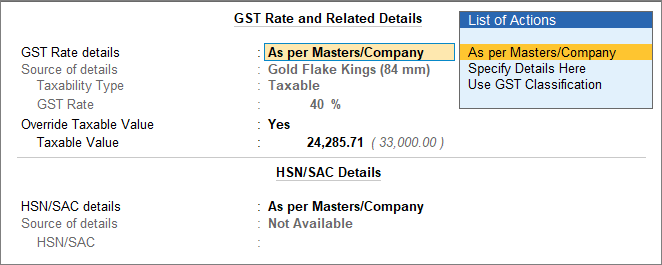
MRP*Qty/1.4 (when the tax rate is 40% divider is 1.4, it will be 1.18 in case of bidis)
For example, if the MRP for 10 cartons of Cigarettes is Rs. 3,400/Carton, then calculate tax on 10*3400/1.4 = 24,285.71
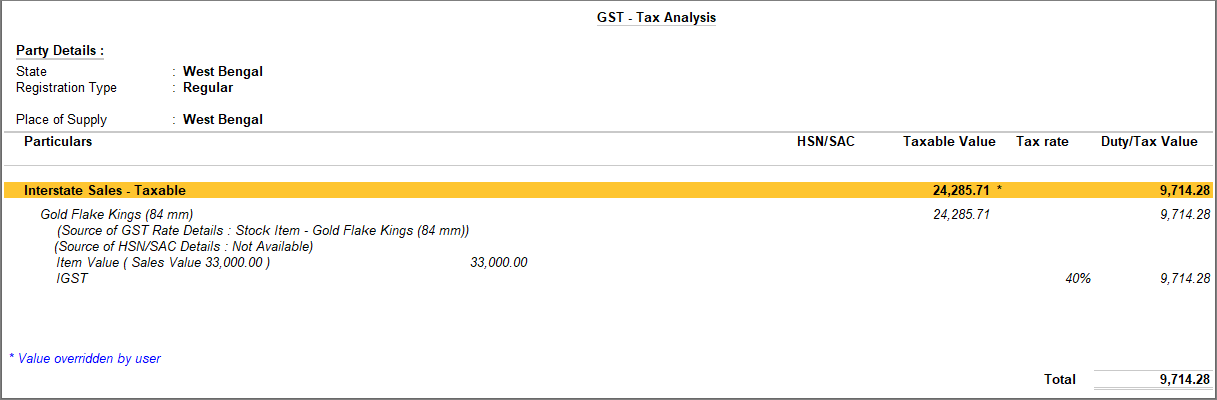
The tax calculation uses the taxable value, not the selling price.Questions & Answers
GST may not be calculated on the MRP in the voucher due to the following reasons:
Yes, you can use Voucher Class to record transactions for tobacco products. From TallyPrime Rel 7.1, if your stock item is configured with Calculate GST on MRP (Incl. Tax), then the tax will also get calculated on MRP when you are using Voucher Class to record the transaction.
Yes. Tobacco tax configuration will work, treating MRP as tax-inclusive.
When Provide Rate Inclusive of Tax for Stock Item is enabled, the MRP is treated as an inclusive-of-tax rate. Tally derives the tax amount from the MRP value and calculates the taxable value by subtracting the tax amount from the MRP.
As a result:
The e-Invoice and e-Way Bill portals reject invoices if the sum of taxable value and tax amount is greater than the total invoice value. However, invoices containing items with the specified HSN codes, either individually or in combination, are accepted and not rejected.
Yes, you can include deemed taxable amount while printing, exporting, or emailing invoices.
You can now see the Deemed Taxable Amount in the GST Analysis section in the invoice.


