
Record Material Out Voucher Under GST
In your business, inventory often needs to be moved from one location to another as you sell goods to parties. In TallyPrime, you can record such movements seamlessly using the Material Out voucher with GST.
For example:
- If you are a Principal Owner, you can use this voucher to record the issue of goods to an agent for consignment sales.
- If you are an Agent, you can use this voucher to record the return of goods to the Principal Owner.

- Make sure that GST details are configured for your Company. If you have multiple GST registrations, you may configure all registrations in the same Company.
- Activate the Material Out voucher type and configure as needed.
- Set up party masters with GST Registration details
- Set up stock items with GST details.
- Set up the required tax ledgers.

- Press Alt+G (Go To) > Create Voucher > press F10 (Other Vouchers) > Material Out.
- In Party A/c name, select the party ledger to whom you are sending the material.
- In Destination Godown, select the godown to which you are sending the material.
- Enter stock item details, including Quantity and Rate.
- Select the applicable tax ledgers – CGST & SGST for local transfer; IGST for interstate transfer.
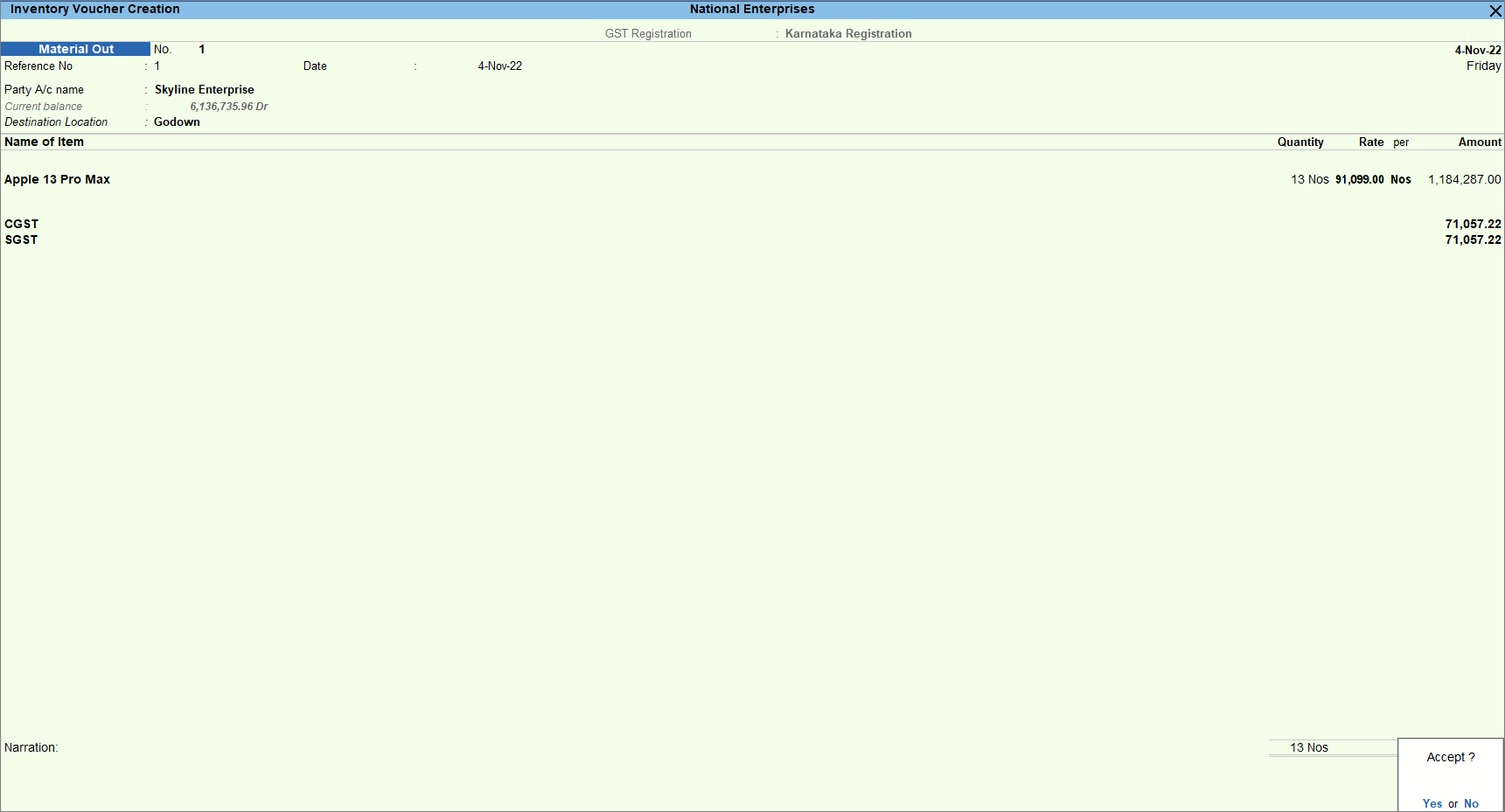
- Provide other necessary details, and press Ctrl+A to save.
Is this information useful?
YesNo


