
Log in and Log out of Connected Banking in TallyPrime
Once you set up Connected Banking in TallyPrime, you can log in or log out of Connected Banking at any point in time.

- You have enabled Connected Banking with a valid Tally.NET ID.
- A working internet connection is available.
Log in to Connected Banking
- Press Alt+Z (Exchange) > All Banking Options > Login & Logout.
- Enter your Tally.NET ID in the Log In to Connected Banking screen.

- Enter your Tally.NET password.

- Enter the OTP received on your mobile number.
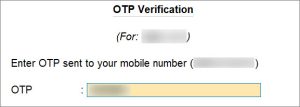
If you do not receive the OTP, press Alt+R (Resend OTP).
Once you enter the OTP, you get logged in to the Connected Banking services.
Log in when the session is expired or inactive
A Connected Banking session expires after 24 hours. In such a case, you can enter your Tally.NET password and OTP to log in.
Moreover, your Connected Banking session might become inactive in three cases:
- No activity is performed for more than 15 minutes.
- The Company is shut and opened in another instance of TallyPrime.
- TallyPrime is closed.
In case of an inactive connection, you need to enter just your Tally.NET password to log in.
Log Out from Connected Banking
When you are not using any Connected Banking facility, you can log out.
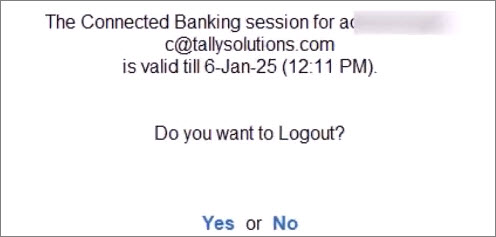
- Press Alt+Z (Exchange) > All Banking Options > Login & Logout.
- Press Y to log out.
Reset Connected Banking Login
When you are not able to log out of Connected Banking, you can reset the Connected Banking login.
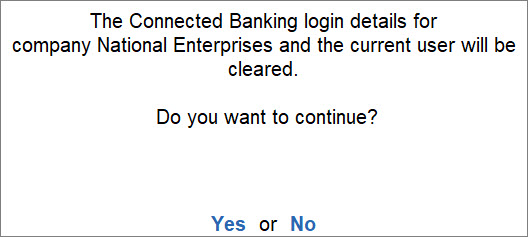
- Press F1 (Troubleshooting) > Reset Connected Banking Login and press Enter.
- Press Y to confirm.
Questions & Answers
- I am unable to log in. How can I proceed?
If you are not able to log in, then check the following:
1. Your Tally.NET ID and password are correct.
2. You have a stable internet connection.
3. You have the mobile with the number linked with your Tally.NET ID. You get the OTP on the same number.
If you are still unable to log in, then reset Connected Banking Login and try to log in again.
- How can I log in if I have changed my mobile number?
In such a case, update your mobile number on the Tally Solutions portal.
Is this information useful?
YesNo


