Record Supplies Through e-Commerce Operator in TallyPrime
In your business, apart from regular sales, you can supply goods or services through an e-commerce operator. You might be selling goods through an online portal or e-commerce operator such as Amazon, Flipkart and others. In such cases, you are supplying the goods to such e-commerce operators although your buyer is an end user. Once you have supplied the goods to the e-commerce operator, they will deliver the same goods to the end user. You can record the supply of goods to such e-commerce operators in TallyPrime using the sales voucher.

Ensure that you have:
- Enabled GST for your Company.
- Configured the GST Rate and HSN/SAC details in the applicable masters.
- Configured the party ledger with Registration Type as e-Commerce Operator.
- Created the applicable tax ledgers – CGST & SGST for local sales; IGST for interstate sales.

B2B Sales Through e-Commerce Operator
In the sales voucher:
- Select the party ledger set as e-Commerce Operator.
- In the Party Details screen, provide the e-Commerce Operator details.
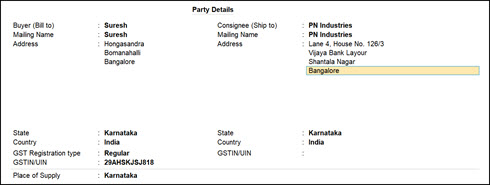
- Select the tax ledgers based on the place of supply of the e-Commerce Operator.
For example, CGST and SGST for local sales; IGST for interstate sales.
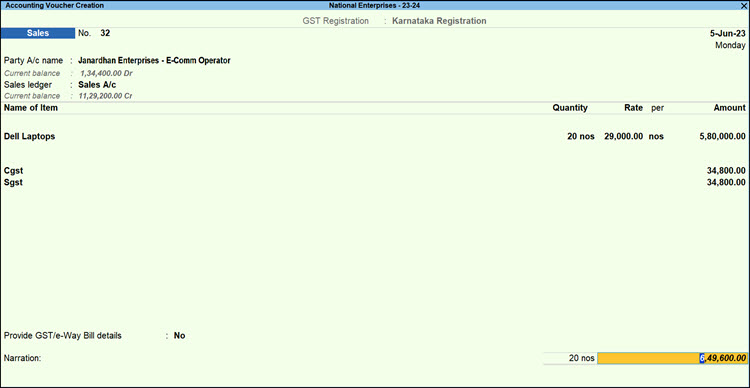
- Provide other necessary details, and press Ctrl+A to save the voucher.
In GSTR-1 of TallyPrime, the sales invoice appears in the B2B Invoices – 4A, 4B, 4C, 6B, 6C.
B2C Sales Through e-Commerce Operator
In the sales voucher:
- Select the party ledger for which the Registration type is set as e-Commerce Operator.
- In the Party Details screen, ensure that the GST Registration Type is set as Unregistered/Consumer.
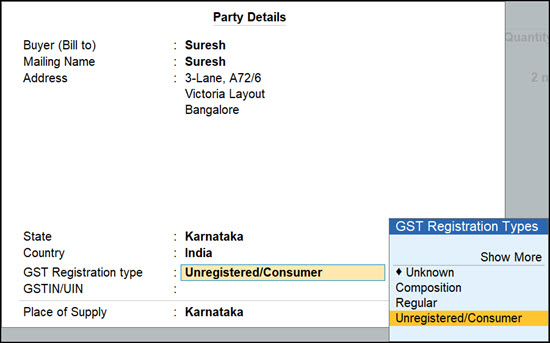
- Select the tax ledgers based on the place of supply of the Unregistered/Consumer.
For example, CGST and SGST for local sales; IGST for interstate sales.
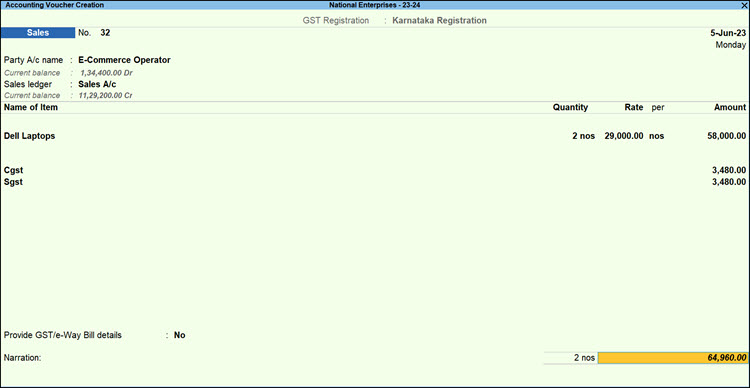
- Provide other necessary details, and press Ctrl+A to save the voucher.
Is this information useful?
YesNo