
Log In and Log Out from Docs by Ira in TallyPrime
To use Docs by Ira in TallyPrime, log in with a Tally.NET ID that has access to Docs by Ira enabled. If you do not have a Tally.NET ID, you can request an administrator to create one and enable access to Docs by Ira, or create a Tally.NET ID using a valid e-mail address and obtain administrator approval.
Ensure that:
Log In to Docs by Ira
- Press Alt+O (Import) > All Docs by Ira options > Docs by Ira Log In & Log Out.
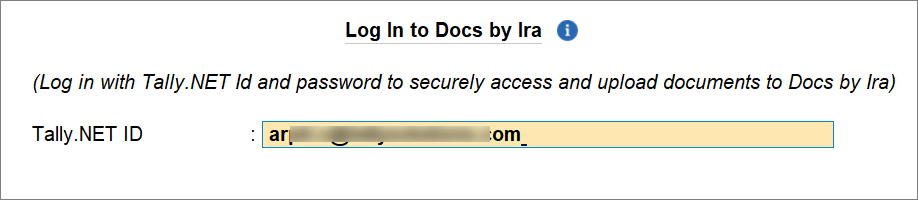
- Enter your Tally.NET ID and press Enter.
- Enter your Tally.NET Password and press Enter.
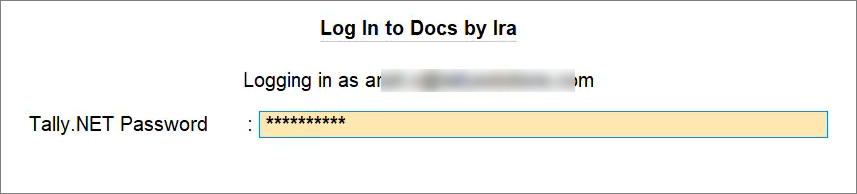
You will get logged in to Docs by Ira and see a confirmation message.
The Docs by Ira session remains active for 31 days.
Create New Tally.NET User and Enable Access to Docs by Ira

If you do not have a Tally.NET ID, you can request an administrator to create one and enable access to Docs by Ira for you. Alternatively, you can create a Tally.NET ID using a valid e-mail address and request administrator approval.
Create new Tally.NET users and enable Docs by Ira | Admin
As an admin, you can use the e-mail address of the user and then:
- Create Tally.NET ID and enable Docs by Ira in TallyPrime.
- Grant access to an existing or newly created Tally.NET ID through the Tally Solutions customer portal.
- Press Alt+O (Import) > All Docs by Ira options > Docs by Ira Log In & Log Out.
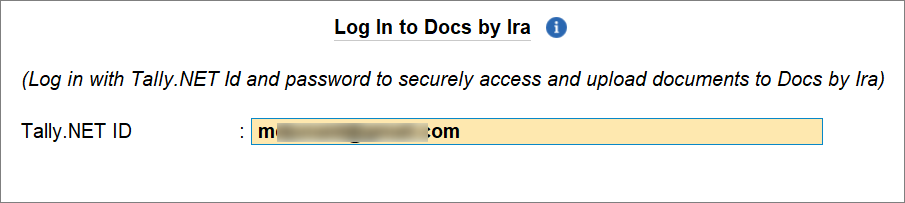
- Enter the e-mail address of the user.
- Press Y.
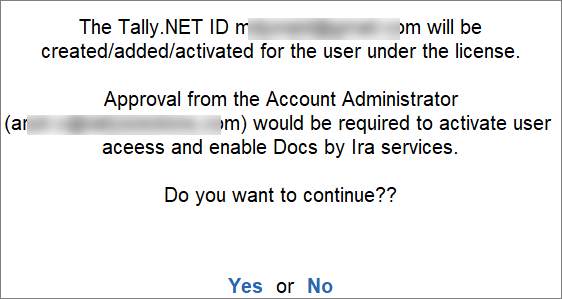
The e-mail address gets added on the Tally Solutions portal as a new user/Tally.NET ID, but the status will be inactive.
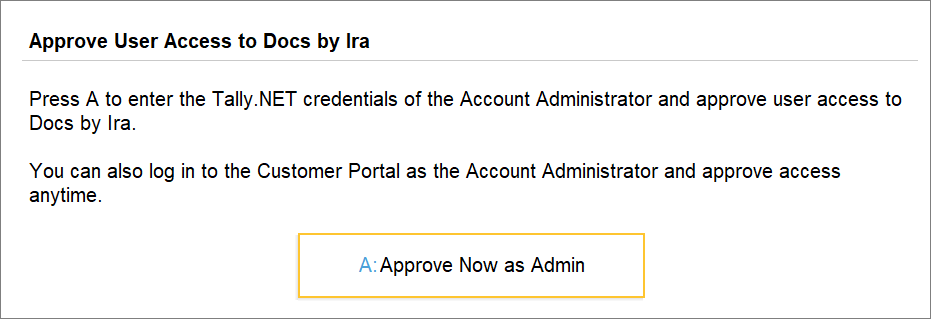
You can approve the Tally.NET user. - Press A to approve the user.
- Enter your admin Tally.NET ID and Password.
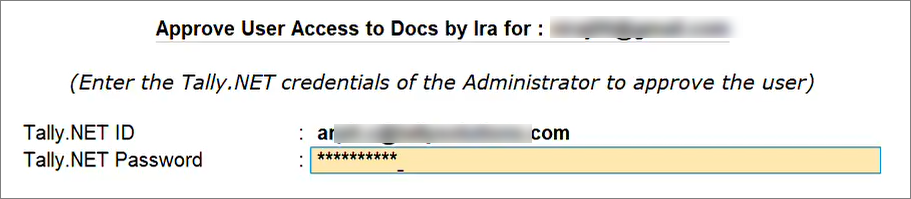
The Tally.NET user gets activated and approved under this license to use Docs by Ira.
Once the Tally.NET ID creation is approved and access to Docs by Ira is enabled, you will receive a confirmation e-mail, and the user will receive the Tally.NET password. The user can then log in using the Tally.NET ID and password.
Create new Tally.NET users and enable Docs by Ira | Non-admin
As a new non-admin user, you can initiate the creation of your Tally.NET ID right from TallyPrime.
- Press Alt+O (Import) > All Docs by Ira options > Docs by Ira Log In & Log Out.
- Enter your e-mail address.
- Press Y.
Your admin receives an e-mail for approval of Tally.NET user creation with your e-mail address and enabling access to Docs by Ira.
The admin can approve either from your TallyPrime or on the Tally Solutions Customer Portal.
Log Out from Docs by Ira
- Press Alt+O (Import) > All Docs by Ira options > Docs by Ira Log In & Log Out.
- Press Y to log out.
Before you log out, you can check the session validity.
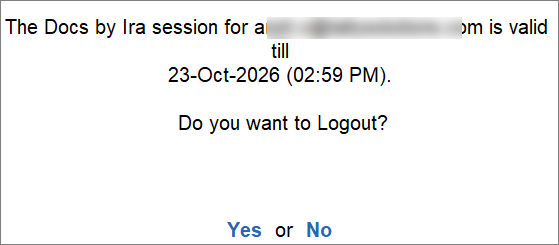
You get logged out of Docs by Ira and see a confirmation message.
Questions & Answers
- Why am I not able to log in to Docs by Ira?
If you are an admin, then ensure that you have registered for the Docs by Ira with the same Tally.NET ID you are using to log in.
If you are not an admin, then ensure that your admin has enabled access to Docs by Ira.
- Do I need to log in to Docs by Ira each time I open TallyPrime?
No, you remain logged in for 31 days, unless you log out.
- In a multi-user environment, will the Docs by Ira login applicable to all the desktops using the TallyPrime license?
No, you will need to log in on all the desktops separately.
- I received an e-mail to approve a Tally.NET user. Can I approve the user from TallyPrime?
Yes, you can do that. Just enter the user’s e-mail address. Thereafter, as an admin, you can directly approve the user.
- To approve the creation of a Tally.NET ID and enable access to Docs by Ira, I logged in to the requestor’s system using my admin credentials. Will my credentials be stored in the requestor’s TallyPrime installation?
No, The admin login is only for approving the ID and access. Once you approve, the user has to log in to Docs by Ira using their Tally.NET ID and password.
- How many Tally.NET users can use Docs by Ira?
Any number of Tally.NET users can be added under a TallyPrime license to access Docs by Ira.


