
Set Up Unit of Measurement (UoM) for UAE e-Invoicing
In UAE e-Invoicing, the Unit of Measurement (UoM) used for stock items must be mapped to the appropriate reporting unit for accurate invoice generation and statutory reporting. By configuring the Unit Quantity Code (UQC) in TallyPrime, you can ensure standardised reporting of quantities in e-Invoices.

-
Enable VAT & e-Invoicing.
- Create the required Unit of measurement.
- Select the required Type of unit.
- Enter the Symbol and Formal Name for the unit.
- Unit Quantity Code (UQC): From the List of UQCs, select the applicable reporting UQC.
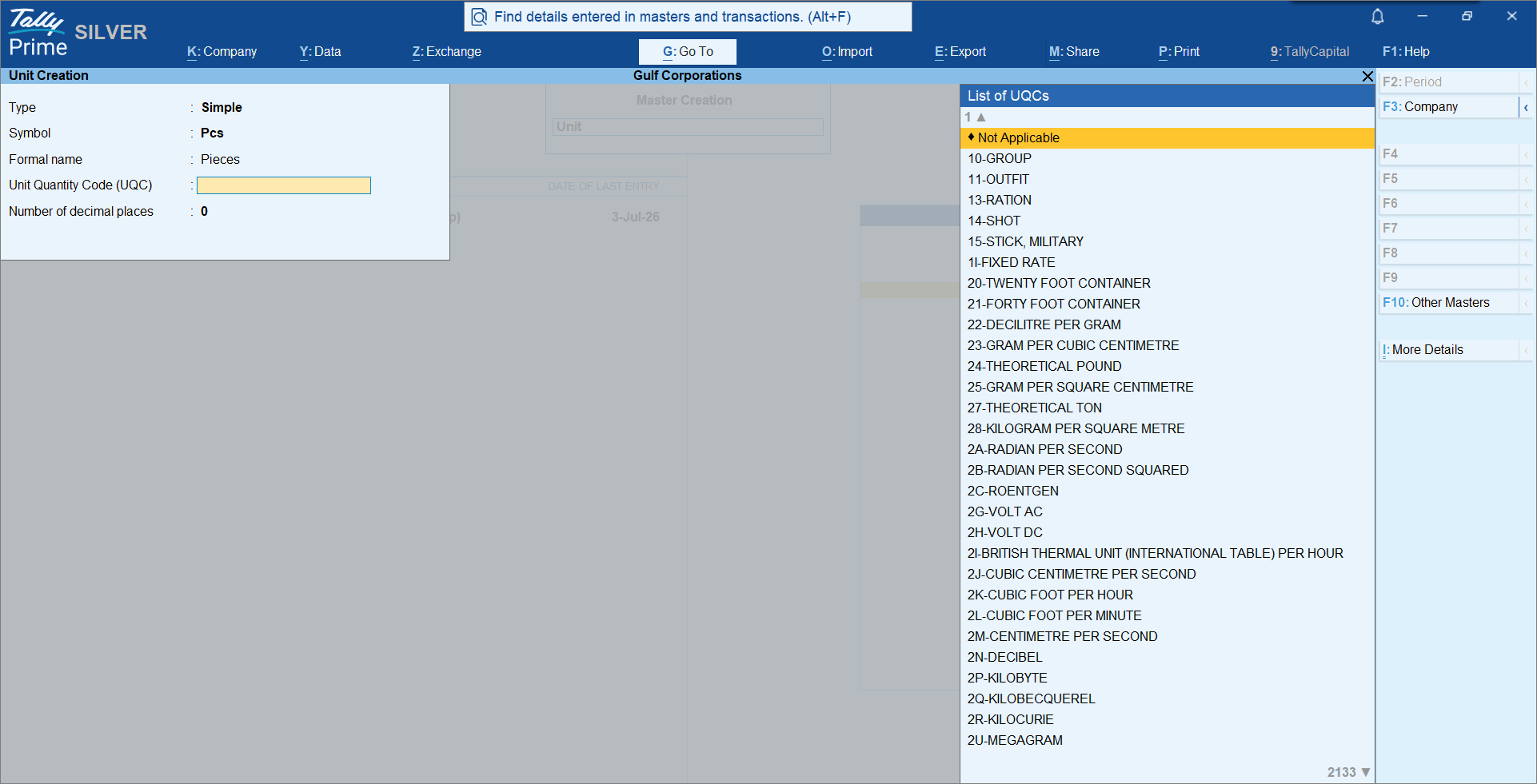
- Enter the required Number of decimal places for quantity calculation.
- Alternatively, you can press Ctrl+I (More Details) to update these reporting details.
- Unit Quantity Code (UQC): Select the applicable reporting UQC.
- Unit Quantity Code (UQC) (History): View the history of UQC changes configured for the unit.
- Provide other necessary details and press Ctrl+A to save.
Questions & Answers
What is a Unit Quantity Code (UQC)?
A Unit Quantity Code (UQC) is a standard code that maps your Unit of Measurement to an internationally recognised unit defined by PEPPOL. This mapping is required for successful e-Invoice exchange.
Is this information useful?
YesNo


