
Set Up Party Ledger for UAE e-Invoicing
Configure your party ledgers with the required VAT and e-Invoicing details in TallyPrime to generate compliant e-Invoices in the UAE.


- Under VAT Registration Details, configure the details required for UAE e-Invoicing.
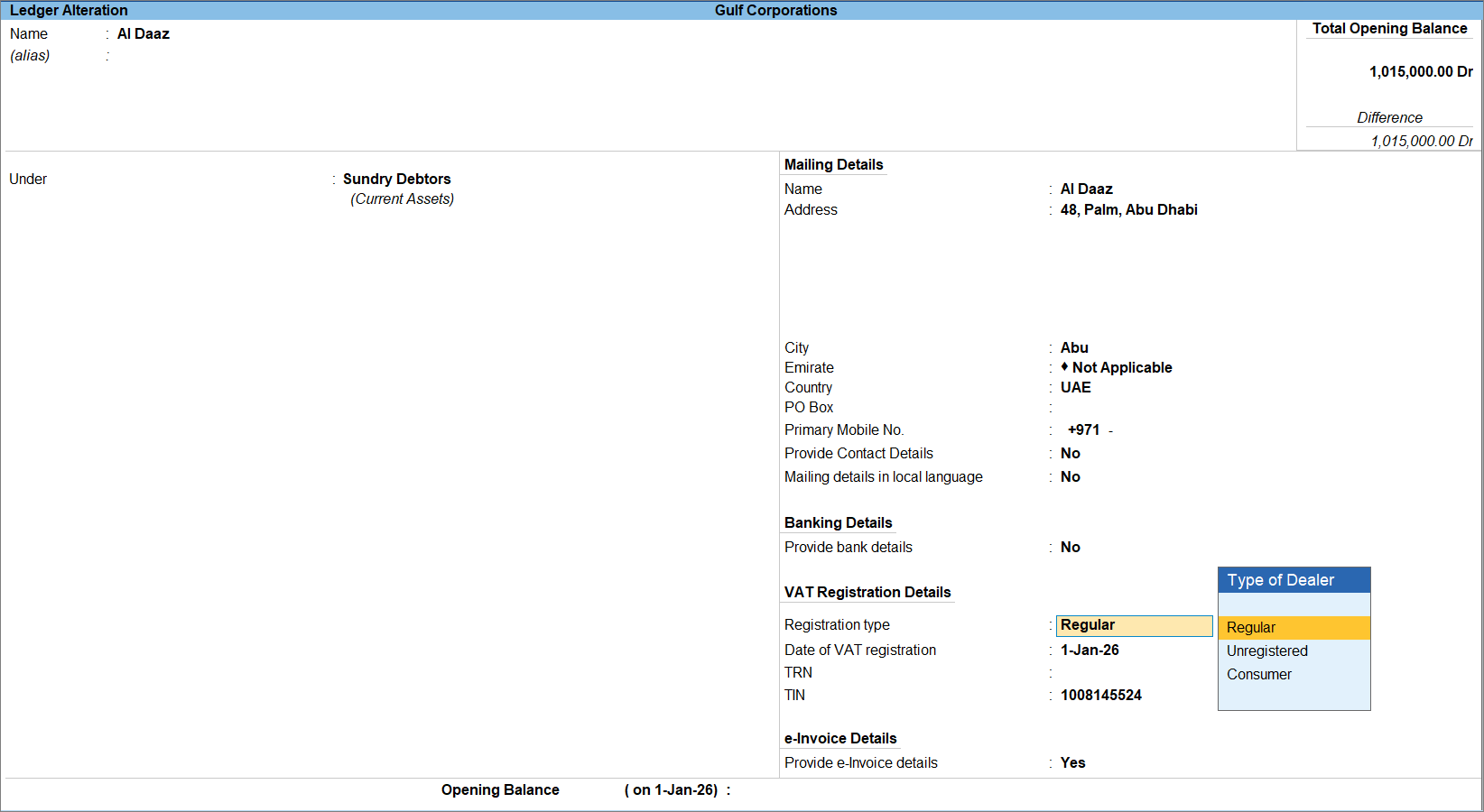
- Select the required Registration type.
- Regular: When the party is registered under UAE VAT and has a valid TRN.
- Unregistered: When the party is not registered under UAE VAT and does not have a TRN.
- Consumer: For retail or end customers where transactions are made directly to consumers instead of registered businesses.
- Enter the Date of VAT registration, as applicable.
- TRN: Enter the Tax Registration Number (TRN).
- TIN: It is automatically populated based on the first 10 digits of the TRN.
- Select the required Registration type.
- Enable Provide e-Invoice details to configure the e-Invoice Details.
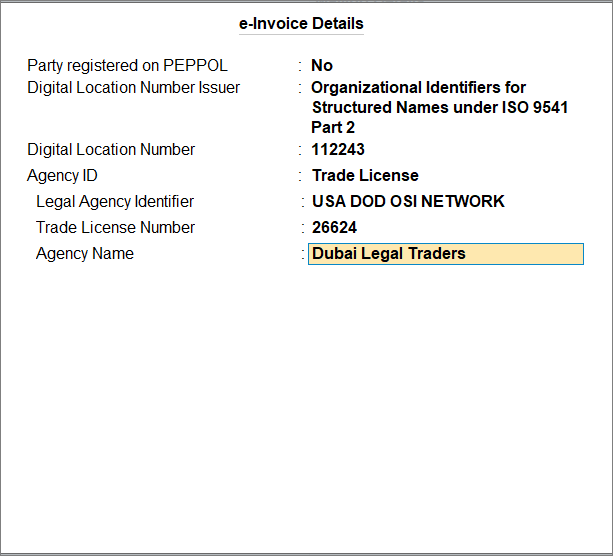
- Set Party registered on PEPPOL to Yes, if the party is registered on the PEPPOL network.
- Enter the PEPPOL ID.
- Digital Location Number Issuer: Select the applicable issuer from the list.
- Enter the Digital Location Number.
If the party’s country is other than UAE, or if the party’s Country is UAE and the Registration Type is Unregistered, the following additional fields appear:
- Enter the Digital Location Number.
- Digital Identity Number Issuer: Select the applicable issuer from the list.
- Digital Identity Number: Enter the Digital Identity Number.
- Agency ID: Select the applicable Agency ID.
- Select the Legal Agency Identifier.
- Select the Agency Name.
- Set Party registered on PEPPOL to Yes, if the party is registered on the PEPPOL network.
- Alternatively, press Ctrl+I (More Details) > e-Invoicing Registration Details to configure the e-Invoicing details, if required.
- Provide other necessary details and press Ctrl+A to save.
Questions & Answers
- What new information can I capture in the party ledger for e-Invoicing in UAE?
TallyPrime has introduced additional fields such as City, TIN, PEPPOL details, Digital Location and Digital Identity details, and Free Zone Number to support UAE e-Invoicing requirements. These fields are available once you enable e-Invoicing for the Company. -
What happens when I change the TRN or Registration Type of a party?
Transactions created on or after the effective date automatically use the updated TRN and Registration Type maintained in the party ledger history. -
I am upgrading to a new version in TallyPrime. Will my existing party ledger data be migrated?
Yes, the existing party ledger data is retained after migration. However, history records for the newly introduced e-Invoicing fields are not created automatically. History tracking begins when you first alter the ledger and save the changes with an effective date. -
Can I capture e-Invoicing details for multiple addresses?
When Enable multiple addresses is set to Yes in F11 (Company Features), you can capture e-Invoicing details separately for each address.


