
Record Recovery of Salary Advance in TallyPrime (Payroll)
TallyPrime Payroll enables you to track salary advances paid to employees from Employee Pay Head Breakup report and define recovery criteria. You can recover these salary advances from the employee’s salary either in full or in multiple instalments.
Before you begin | Prerequisites
- Create Employee Master.
- Create Salary Advance Deduction Pay Head.
- Ensure you include the Salary Advance Deduction Pay Head in the salary structure.
- Record payment of salary advance.
To record the recovery of salary advance,
- Press Alt+G (Go To) > Create Voucher > press Ctrl+F4 (Payroll).
- Select Bank ledger under Account.
- Select the employee category, if any.
- Select the employee name to recover the salary advance.
- Enter the value against Salary Advance Deduction.
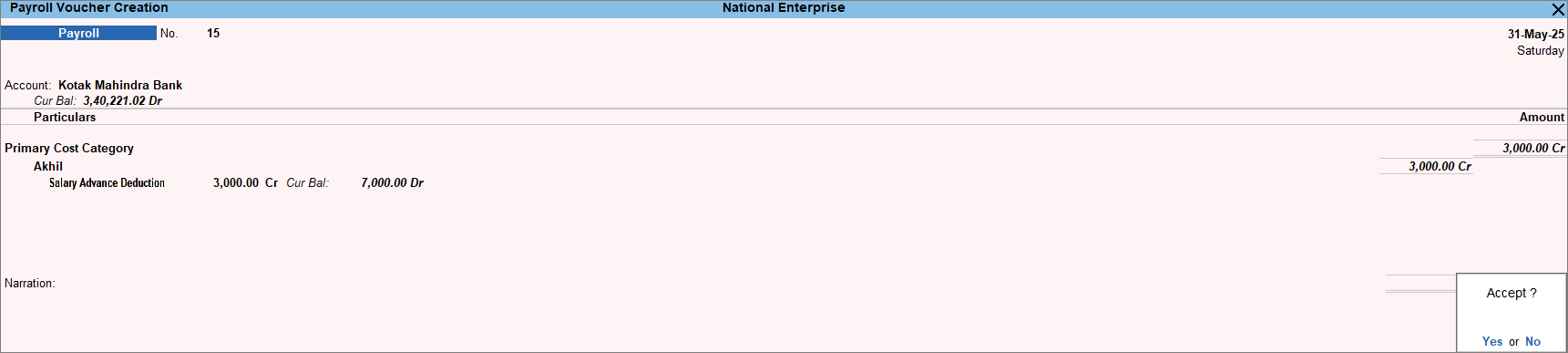
- Press Ctrl+A to save the voucher.
Once the loan amount is repaid, you can remove the Salary Advance deduction Pay head from the Salary Details of the relevant employee to avoid erroneous deduction of Salary Advance during the Payroll Voucher.
If you were not able to recover the amount from the employees during the financial year, you need to carry forward the balance to the next year.
Q&A
How can I remove the Salary Advance Deduction pay head from the salary details?
You can remove the pay head from Define Salary.
- Press Alt+G (Go To) > Alter Master > type or select Define Salary.
- Select the employee name from the List of Groups/Employees.
- Press Alt+W (Show All Periods) to see the salary structure for all the periods.
- Under the Pay Head column, click on Salary Advance Deduction pay head.
- Select End of List and press Enter.
The pay head will be removed from the salary structure. - Press Ctrl+A to save.


