
Set Up Standard Selling Price in TallyPrime
In TallyPrime, you can define a Standard Selling Price and Standard Cost for each stock item based on the rates applicable to your business. You can specify the rate and the date from which it is applicable. When you record sales or purchase transactions, TallyPrime picks up the applicable standard rate based on the voucher date.

Ensure that:
- You have created the required stock items.
In the Stock Item Alteration screen:
- Press F12 (Configure) and enable Provide Standard Buying and Selling Rates.
- Set Alter standard rates to Yes.
- Set the Standard Cost and Standard Selling Price.
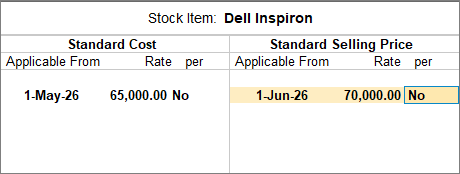
- To set the buying price, in the Standard Rates screen, enter the Standard Cost with the Applicable From date and Rate per unit.
- To set the selling price, in the Standard Rates screen, enter the Standard Selling Price, Applicable From date, and Rate per unit.
- Press Ctrl+A to save.
- Press Ctrl+A to save the Stock Item.
Is this information useful?
YesNo


