
Record Sales with Price Lists and Price Level in TallyPrime
If you have created Price Lists for different Price Levels, you can select the required Price Level while recording a Sales voucher. TallyPrime automatically picks up the applicable rate and discount based on the selected Price Level, stock item, voucher date, and quantity. You can also assign a Price Level to a party ledger so that it is selected automatically when you choose the customer in the Sales voucher.

Ensure that:
- You have created the required Price Levels and defined the corresponding Price Lists.
- To have the Price Level selected automatically for a customer, you have assigned it to the relevant party ledger.
In the Sales voucher:
- Press F2 (Date) and select the date for which the Price List is applicable.
- Select the party ledger with the predefined Price Level as the Party A/c Name.

The Price Level appears automatically as defined in the party ledger. - Select the stock item and enter the Quantity. The Rate appears as defined in the price list linked to the selected price level.
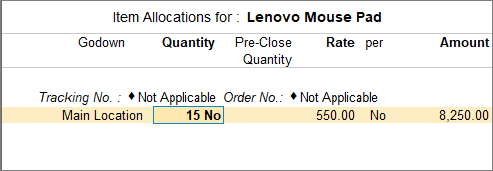
- To modify the rate in the voucher, press F12 (Configure) and set Modify all fields during voucher entry to Yes.
- Select additional ledgers, if any.
- Enter the necessary details, and press Ctrl+A to save the voucher.
Questions & Answers
- Can I select a different Price Level while recording a sales invoice?
Yes. Even if a Price Level is predefined for the party ledger, you can select a different Price Level while recording the invoice, if required. - Can I modify the rate picked from the Price List while recording sales?
Yes. Press F12 (Configure) and set Modify all fields during entry to Yes. You can then modify the rate during voucher entry. - Can I use the Standard Selling Price for one sale and a Price List for another?
Yes. You can record a sale using the Standard Selling Price when no Price Level is selected. When you select a Price Level, the rate from the corresponding Price List is applied.
Is this information useful?
YesNo


