
Record Credit Purchases in TallyPrime
In TallyPrime, you can record credit purchases to track amounts payable to suppliers and monitor outstanding dues until they are settled. Depending on your business requirements, you can track credit purchases at the supplier level, manage individual supplier invoices, or split a purchase into multiple payment commitments.

Ensure that the supplier ledger is configured with the required Credit Limit & Credit Period, and for maintaining balances bill-by-bill.
In the Purchase voucher:
- Press F12 (Configure) and set Use default Bill-wise details for Bill Allocation to No.
- Under the Party A/c Name, select the supplier.
- Select the purchase ledger and enter the necessary stock item details.
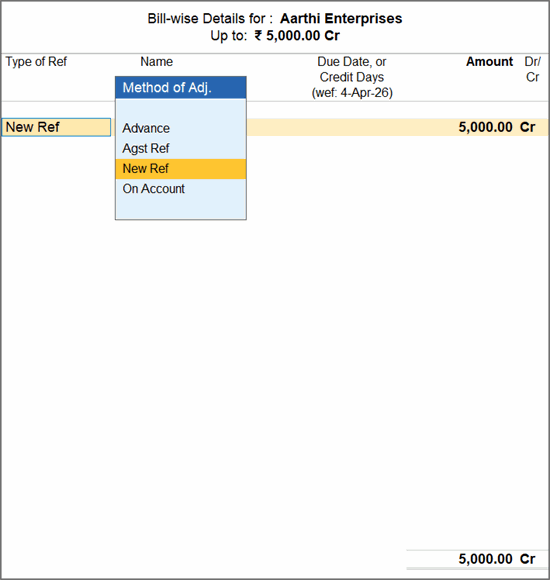
- In the Bill-wise Details for screen, update Type of Ref, as required, and enter the Amount.
- On Account: To record as an outstanding payable against the supplier without separate bill references.
- New Ref: To link to a specific bill along with Due Date, and settle separately through payment transactions.
You can also create multiple New Ref entries and allocate the purchase amount across the required bill references.
- Press Ctrl+A to save.
In this way, you can record credit purchases with flexible bill-wise tracking to efficiently manage supplier payables, monitor due dates, and settle outstanding amounts.
Is this information useful?
YesNo


