Check Credit Score in TallyCapital
If your firm type is Sole Proprietor, you can check your credit score along with a detailed credit report in TallyCapital Plug-In. It should be noted that checking your credit score does not have any impact on your credit score.
Check Credit Score and Credit Report
You can check your credit score along with a detailed credit report in TallyPrime.
- Press Alt+9 (TallyCapital) from any screen on TallyPrime > F4 (Check Credit Score).
- Enter the Mobile and OTP to log in.
On successful authentication of the OTP, the Specify Details for Credit Score form opens. - Enter the Personal Details.
- Enter the Mobile followed by the OTP.
- Individual PAN: Enter the PAN number.
- Enter the First Name.
- Enter the Last Name.
- Enter the E-mail address.

- Accept the Privacy Policy.
- Enable the option View the Terms & Privacy Policy to view the privacy policy.
- Give your consent to fetch your credit report by enabling the consent option.
The Credit Report opens with details of your credit accounts.
The Credit report is divided into two sections.
- Details of: Active and Closed Accounts
- Details of: Credit Inquiries

Details of Active and Closed Accounts
This section includes the details of your active and closed accounts impacting your credit score. You can see the account number and account type along with the loan amount or credit limit, overdue amount, and tenure. You can also see the name of the credit grantor under Financial Institution.
- Financial Institution: The list of financial institutions from which you have taken loans/credit.
- Account Number: The list of loan account numbers linked with your PAN.
- Account Type: Type of the loan.
- Loan Amount/Credit Limit: Loan amount or credit limit.
- Current Outstanding: Current outstanding balance of loan accounts.
- Overdue Amount: Overdue amount, if any, from the loan accounts.
- Tenure (Months): Tenure of the loan accounts.
- Status: Status of loan accounts.
If you find any discrepancy in your credit report, press F8 (Raise a Dispute) on the Credit Report screen.
The credit report will be available in condensed mode by default. Press Alt+F5 to view the detailed view of the credit report.

A detailed credit report consists of the following details.
- Ownership: The type of ownership such as Individual or Guarantor.
- Disbursed Date: Loan Disbursal date.
- Last Payment Date: Last Payment Date.
- Installment/Payment Interval: Installment amount of loan and payment frequency.
- Number of Late Payments
- Closed Date: The date on which the account was closed.
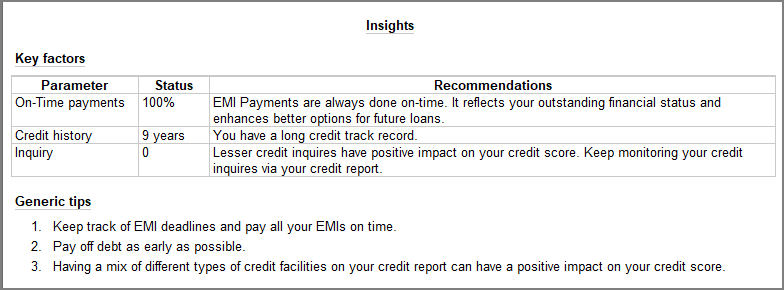
If you want to improve your credit score, TallyPrime provides you with some tips that you can refer to. On the Credit Report screen, press Ctrl+T (Insights).