
Record Purchase of Free Items in TallyPrime
In some businesses, suppliers may provide additional items at no extra cost as part of a scheme, promotion, or sample distribution. TallyPrime helps you record such purchases by capturing the actual and billed quantities or by recording the free items without specifying a rate or amount.
Account for Free Items Using Actual and Billed Quantities


In the Company Features (F11) screen, ensure that you have set Use separate Actual and Billed Quantity columns in invoices to Yes.
- In the purchase invoice, select the stock item and specify the stock item and the quantity.
Actual: Enter the quantity purchased from the supplier, say 25 Nos of the item.
Billed: Enter the quantity for which you will pay the supplier, say 24 Nos of the same item.
- Provide Narration for the voucher, if needed, and press Ctrl+A to save.
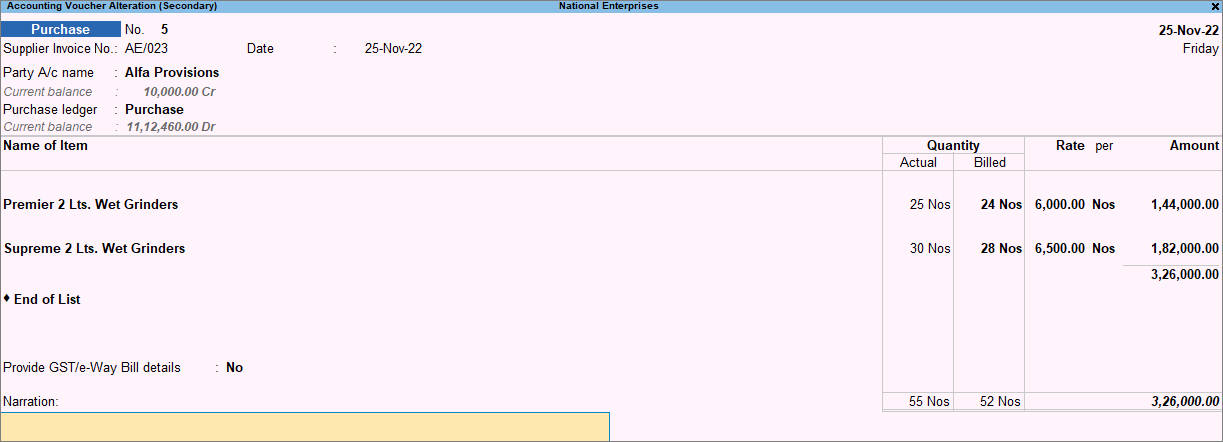
The total amount is calculated on the billed quantity.
Account for Free Items Using Zero-Valued Transaction
Ensure that you have configured the Purchase voucher type and set Allow zero-valued transactions to Yes.
- In the purchase invoice, specify the Quantity, Rate, and Amount that you have been billed for.
- Select the free item and enter the Quantity. Keep the Rate and Amount blank.
- Provide Narration for the voucher, if needed, and press Ctrl+A to save.
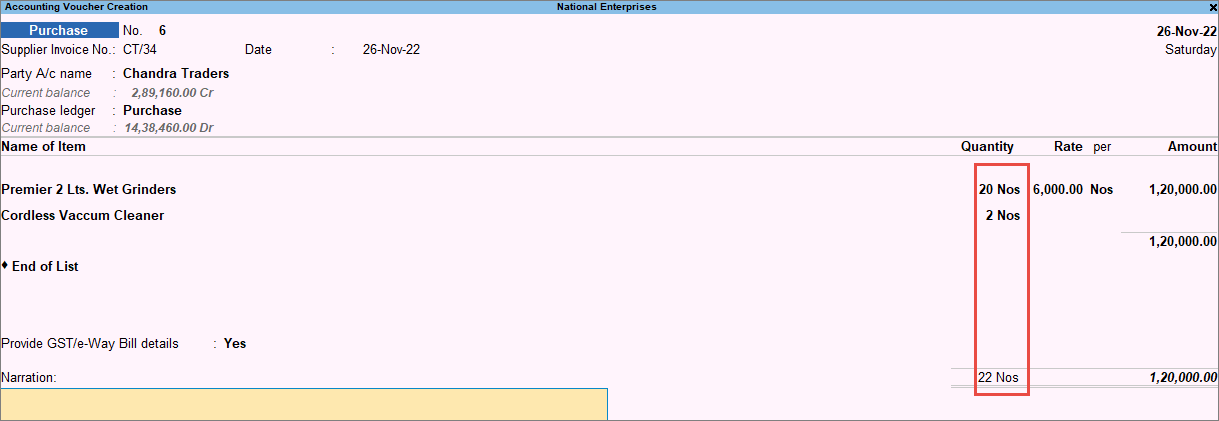
In this way, you can record free items using either actual & billed quantities or zero-valued transactions. This helps you maintain accuracy in stock quantities and purchase value.


