
Record Sales of Stock Items from Specific Batches in TallyPrime
In your business, you may have stock items that have an expiry date. You might want to sell these items based on their expiry dates or cost. To manage such stock efficiently, you can allocate the items to different batches. When recording a sales transaction in TallyPrime, you can then select the appropriate batch for the stock item.

Ensure that:
- You have enabled batches for the Company.
- You have created stock items and enabled batches for them.
While recording a sales invoice:
- Select the stock item and press Enter.
- Provide the batch-related details in the Stock Item Allocations screen.
- Select an active Batch or create a New Number.
- Enter the Mfg Dt. and Expiry Date.
The Mfg Dt. and Expiry Date will be considered from the batches allocated to the stock items.
However, you can alter these dates in this screen. - Enter the Quantity and Rate.
The Amount gets calculated.You can select multiple batches if the stock item belongs to more than one batch.
- Press Ctrl+A to save.
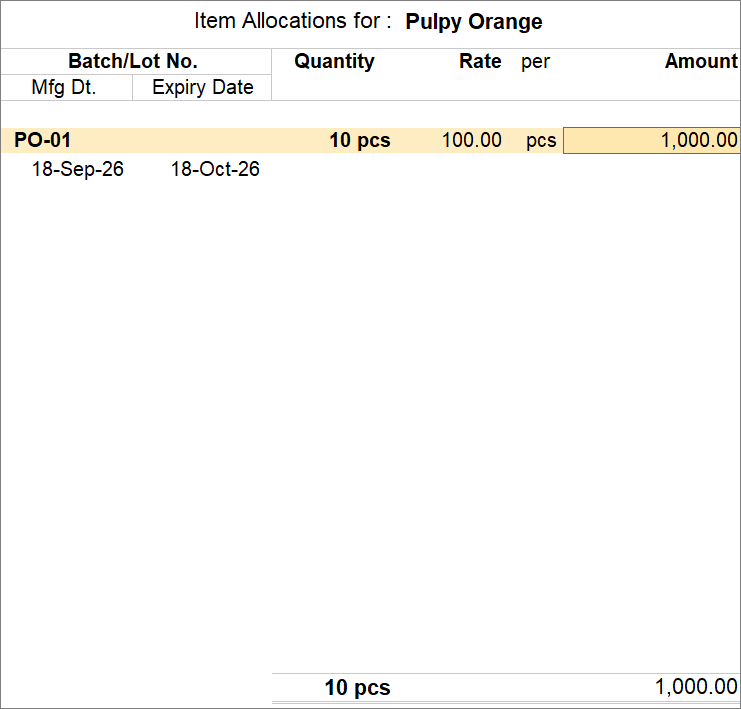
- Enter other necessary details, and press Ctrl+A to save the voucher.
Questions & Answers
- Can I sell items at different prices based on batches?
Yes, if the same item exists in batches with different costs, then:- Each batch can have its own selling price.
- You can choose the right batch based on the price requirement.
While recording a sales invoice, you can enter a rate against each batch.
- You can choose the right batch based on the price requirement.
- Each batch can have its own selling price.
- What happens if the required quantity is not available in the selected batch?
While recording the sales invoice, you can allocate the remaining quantity from another available batch.
Is this information useful?
YesNo


