
Record Sales with Cost Centres to Track Additional Charges in TallyPrime
You can use cost centres to track additional charges in a sales invoice, such as transportation, packaging, and insurance.
For example, if you work with multiple transportation agents based on delivery areas, you can create a cost centre for each agent to track how much each one charges for transportation.

Ensure that:
- In F11 (Company Features), you have set Enable Cost Centre to Yes.
- You have created required additional charges ledger under Indirect Expenses.
- In the Ledger Creation/Alteration screen for additional charges ledger, press F12 (Configure) > set Apply Cost Centres for Ledgers to Yes.
In the Sales voucher:
- Enter the stock item details.
- Select the additional charges ledger, such as Transportation Charges.
- Enter the percentage under Rate. You can also enter the amount.
- In the Cost Centre Allocation screen, select the cost centre created for the respective transportation agent.
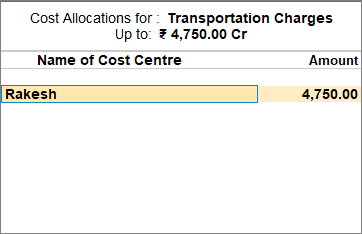
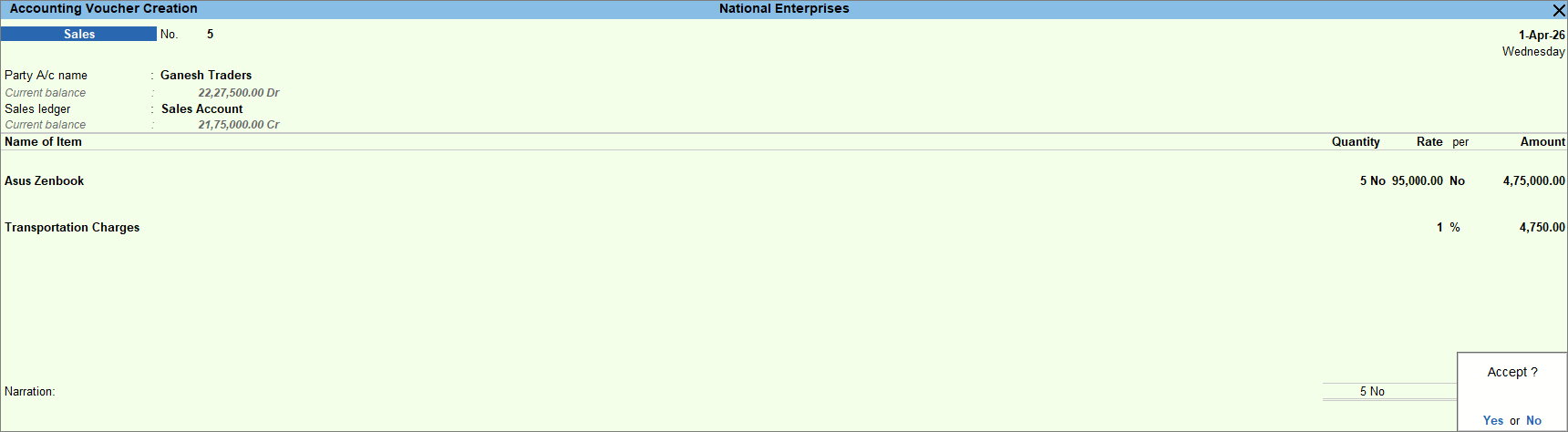
- Enter the necessary details, and press Ctrl+A to save the voucher.
Is this information useful?
YesNo


