
Record Additional Cost/Expenses Incurred in Transfer of Goods in TallyPrime
During stock transfers, you might incur additional expenses such as transportation, loading, and handling charges. In TallyPrime, you can record such expenses while recording a Stock Transfer Journal.

Ensure that:
- You have created stock items.
- You have created godowns.
- You have configured the additional expense ledger.
- Press Alt+G (Go To) > Create Voucher and press Alt+F7 (Stock Journal).
- Source (Consumption): Select the items and the location from which you are transferring the goods, and enter the Quantity.
The Rate gets prefilled based on the stock item master, and the Amount gets calculated. - Destination (Production): Select the items and the location to which the goods should be sent, and enter the Quantity.
The Rate gets prefilled based on the stock item master, and the Amount gets calculated. - In the Additional Cost Details screen, provide the details of the additional cost.
- Type of Cost: Select the additional cost ledger.
- %-age: Enter the additional cost percentage.
The amount gets automatically calculated based on the stock item amount.
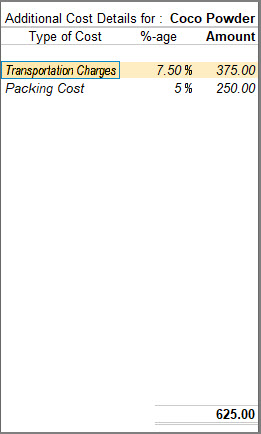
- Press Ctrl+A to save the screen.
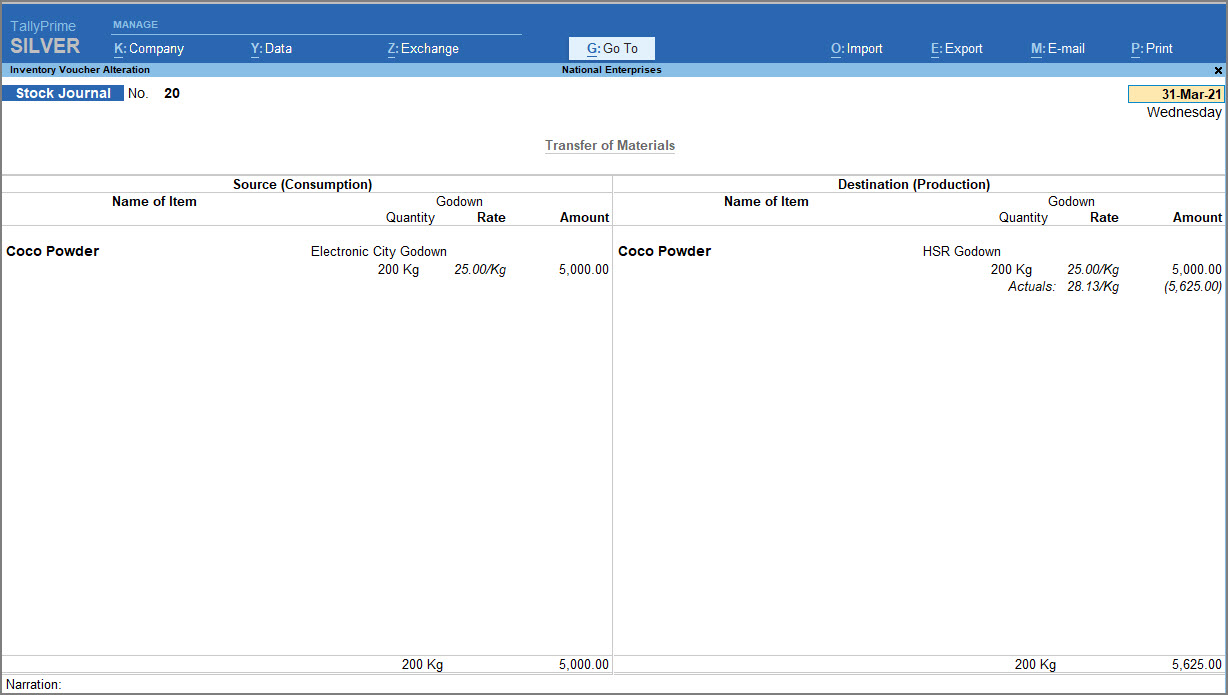
- Press Ctrl+A to save the voucher.
Questions & Answers
- I am transferring raw materials from my Head Office godown to a manufacturing unit, and the transfer involves freight, loading, and unloading charges. How can I include these costs in the stock value at the destination godown?
Record the stock transfer using a Stock Journal voucher and enter the freight, loading, unloading, and other transfer-related charges under Additional Cost Details. TallyPrime apportions these costs across the transferred items and adds them to their cost at the destination godown, ensuring that the stock value reflects the transfer-related costs.
- I received a single freight bill for transporting three different stock items from one godown to another. How can I distribute the freight cost across the items without calculating the cost for each item manually?
While recording the stock transfer, enter the total freight amount under Additional Cost Details in the Stock Journal voucher. TallyPrime automatically apportions the freight cost across the transferred items based on the selected allocation method, such as value or quantity, eliminating the need for manual calculations and ensuring accurate item-wise costing.
- The rate of the stock item at the source and destination are different. Is it possible to have different rates for stock items in a single voucher?
You can have different rates for the same stock item in the Source (Consumption) and Destination (Production) columns.
Is this information useful?
YesNo


