
Record Point of Sale (POS) in Tally e-Billing
In Tally e-Billing, you can record over-the-counter sales as POS transactions and accept payments through multiple modes, if required.

Ensure that:
- You have created the sales account, party account, and output VAT account.
- You have created the required stock items.
- You have configured the POS voucher type with the default sales account, VAT account, and other details.
- From Gateway > click Transactions > and then click POS.
- Select the Party.
- Enter the Stock Item details.
- Select the stock item.
- Enter the Quantity and Rate.
- Select Payment Mode and enter the Amount.
If there are multiple modes of payment, then click Add Payment Mode and select the required mode. - To include a line item discount, click Voucher Configuration and enable Discount Column.
- To include additional charges and discounts, click Voucher Configuration and enable Additional Charges.
- Include buyer details for cash transactions.
- Click Voucher Configuration and enable Show Buyer Details.
- Click Add to enter the party details.
- In the Party Details screen, enter Buyer (Bill to), Mailing Name, Sales Tax No. / PAN, Address, Province, Country, Mobile, and Email.
- Click Save Details.
- Enter a Narration, if required.
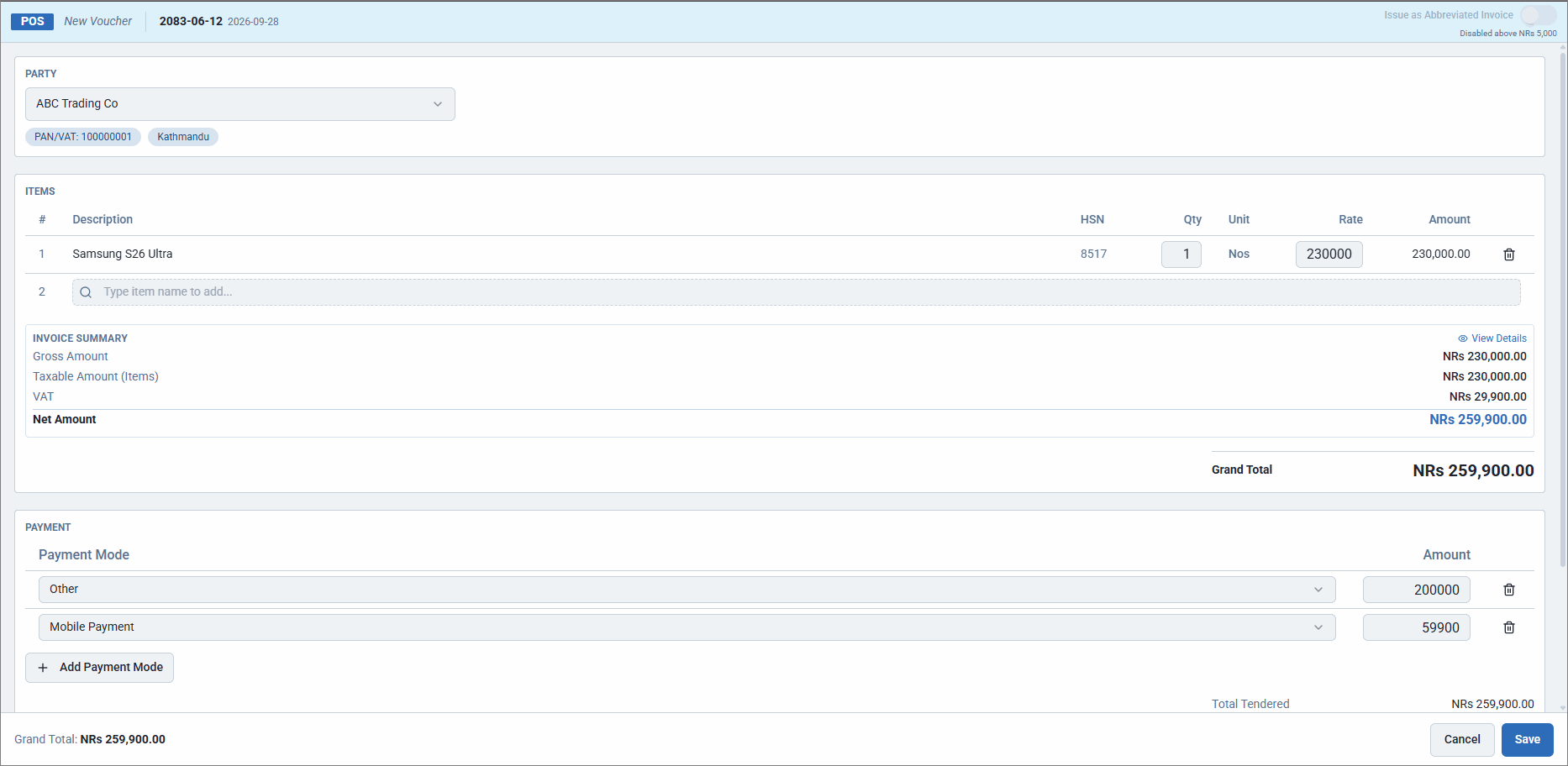
- Click Save.
Is this information useful?
YesNo


