
Set Up Tax Account in Tally e-Billing
Create tax accounts to record applicable duties and taxes, and configure their calculation method, rates, effective dates, and rounding requirements. You can also create tax ledgers for Excise if you are in the business of selling liquor, tobacco products and so on.
Set Up Tax Account for VAT
While recording sales, record the VAT amount under Output VAT, and while recording purchases, record it under Input VAT.
- From Gateway > click Chart of Accounts > click Accounting Masters > and then click Accounts.
- In the Account screen, click Create.
- In the Create Ledger screen, enter the Basic Details.
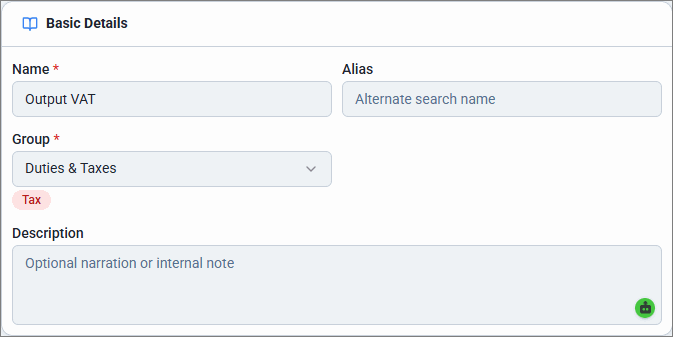
- Enter the Name of the tax ledger and Alias, if any.
- For Group, select Duties & Taxes.
- Enter Description, if any.
- Enter the Statutory Details.
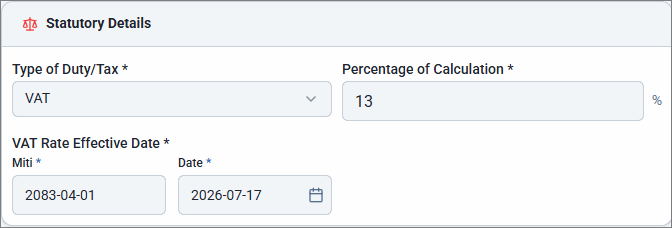
- Select the Type of Duty/Tax as VAT.
- Enter the Percentage of Calculation and VAT Rate Effective Date.
- Select the required Rounding Method.
- Enter the Opening Balance and select the as on date of the balance.
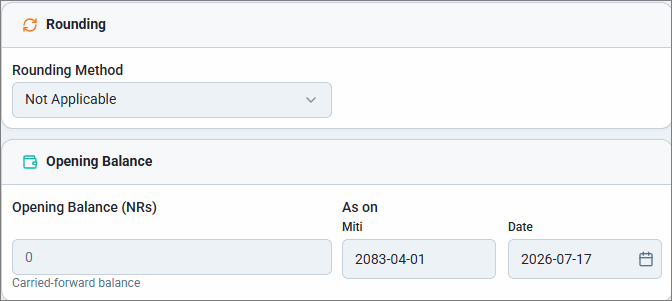
- Click Save.
Similarly, you can create Input VAT account under Duties & Taxes.
Set up Tax Account for Excise
- From Gateway > click Chart of Accounts > click Accounting Masters > and then click Accounts.
- In the Account screen, click Create.
- In the Create Ledger screen, enter the Basic Details.
- Enter the Name of the tax ledger and Alias, if any.
- For Group, select Duties & Taxes.
- Enter Description, if any.
- Enter the Statutory Details.
- Select the Type of Duty/Tax as Excise.
- Select the Method of Calculation as % of Value (Ad-Valorem) or By Quantity (Specific Duty).
- Enter the Excise Rate (%) and Excise Rate Effective Date.
- Select the required Rounding Method.
- Enter the Opening Balance and select the as on date of the balance.
- Click Save.
Is this information useful?
YesNo


