
Set Up Party Account in Tally e-Billing
Create customer and supplier accounts to maintain party details, including PAN/VAT information, contact details, credit periods, and opening balances. Let’s see how to create a customer account.
- From Gateway > click Chart of Accounts > click Accounting Masters > and then click Accounts.
- In the Account screen, click Create.
- In the Create Ledger screen, enter the Basic Details.
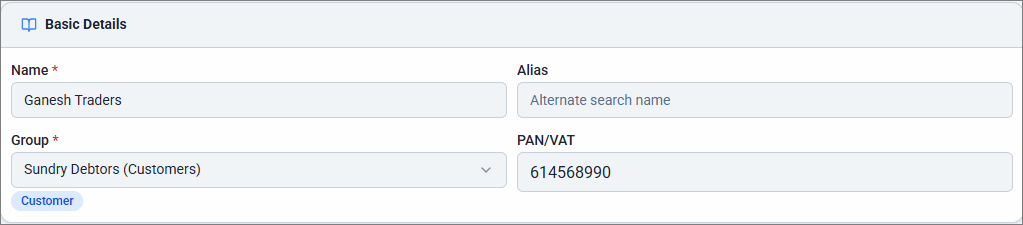
- Enter the Name of the customer and Alias, if any.
- For Group, select Sundry Debtors (Customers).
- PAN/VAT: Enter the 9-digit PAN/VAT number.
- Enable and update Contact Details.
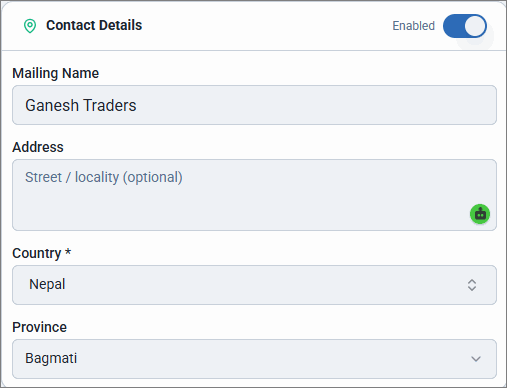
- Mailing Name is automatically filled on the customer’s Name and can be edited if required.
- Enter the Address, Country, and Province.
- Enable and update Additional Details.
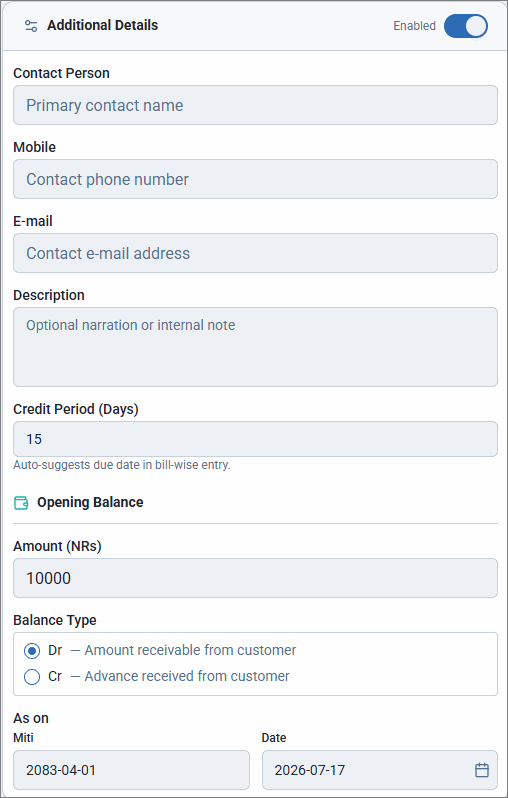
- Enter the Contact Person name, Mobile, and E-mail.
- Enter the Credit Period (Days), if applicable.
- Enter the Opening Balance and select the as on date of the balance.
- Click Save.
Similarly, you can create supplier account under Sundry Creditors.
Is this information useful?
YesNo


