Record Import of Goods with Additional Expenses
You may incur additional expenses such as Customs Duty, clearing and forwarding charges, and freight expenses after purchasing the goods in some import transactions. While these expenses are not payable to the foreign supplier, they form part of the actual cost of procuring the goods and need to be allocated to the stock items.
By doing so, you can accurately determine the actual or landed cost of imported goods and maintain correct inventory valuation.

Ensure that you have created the following masters based on your requirements:
|
Master Type |
Name |
Under Group |
Configuration |
|
Group |
Import Expenses |
Direct Expenses |
Set Method to allocate when used in purchase invoice to Appropriate by Value. |
|
Group |
Import Expenses Payable |
Current Liabilities |
Set Method to allocate when used in purchase invoice to Not Applicable. |
|
Ledger |
Foreign Supplier |
Sundry Creditors |
– |
|
Ledger |
Freight Forwarders |
Sundry Creditors |
– |
|
Ledger |
Customs Duty |
Import Expenses |
– |
|
Ledger |
Clearing and Forwarding Charges |
Import Expenses |
– |
| Ledger |
Freight Charges – Import |
Import Expenses |
– |
| Ledger |
Customs Duty Payable |
Import Expenses Payable |
– |
| Ledger |
Clearing and Forwarding Charges Payable |
Import Expenses Payable |
– |
| Ledger |
Freight Charges – Import Payable |
Import Expenses Payable |
– |
| Ledger |
Purchase – Import |
Purchase Accounts |
– |
Let’s assume that you have imported Item A and Item B.
In a purchase invoice:
- Select the stock items Item A and Item B and enter Quantity and Rate.
- Select the additional cost ledgers, Customs Duty, Clearing and Forwarding Charges, and Freight Charges, as needed.
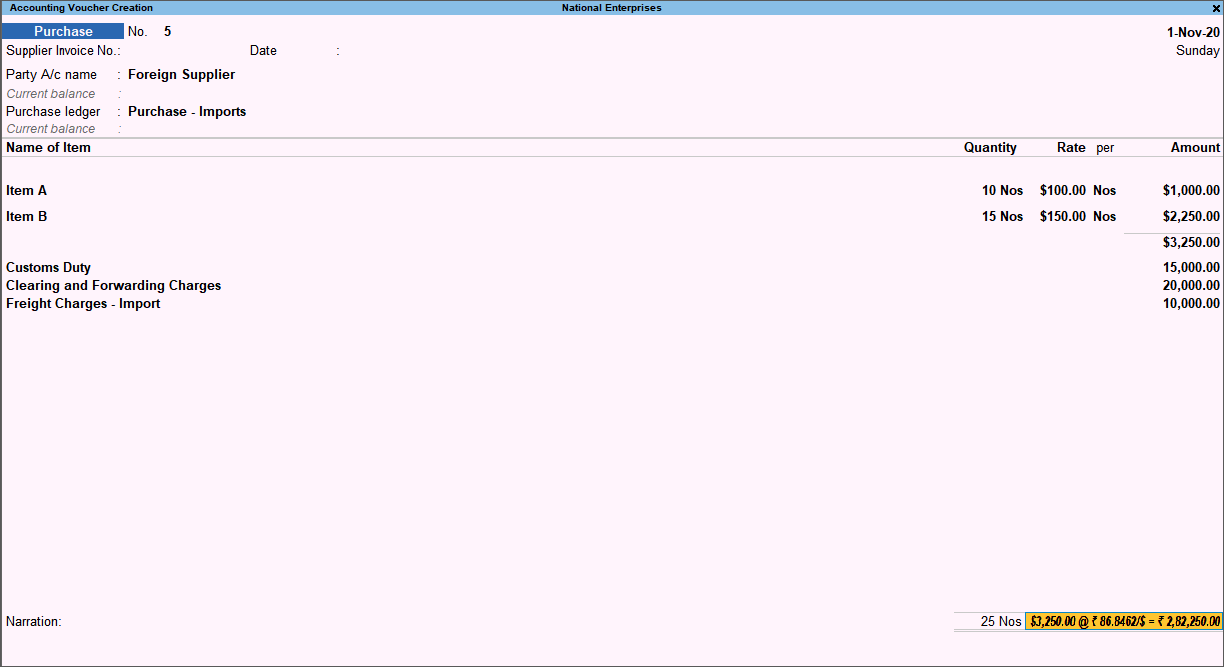
- Press Ctrl+A to save.
- View the break-up of additional expenses appropriated to the item cost.
- Press Page Up key to open the invoice in alteration mode.
- Press Ctrl+H (Change Mode) and select As Voucher.
- Select either of the stock items and press Enter.
You can see the breakup of the additional expenses appropriated to the item cost.

In this way, you can easily account for your additional import expenses in the item cost. Now, you can view the actual values of the imported items in the Stock Summary.