
Create a Reversing Journal in TallyPrime
A Reversing Journal is a temporary voucher that does not affect your regular books of accounts. You can use it to record provisions, accruals, or anticipated expenses. To view its effect in reports, include the Reversing Journal in a Scenario.
For example, salaries for July are accrued but will be paid in August. In such cases, you can create a Reversing Journal dated 31 July to temporarily record the salary expense and liability. The entry can be reversed automatically when the actual salary transaction is recorded.

- Ensure that you have created the required ledgers, in this case, salary expense ledger and Provision for salary ledger.
- Press Alt+G (Go to) > Create Voucher > press F10 (Other vouchers) > type or select Reversing Journal.
- Press F2 (Date) and enter the date on which you want to record the Reversing Journal.
- Debit the expense ledger, in this case, the Salary Account ledger and enter the amount.
- Credit the provision or payable ledger, in this case, the Provision for Salary Account ledger.
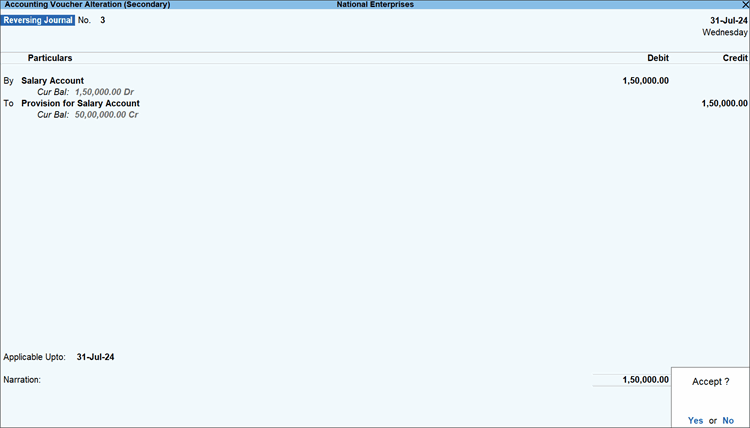
-
In Applicable Upto, specify the date up to which you want the salary provision to be available for inclusion in a Scenario.
-
Enter Narration, if required, and press Ctrl+A to save the voucher.
You can view the recorded Reversing Journal in Day Book and the Reversing Journal Register.
Questions and Answers
- Can I convert a Reversing Journal into a regular voucher?
You can convert a Reversing Journal into a regular voucher if the temporary adjustment needs to be retained in the books of accounts.- Press Alt+G (Go To) > type or select Reversing Journal Register.
- Select the required Reversing Journal voucher and press Enter.
- Select the required voucher type and make the necessary changes.
- Press Ctrl+A to save.


