Record Journal Entries in TallyPrime
A Journal voucher in TallyPrime is used to record accounting transactions involving debit and credit entries, such as adjustments, provisions, and depreciation on fixed assets.
For example, you can record provision for salary, when the salary is due for the current month but will be paid next month.

Ensure that you have created required ledgers. For example, salary expenses ledger under Indirect Expenses and salary payable ledger under Current Liabilities.
- Press Alt+G (Go To) > Create Voucher > press F7 (Journal).
- Debit the salary expenses ledger and enter the amount.
- Credit the salary payable ledger.
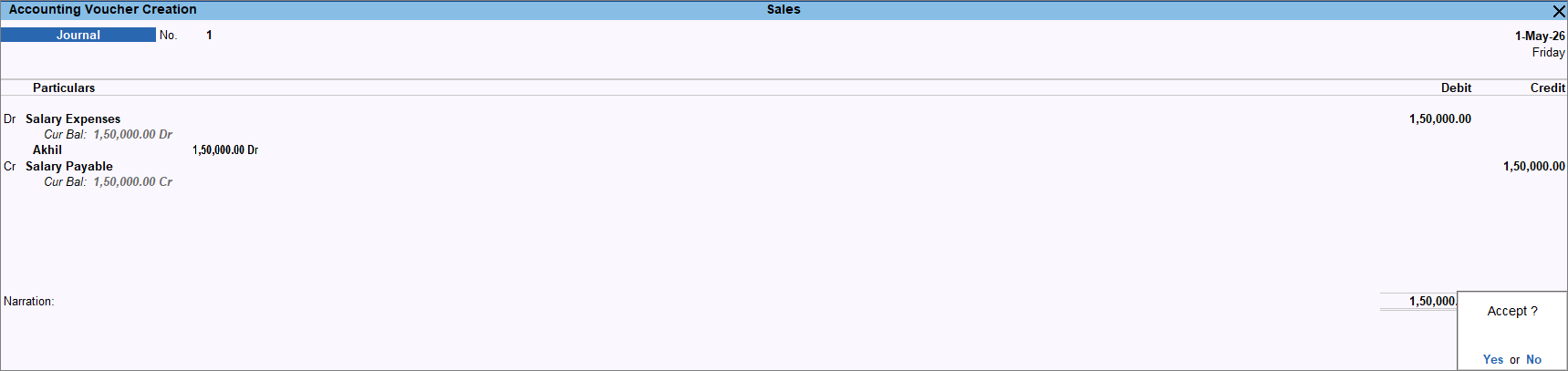
- Enter Narration, if required and press Ctrl+A to save.
Similarly, you can record a rent payment using a Journal voucher by debiting the rent ledger and crediting cash or bank ledger. However, the specialised voucher type Payment helps ease the data entry.
View Journal Register
- Press Alt+G (Go To) > type or select Journal Register.
- Drill down from the journal register to view the journal vouchers recorded for that month.
- To analyse the report in different views, press Ctrl+H (Change View) and select the required view:
- Columnar: Displays journal vouchers in a column-based format, making it easier to compare voucher details across periods or categories.
- Extract: Displays a summarised view of voucher information, helping you quickly review the recorded journal vouchers.
- To view the list of cancelled vouchers and post-dated vouchers, press Ctrl+J (Exception Reports).
Questions & Answers
- Can I use Journal vouchers to record adjustment entries?
Yes. You can use Journal vouchers to record adjustment entries, including provisions and other entries required for finalising your books of accounts. - How can I view Journal vouchers in Day Book?
To view Journal vouchers in Day Book:- Press Alt+G (Go To) > type or select Day Book.
- Press F2 (Date) to select a date or Alt+F2 (Period) to specify a date range.
- Press F4 (Voucher Type) and select Journal voucher.
- View the journal vouchers recorded for the selected period.
- Can I use Journal vouchers to record all types of accounting transactions?
While you can use Journal vouchers to record different types of accounting entries, it is recommended that you use the specialised voucher types available in TallyPrime for specific transactions.
For example:- Use Payment vouchers to record payments made through cash or bank.
- Use Receipt vouchers to record money received through cash or bank.
- Use Contra vouchers to record transfers between cash and bank accounts.
Use Journal vouchers primarily for adjustment entries, provisions, and other accounting transactions involving debit and credit entries.
Is this information useful?
YesNo