
Create Cost Centre Class in TallyPrime
In TallyPrime, you can create a Cost Centre Class to automatically allocate incomes and expenses to Cost Centres based on predefined percentages. Once selected during voucher entry, the allocations are applied automatically, eliminating the need for manual allocation.

Ensure that in the F11 (Company Features) screen, you have set Enable Cost Centres to Yes.

- Press F11 (Features) > Ctrl+I (More Details) > Cost Centre Class and press Enter.
- In the Cost Centre Classes screen, type the Class Name, and press Enter.
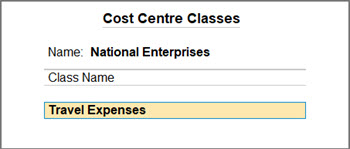
- Select the Cost Category and the respective Cost Centres created for your business.
- Specify the percentage of allocation and select End of List.
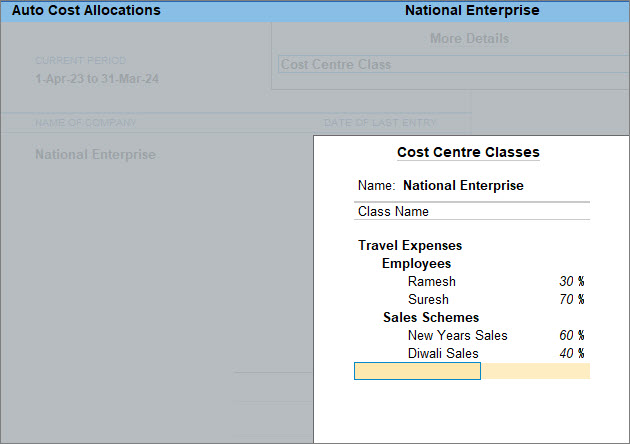
-
Press Ctrl+A to save.
You can alter the Cost Centre Class whenever your business requirements change, and delete them when they are no longer needed.
Instead of manually allocating expenses to the Cost Centres, Cost Centre Class allows you to allocate the expenses and income to the respective Cost Centres based on the percentages decided at the time of creating the Class.
Is this information useful?
YesNo


