
Create Stock Groups and Stock Categories in TallyPrime
Stock Groups and Stock Categories in TallyPrime help organise inventory for better reporting and analysis. In TallyPrime, you can:
- Create stock groups: Classify items based on nature or type such as electronics and furniture.
- Create stock categories: Use additional classification such as brand and size. However, assigning a stock category to a stock item is not mandatory.
Create Stock Groups
- Press Alt+G (Go To) > Create Master > type or select Stock Group > and press Enter.
- Name: Specify the name of the stock group.
- Under: Select Primary or an existing Stock Group.
- Should quantities of items be added: Specify whether the quantities of Stock Items under the Stock Group should be added together. The Stock Items must have the same unit of measurement. For example, quantities in Kgs can be added, but quantities in Kgs and Pcs cannot be added.
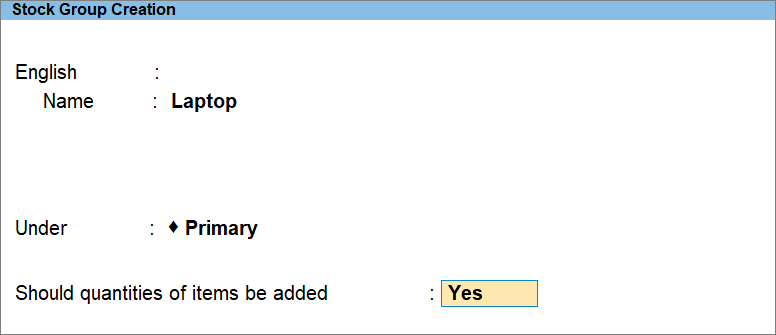
- Press Ctrl+A to save.
Create Stock Categories
- Press Alt+G (Go To) > Create Master > type or select Stock Category > and press Enter.
- Name: Specify the name of the stock category.
- Under: Select Primary or an existing Stock Category.
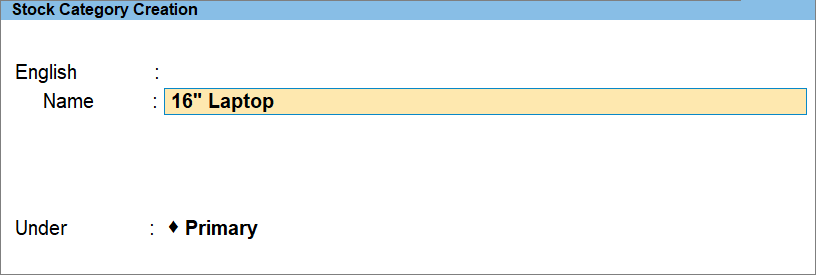
- Press Ctrl+A to save.
Is this information useful?
YesNo


