
Settle Outstanding Dues
Settle outstanding dues to clear pending bills and ensure that receivable and payable balances accurately reflect the latest payments and receipts.
Depending on your business requirements, you can settle bills directly from the Outstandings reports and verify whether dues have been fully or partially cleared.

Ensure that:
- Credit sales or credit purchases have been recorded.
- Bills with pending outstanding balances are available for settlement.
- Bill-wise tracking is enabled, if invoice-level settlement is required.
Settle Outstanding Bills from Reports
Use this option when you want to settle customer invoices or supplier bills directly from the Outstandings reports. Once you settle a bill, TallyPrime automatically updates the receivable or payable position. In addition, you can settle bills fully or partially based on the amount received or paid.
To understand bill-wise and on-account tracking, see Flexible Tracking of Receipts, Payments, and Outstanding Amounts.
In the Ledger Outstandings report:
- Select one, multiple, or all outstanding customer or supplier invoices that need to be settled.
- Press Alt+B (Settle Bills).
- Verify the Voucher Type and date.
- Select the Account from List of Ledger Accounts.
- Enter Narration.
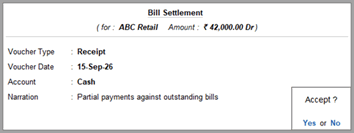
- Press Ctrl+A to save the bill settlement details.
A Receipt or Payment voucher is prefilled with the settlement details. - Make changes, if necessary.
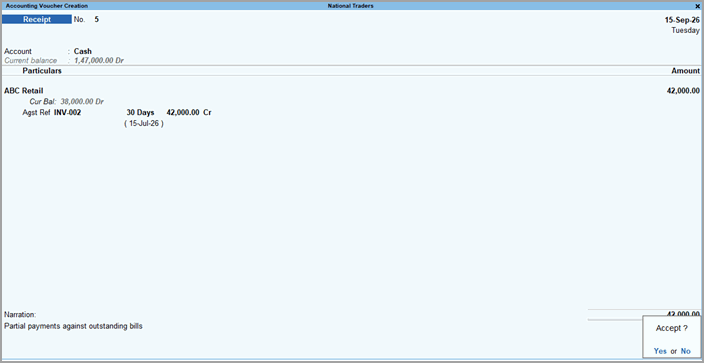
- Press Ctrl+A to save the voucher.
The amount recorded settles the selected bills fully or partially and updates the outstanding balances in the Outstandings reports accordingly.
Questions & Answers
- How can I verify that no outstanding dues remain for a supplier?
Review the Ledger Outstandings report. When no pending invoices or balances remain, you have settled all outstanding dues for the selected customer or supplier. - Can I settle a purchase bill through multiple payments?
Yes. Settle a purchase bill through part-payments or instalments until the outstanding amount reaches zero. - Why does a bill continue to appear in the Outstandings report after settlement?
A partially paid bill continues to appear in the Outstandings report. The report removes the bill when its outstanding balance reaches zero.


