
Set Up Your Interakt Account for TallyPrime with WhatsApp
To use TallyPrime with WhatsApp, the first and foremost step is to initiate the sign-up process. Contact your Tally Partner to get a detailed understanding of the process and other related details and initiate the process by submitting a request with the Partner. You can choose to have a new Interakt account or use your existing Interakt account.

Ensure that you have:
- An active Tally Software Services (TSS) subscription with at least one month validity.
- A GST registration certificate.
- A Facebook business page.
- A business phone number that you want to use with WhatsApp.
Create a New Interakt Account
- In TallyPrime, press Alt+M (Share) > Manage > Sign Up for WhatsApp.
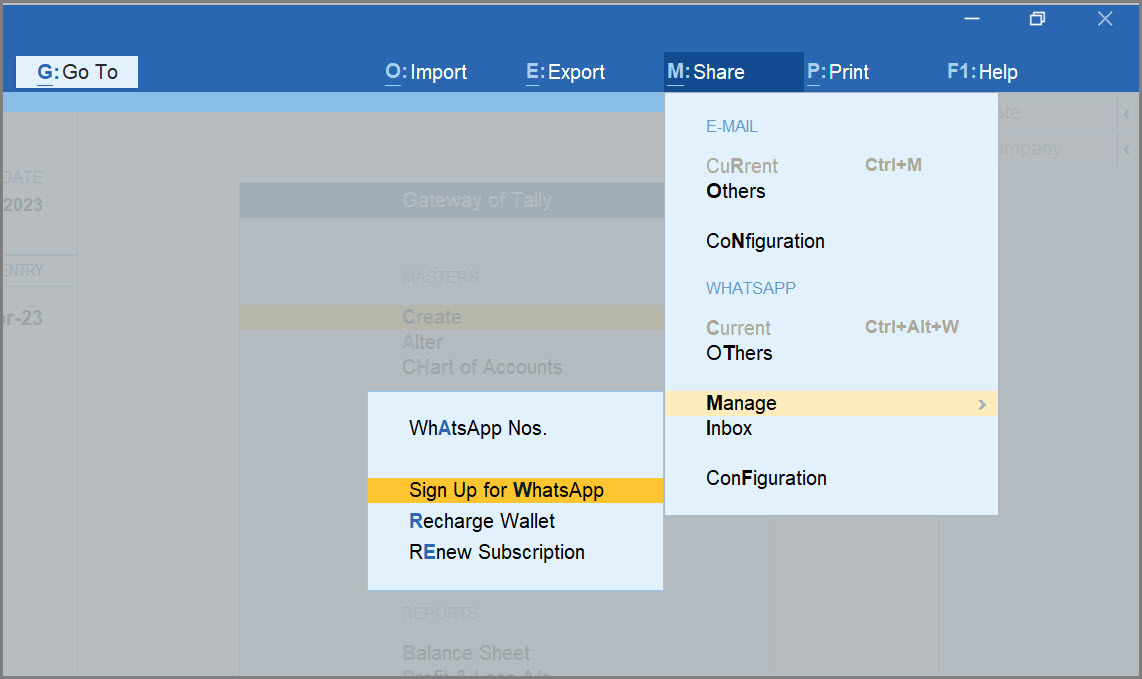
This action will open a webpage on TallyPrime with WhatsApp. - Log in to the Customer Portal from www.tallysolutions.com.
- Select WhatsApp for Business.
- In the Buy WhatsApp for Business screen, ensure that the details like Product Information and My Contact Details are filled with the correct details.
- Re-enter your E-mail address in the Confirm E-mail ID field to ensure that it matches with the Admin E-mail ID field.
- Select your Tally Partner.
- If a Tally Partner is assigned to you, the Partner Information > Partner Name field is prefilled. You can select the Partner that you have spoken to about the sign-up process.
- If a Tally Partner is not assigned to you, select the Let TSPL choose a Tally Partner option or click the Partner Locator button to find a nearby Partner. A Tally Partner will be assigned who will contact you to take things forward.
- Click Submit.
Once your Interakt account is created, you will receive an e-mail with the login credentials of your Interakt account.
Set Up an Existing Interakt Account
- Raise a request with Tally Support.
- Get an understanding from the support personnel on the impact of shifting from the existing account to the new Interakt account.
Once you have provided your consent to the support personnel, your request is forwarded to Interakt support to complete the process for you. - Once you have confirmed about the completion of the setup required in your new Interakt account, ask your Tally Partner to activate your WhatsApp subscription to use TallyPrime with WhatsApp.
Once your existing Interakt account is set up, you will receive an e-mail with the details of your account.
You can next add an existing WhatsApp Business Number or a new contact number to WABA complete the sign-up process.
Is this information useful?
YesNo


