
Record Sales for Exporting Goods in TallyPrime
If you are in the business of exporting goods outside India, then you can record such sales in TallyPrime.

Ensure that:
- You have created the party ledger with the required foreign country details for the export transaction.
- You have created the required currency.
- You have defined the forex rate for the currency.
In the Sales voucher:
- Select the party ledger for export of goods.
- Under Name of Item, select the stock items. Enter the Quantity and Rate.
Enter the Rate of the item in the foreign currency by adding the currency symbol. - Update the Rate of Exchange.
- In the Forex Rate of Exchange screen, update the Rate of Exchange, if required.
By default, it displays the selling rate. - Press Ctrl+A to save.
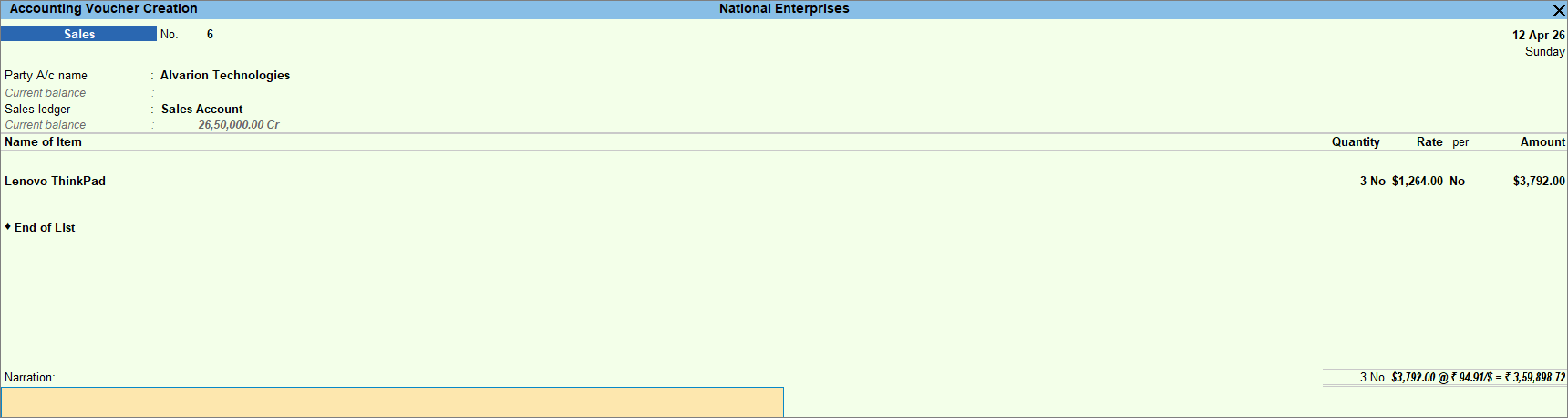
- In the Forex Rate of Exchange screen, update the Rate of Exchange, if required.
- Enter the necessary details, and press Ctrl+A to save the voucher.
- Print the sales voucher.
- Open the sales voucher and press Ctrl+P (Print).
- In the Voucher Printing screen, press C (Configure).
- In Print Configuration, enable Show Base & Foreign Currency for Total.
- Press I (Preview) or press P (Print).
Is this information useful?
YesNo


