
Record Sales Against Advance Receipt in TallyPrime
If you have received an advance payment from a customer and later record the sale against it, you can adjust the advance amount against the sales invoice. For partial deliveries, you can adjust the advance as you record each sales invoice, either fully in a single invoice or partially across multiple invoices.

Ensure that:
- In F11 (Company Features), Enable Bill-wise entry is set to Yes.
- In the party master, Maintain balances bill-by-bill is enabled to track bill details while recording transactions.
- You have recorded the advance receipt.
In the Sales voucher:
- Press F12 (Configure) and set Use default Bill-wise details for Bill Allocation to No.
This allows you to select the required Type of Ref while recording the voucher. - Enter the necessary details and press Enter on the invoice total.
- Adjust the advance received against the sales invoice.
- In the Bill-wise Details screen, select Agst Ref as the Type of Ref.
- Under Name, select the advance receipt voucher number from the list of Pending Bills.
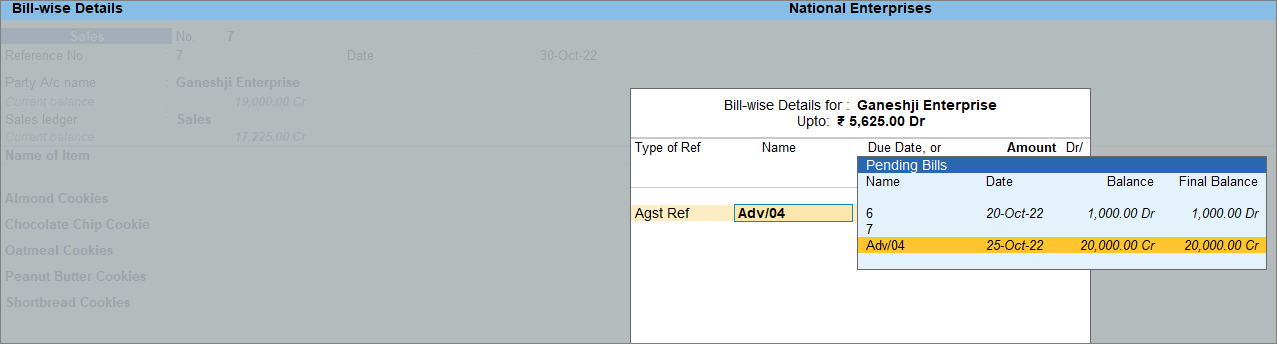
- Press Enter to save the Bill-wise Details screen.
- Press Ctrl+A to save the voucher.
Is this information useful?
YesNo


