
Create an Optional Voucher in TallyPrime
You can use Optional Vouchers in TallyPrime to record tentative or future transactions without affecting your books of accounts. You can also include these vouchers in a Scenario to analyse their impact on reports and regularise them later when the transactions become due.
For example, if you want to view the Balance Sheet as of 15 August, but the rent for August is due only in the first week of September. Record an Optional Voucher dated 15 August to reflect the rent liability in the Balance Sheet. When the rent becomes due, open the voucher and make the entry regular to include its accounting impact in the books of accounts.

-
Ensure that you have created the required ledgers, in this case, create the Rent A/c and Cash A/c ledgers.
To record the rent payment as an Optional Voucher, create a Payment Voucher.
- Press Ctrl+L (Optional) to mark the voucher as an Optional.
- Debit the Expense Ledger, in this case, Rent Account, and enter the amount.
- Credit the required ledger, in this case, Cash.
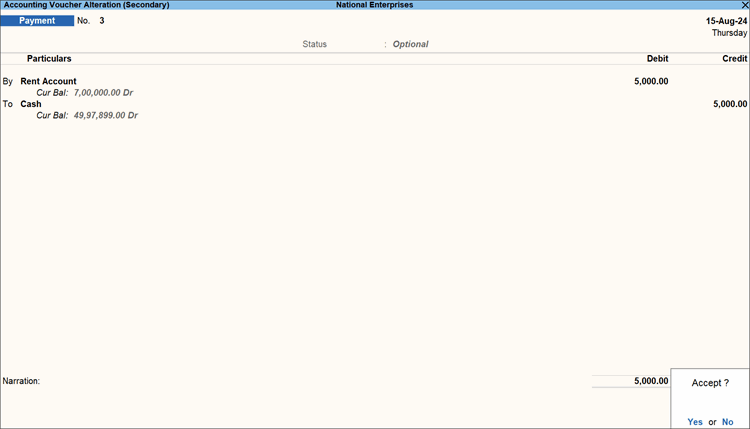
- Press Ctrl+A to save.
You can view the recorded Optional Vouchers in the Day Book and in the Optional Vouchers Register.
Questions and Answers
- Can I convert an Optional Voucher into a regular voucher?
Yes, you can convert an optional voucher into a regular one.- Open the required Optional voucher and press Ctrl+L (Regular).
- Press Ctrl+A to save.


