
Track Purchase Bills Pending in TallyPrime
The Purchase Bills Pending report helps you track purchase transactions where either the inventory entry or the accounting entry is still pending. It provides visibility into mismatches between goods receipt and invoice processing, ensuring that all purchase-related transactions are properly reconciled.
-
Press Alt+G (Go To) > type or select Purchase Bills Pending and press Enter.
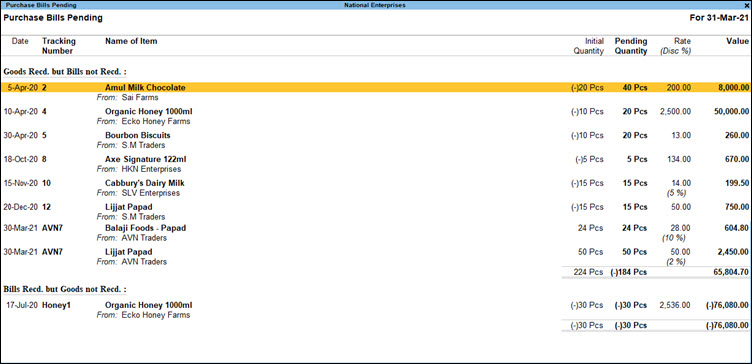
- This report shows the date on which the inventory voucher was recorded, the stock item, the initial quantity, and the quantity pending recording as purchase vouchers. It also shows the total value of the pending stock and, for each item, the tracking number if you are tracking cost for stock items.
The report categorises transactions into:- Goods Received but Bills Not Received: Displays transactions where a receipt note has been recorded, but the corresponding purchase invoice has not yet been entered.
- Bills Received but Goods Not Received: Displays transactions where a purchase invoice has been recorded with a tracking number, but the related receipt note is still pending.
- Cleared Purchase Bills: Displays transactions where both the receipt note and the corresponding purchase invoice have been entered and successfully matched.
- View outstanding bills for Job Work materials.
- Press F12 (Configure).
- Show Outstanding Bills for Job Work Materials: Yes.
This displays bills that are yet to be paid for job work-related stock items. - Show Cleared Bills for Job Work Materials: Yes.
This displays bills that have been paid for job work-related stock items.
- Show Outstanding Bills for Job Work Materials: Yes.
- Press F12 (Configure).
Questions & Answers
- Why does a transaction continue to appear under Goods Received but Bills Not Received even though the supplier invoice has already been entered?
This happens when the Receipt Note and Purchase voucher are linked to different tracking numbers. Use the same tracking reference in both vouchers to reconcile and clear the entry.
In a different scenario, the Purchase Voucher may not have been recorded for the transaction. You need to record the purchase voucher with the same tracking number.
- How can I quickly identify suppliers with delayed invoices?
Review the Goods Received but Bills Not Received section regularly. Transactions listed here indicate that goods have been received, but the supplier invoice is still pending. You can identify the supplier below the stock item name.
Is this information useful?
YesNo


