
Set Up Units of Measurement in Tally e-Billing
Tally e-Billing provides commonly used units of measurement by default, which you can use or configure as required. You can also create the units of measurement required for your stock items, including simple and alternate units with the required decimal precision.
- From Gateway > click Chart of Accounts > click Inventory Masters > and then click Unit.
- In the Unit screen, click Create.
- In the Create New Unit screen, enter the Unit Details.
- Unit Symbol: Enter the symbol for the unit of measurement.
- Full Name: Enter the name of the unit of measurement.
- Type: Select the required unit of measurement type, such as Counting, Volume, Weight, Length, Packaging, Time, Area, or Others.
- No. of Decimal Places: Specify the number of decimal places, up to a maximum of 4.
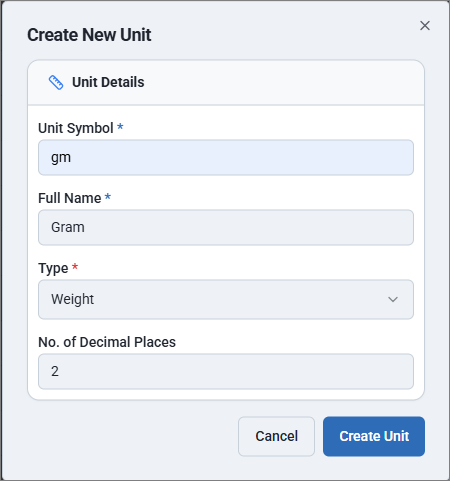
- Click Create Unit.
Is this information useful?
YesNo


