Record TCS on Purchase in TallyPrime
You can record TCS paid on purchases of taxable stock items. You can account for the TCS amount under Duties & Taxes or Current Assets, calculate TCS on current sub-totals, and record purchases containing both taxable and non-taxable stock items.

Ensure that:
- You have enabled TCS for your company.
- You have created the required TCS Nature of Goods.
Record TCS on Purchase Under Duties & Taxes
Use this method when you want to record TCS paid on purchases under Duties & Taxes. Create a ledger with Type of Duty/Tax set to Others to record the TCS amount paid to the supplier without including it in your TCS liability.
Create the TCS ledger for purchases under Duties & Taxes
TCS paid on purchases is not required to be shown in TCS returns. Therefore, create a tax ledger with Type of duty/tax set to Others.
While creating the TCS ledger for purchases:
- Set Under to Duties & Taxes.
- Set Type of duty/tax to Others.
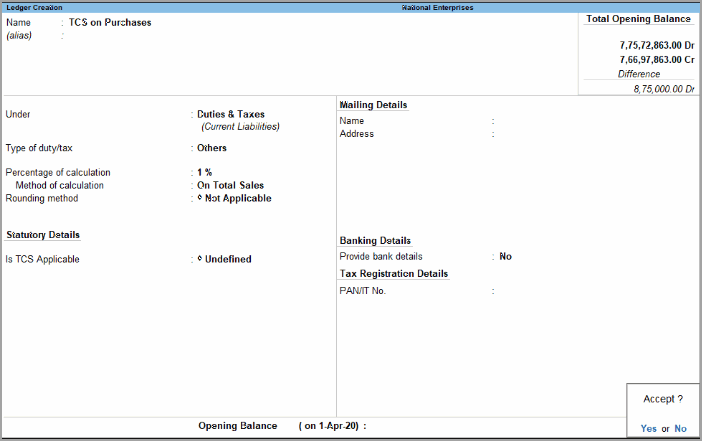
- Enter the Percentage of calculation.
If you are using a common TCS ledger for stock items taxable at different TCS rates, leave Percentage of calculation blank. - Enter the other required details and press Ctrl+A to save the ledger.
If the TCS rate is not defined in the ledger, you can enter the applicable TCS rate while recording the purchase voucher.
Record TCS on purchase under Duties & Taxes
Record the purchase with the taxable stock item and the TCS ledger.
In the Purchase voucher:
- Select the stock item on which TCS is applicable.
- Select the TCS ledger.
The TCS amount is calculated automatically based on the details defined in the ledger.
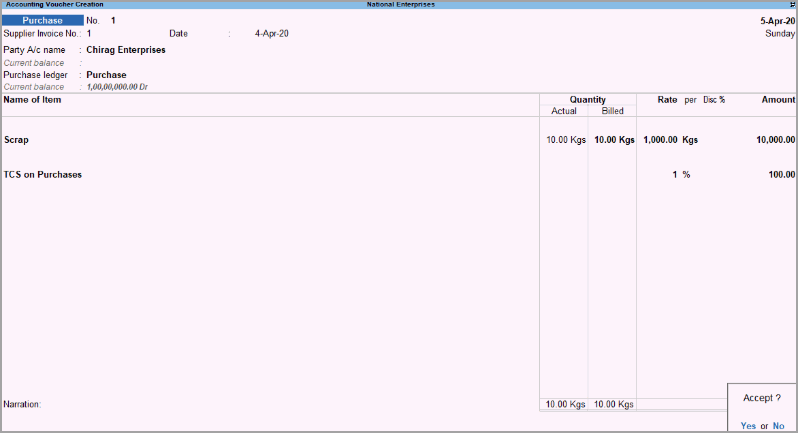
- Press Ctrl+A to save the voucher.
The tax amount calculated in the invoice does not affect the tax liability in the TCS duty ledger. The TCS amount is reflected in the Balance Sheet.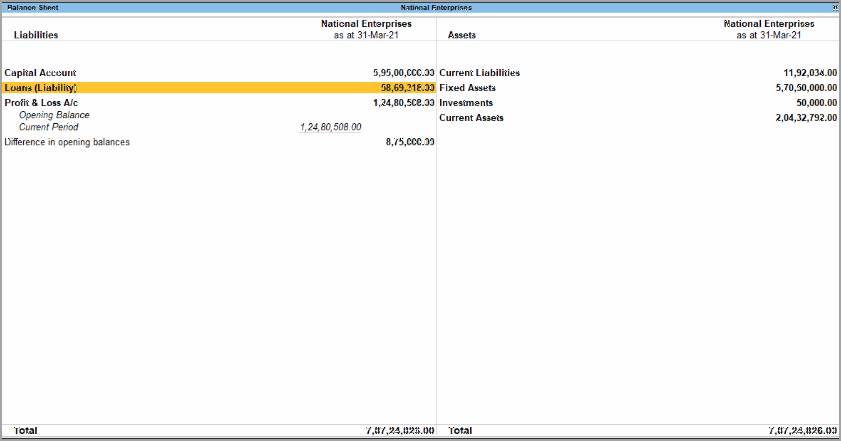
Record TCS on Purchase Under Current Assets
You can account for TCS paid on purchases under Current Assets.
Create the TCS ledger for purchases under Current Assets
While creating the TCS ledger:
- Set Under to Current Assets.
- Set Type of duty/tax to Others.
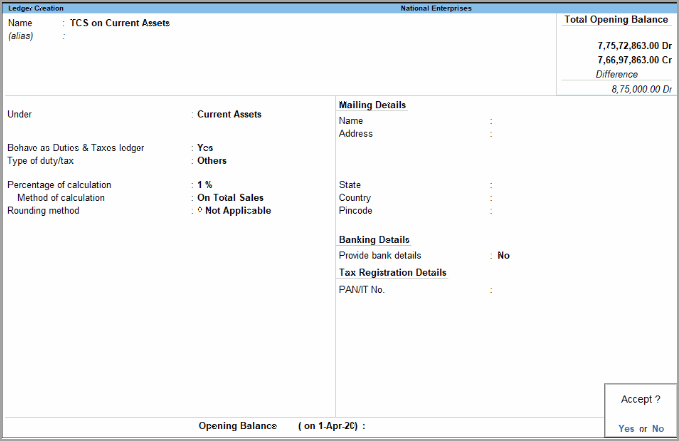
- Enter the other required details, and press Ctrl+A to save the ledger.
Record TCS on purchase under Current Assets
In the Purchase voucher:
- Select the stock item on which TCS is applicable.
- Select the TCS ledger.
The TCS amount is calculated automatically based on the details defined in the ledger.
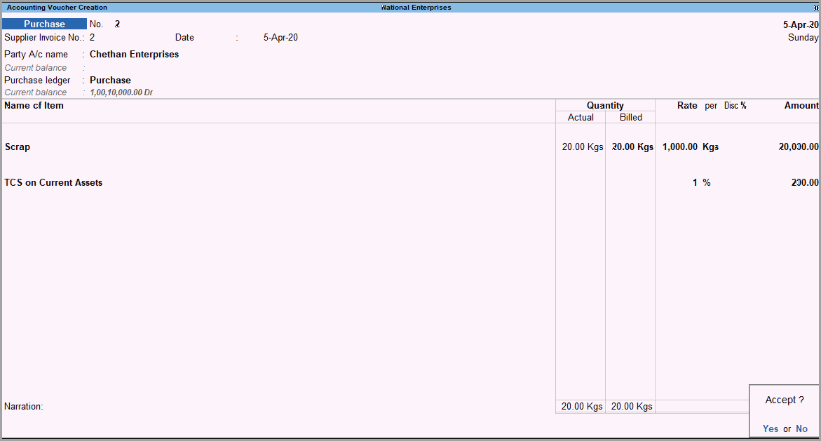
- Press Ctrl+A to save the voucher.
The TCS amount is reflected in the Balance Sheet under the required section.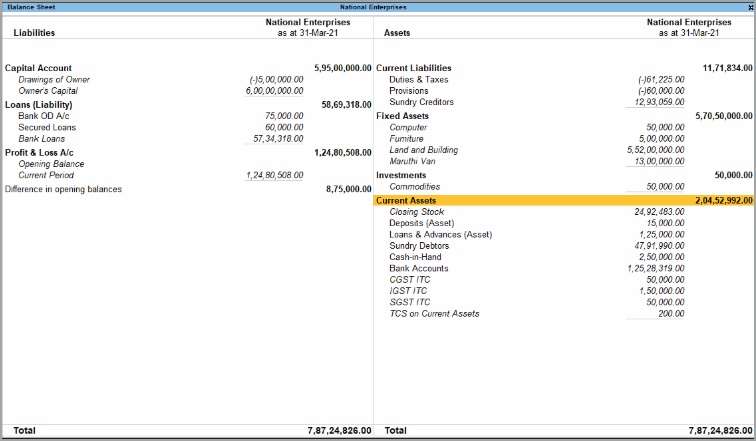
Calculate TCS on Current Sub-Total
You can calculate TCS on the current sub-total, which includes the value of stock items and additional ledgers entered before the TCS ledger.
In the Purchase voucher:
- Press F12 (Configure).
- Set Calculate tax on current sub-total to Yes.
- Record the purchase with the required stock items, additional ledgers, and TCS ledger.
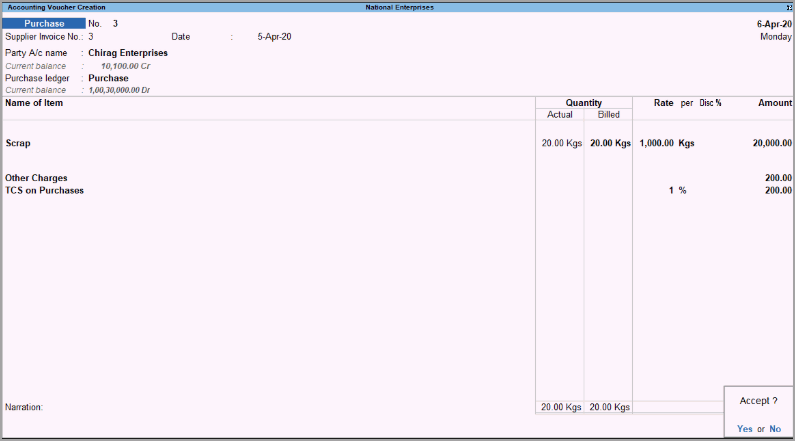
Record Purchase with Taxable and Non-Taxable Stock Items
You can record a purchase containing both stock items that attract TCS and stock items that do not attract TCS.
Create the TCS Ledger
Create the TCS ledger under Duties & Taxes or Current Assets, as required, and set Type of duty/tax to Others.
Record the Purchase
Record the purchase with both taxable and non-taxable stock items, and enter the TCS amount applicable to the taxable stock item.
In the Purchase voucher:
- Select a stock item that is taxable under TCS.
- Select the stock item that does not attract TCS.
- Select the TCS ledger.
- Manually calculate and enter the TCS amount applicable to the taxable stock item.
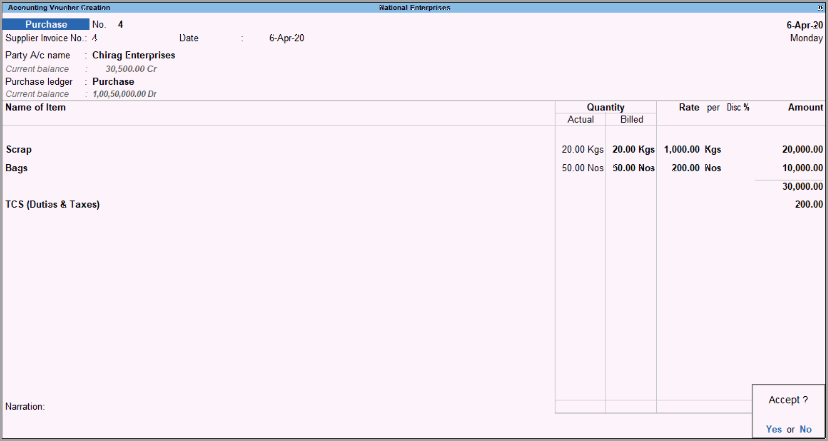
- Press Ctrl+A to save the voucher.
The TCS amount paid on purchases does not affect the tax liability in the TCS duty ledger.