
View and Track Sales Bills Pending in TallyPrime
The Sales Bills Pending report helps you track pending sales transactions, such as goods delivered but not invoiced and invoices raised but goods not delivered. You can use the report to identify sales transactions where inventory or accounting entries are pending.
- Press Alt+G (Go To) > type or select Sales Bills Pending.
The report displays transactions under Goods Delivered but Bills not Made.
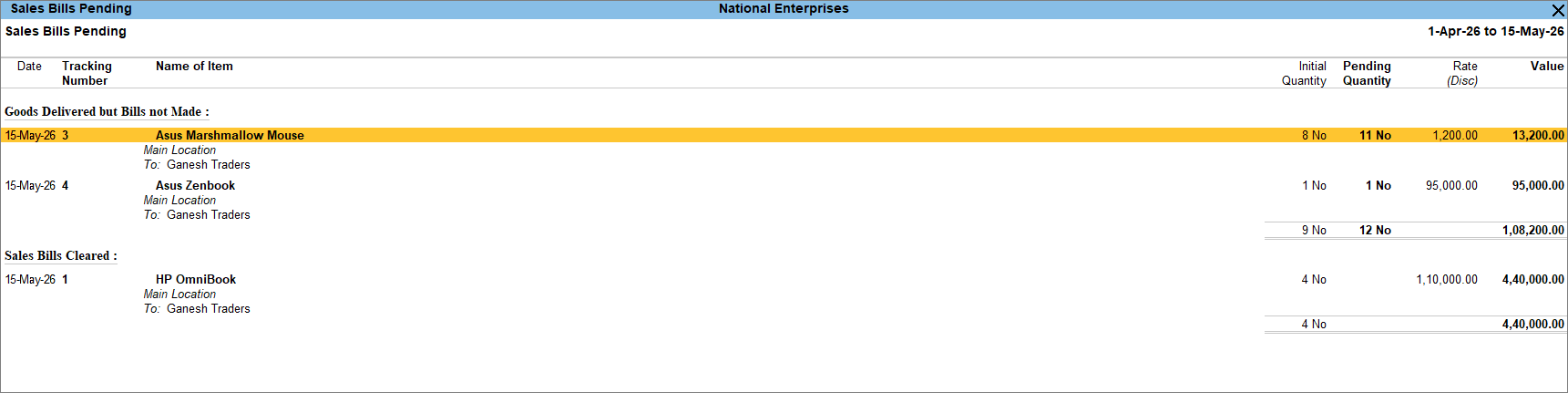
- To view the cleared sales bills, press F12 (Configure) > enable Show Cleared Sales Bills.
- To view the Godown details, press F12 (Configure) > enable Show Location details.
- To view the Outstanding and Cleared Bills for Job Work Materials, press F12 (Configure) > enable Show Outstanding Bills for Job Work Materials and Show Cleared Bills for Job Work Materials.
Is this information useful?
YesNo


