
Record Purchase Return in Tally e-Billing
In Tally e-Billing, you can record a Purchase Return in the following situations:
- When you need to return goods to your supplier.
- When you need to reverse a purchase transaction due to incorrect details, cancellation, or other transaction-related reasons.
Since recorded purchase vouchers cannot be altered, record a Purchase Return against the original voucher and then create a new Purchase voucher with the correct details.

Ensure that:
- You have recorded a purchase transaction.
- You have configured the Purchase Return voucher type with the default VAT account, and other details.
- From Gateway > click Transactions > and then click Purchase Return.
- Select the Supplier from whom the goods were purchased.
The list of active invoices for the selected supplier is displayed.
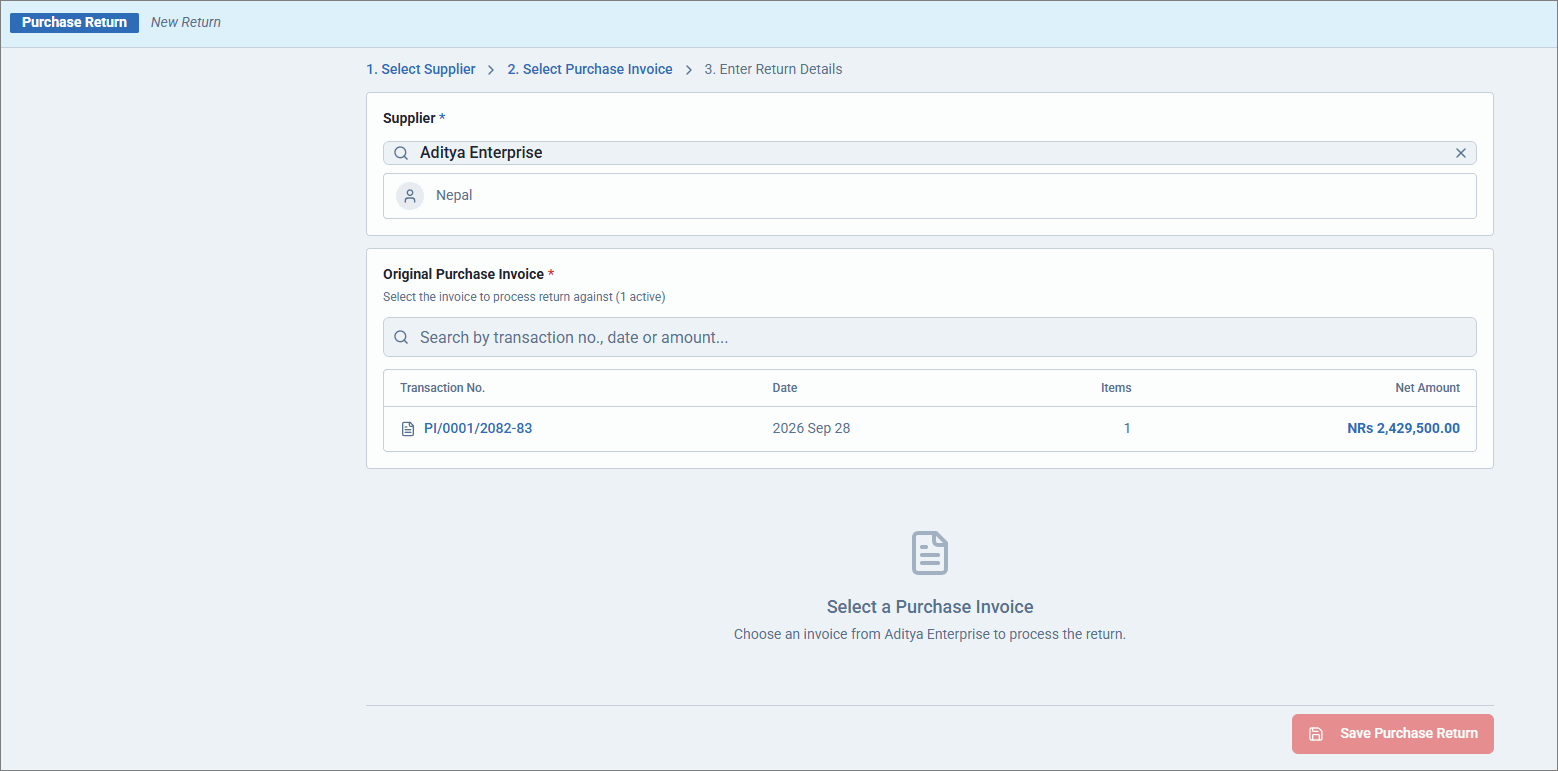
- Select the required invoice.
- Enter the Return Qty.
- Enter the Return Reason.
- Enter a Narration, if required.
- Click Save Purchase Return.
The Bill-wise Details screen displays the invoice against which the purchase return is recorded. - Click Accept.
- Select Yes to save the voucher.
Is this information useful?
YesNo


