
Create Group Company in TallyPrime
If your business consists of branches, subsidiaries, or sister companies, you can create a group company, add them as member companies, and view consolidated financial reports. At any point, you can add more member companies or delete an existing member company from the group.
Suppose you own National Enterprises, a textile business in Bengaluru, with sister concerns in Chennai and Hyderabad. The Bengaluru unit deals in fabrics, while the Chennai and Hyderabad units deal in Western and ethnic ready-made garments, respectively. Create a group company to conveniently view all your companies at one place. The group company functions as a single entity, where financial reports such as Balance Sheet, Profit and Loss A/c, and Trial Balance are consolidated without any impact on the transactions.

Ensure that:
- You have a minimum of two member companies to form a group company.
- The member companies have the same Base Currency symbol and Formal name.
- The member companies have uniform ledger accounts and masters, for proper consolidation of accounts and accuracy of MIS reports.
Create Group Company

- In TallyPrime, press Alt+K (Company) > Create.
- In the Company Creation screen, press Alt+R (Group Company).
- In the Group Company Creation screen, enter the Name of the group company
- Enter the mailing details and other contact information as needed.
You can enter the address that is relevant to your group company. - In the Member Companies field, select the member companies.
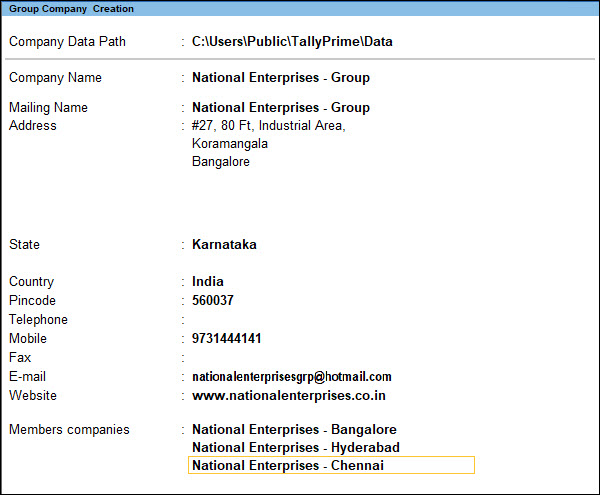
- Press Ctrl+A to save.
On the Gateway of Tally screen, you can see the group company in bold along with the member companies.
Alter Group Company
You can alter the group company to update the contact details and add or remove a member company. You can also delete the group company if it is no longer required.
Add or remove member company
To add a member company:
To remove a member company:
- Press Alt+K (Company) > Alter, and select the group company.
- Make any required changes to the mailing and contact details.
- To add a member company, in the Member companies field, select the new company from the List of Companies.
- To remove a member company, in the Member companies field, select the required member company, and press Spacebar.
If you have only two member companies in the Group Company, you cannot remove any of the companies. - Press Ctrl+A to save the changes.
The changes will be effective only after you reload the Group Company.
Delete Group Company
Deleting the group company does not delete the member companies.
- In the Group Company Alteration screen, press Alt+D (Delete).
- Press Enter to confirm deletion.
View Consolidated Financial Data
A Group Company consolidates financial reports across member companies without affecting their individual transactions, enabling performance comparison, business-wide analysis, and stakeholder reporting.
- In the Group company, open Gateway of Tally > Balance Sheet.
You can see the consolidated Balance Sheet. - To compare the Balance Sheet of the member companies, press Alt+N (Auto Column) and select Member Companies.
- Press Alt+F5 for a detailed view of the Balance Sheet.
You can see details of the Duties & Taxes, Closing Stock, Bank Accounts, and so on. - To view the Balance Sheet of the member companies along with the group company, press Alt+C (New Column) and select the group company.


