
View Day Book in Tally e-Billing
By default, Day Book displays all the vouchers created as on the current date, however you can change the period. You can filter to view the vouchers for a specific voucher type. From Day Book you can sync your vouchers to TallyPrime.
- From Gateway > click Reports > and then click Day Book.
The report opens in Nepali by default.
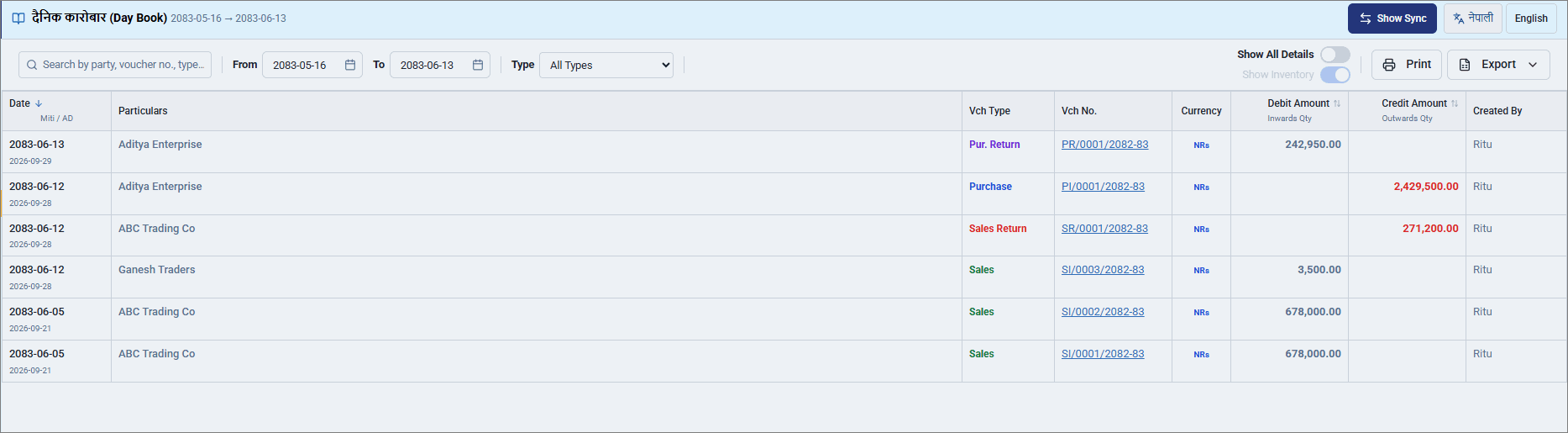
- Click English to change the display language of the report.
- To view the report for a specific voucher type, click All Types and select a specific voucher type.
- Drill down from the Vch No. to view the voucher details.
- To view the details of the transactions, click Show All Details.
- To sync the recorded vouchers to TallyPrime, click Show Sync.
- To export the report, click Export and select Excel or PDF.
- Click Print to print the report.
Is this information useful?
YesNo


