
Create Memorandum Voucher in TallyPrime
A Memorandum Voucher is a temporary voucher that does not affect your books of accounts. You can use it to record transactions such as suspense payments, unverified vouchers, items given for approval, or transactions where the exact expense, amount, or accounting treatment is not yet known. Once the details are confirmed, you can convert it to the appropriate voucher type. To view its effect in reports, include the Memorandum Voucher in a Scenario.
For example, if you give an employee ₹5,000 to buy office supplies, but the actual expenses are not yet known. You can record the advance using a Memorandum Voucher and once the employee submits the expense details, convert the Memorandum Voucher to a Payment voucher.

- Ensure that you have created the required ledgers, in this case, the Office Supplies expense ledger and Cash ledgers.
- Press Alt+G (Go To) > Create Vouchers > press F10 (Other Vouchers) > type or select Memorandum.
- Debit the required ledger, in this case Office Supplies Account, and enter the amount.
- Credit the required ledger, such as Cash Account.
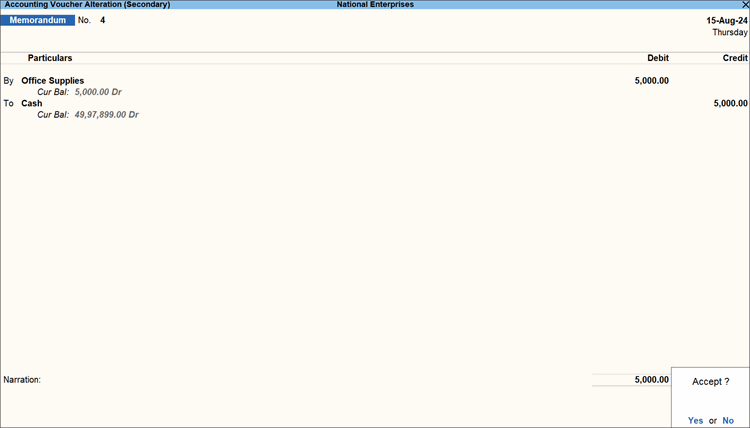
- To enter the Effective Date for your voucher, press Ctrl+I (More Details) > select Effective Date > enter the Voucher Effective Date.
- If you have unused voucher numbers, you can use those for the Memorandum Voucher.
- Press Ctrl+I (More Details) > select Voucher No. Details.
- Select the required voucher number from the List of Unused Voucher Nos.
- Enter Narration, if required, and press Ctrl+A to save the voucher.
You can view the recorded Memorandum Voucher in Day Book and in the Memorandum Register. Since the Memorandum Voucher is included in a Scenario, you can view its provisional impact in the relevant reports. Once the actual expense details are known, you can alter the Memorandum Voucher and convert it to the appropriate voucher type to record the transaction in your books of accounts.
Questions and Answers
- Can I convert a Memorandum voucher into a regular voucher?
You can convert a Memorandum voucher into a regular voucher if the temporary adjustment needs to be retained in the books of accounts.- Press Alt+G (Go To) > type or select Memorandum Register.
- Select the required Memorandum voucher and press Enter.
- Select the required voucher type and make the necessary changes.
- Press Ctrl+A to save.


