
Change Base Currency in TallyPrime
TallyPrime automatically sets the base currency depending on the country you select while creating a company. For example, selecting India sets INR as the base currency, while selecting USA sets USD.
However, you can change the base currency anytime to suit your business needs. For instance, if your company operates in India but most transactions are in USD, you can switch the base currency to USD or any other currency you prefer.
National Handicrafts exports handicrafts to various countries. The transactions are always in USD. Hence, they want to change the base currency from INR to USD.
Before you begin | Prerequisites
- Company is created with a base currency of your choice.
- Press Alt+K (Company) > Alter.
- Base Currency symbol: Enter the symbol of the currency you want to set as the base currency.
- Formal name: enter the Formal name that is used globally for the currency.
- Configure base currency details.
- Press F12 (Configure) > Provide Additional Base currency details: Yes and press Ctrl+A to save.
- Provide the necessary details.
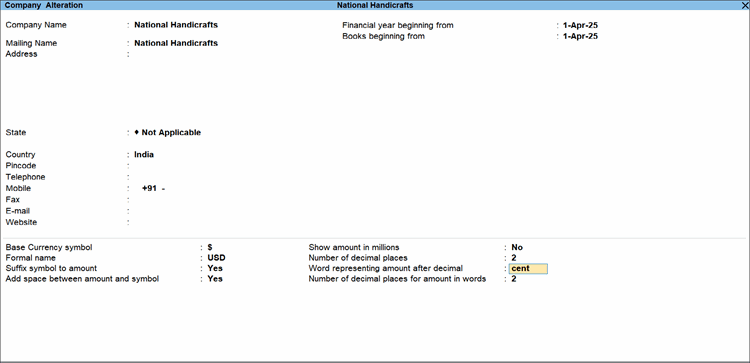
- Press Ctrl+A to save.
Once you change the base currency in TallyPrime, you will need to define the rate of exchange for other currencies with respect to the new base currency.
Questions & Answers
- All transactions in my company are in USD and CAD. How do I make these currencies as base currencies in TallyPrime?
You can have only one currency as base currency in TallyPrime. You can make USD or CAD as your base currency and create the other one as a currency master. Specify the exchange rate against your base currency. - Base currency in my company is USD though my business is in India. Can I view my reports in INR?
Yes. Refer to View Reports in Foreign Currency.


