
Record TDS on Interest in TallyPrime
You can record TDS on interest payable to parties for overdue payments and on interest payable on loans taken from parties.

- PAN details of the party from whom you have taken loan.
- You have enabled TDS in TallyPrime.
- You have created the required TDS masters.
Configure Interest and TDS Details
Configure the interest calculation and TDS details required to record interest and deduct TDS.
Enable Interest Calculation
Enable interest calculation in TallyPrime to calculate interest payable on overdue payments and loans.
- Press F11 (Features) and set Enable Interest Calculation to Yes.
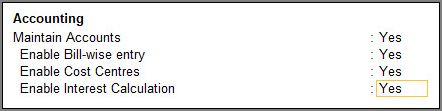
- If the option is not visible, set Show more features and Show all features to Yes.
- Press Ctrl+A to save.
Configure Interest Parameters for the Party
Set the interest parameters for the party so that TallyPrime can calculate interest based on the required terms.
- Press Alt+G (Go To) > Alter Master > Ledger and select the required party ledger.
- Set Activate interest calculation to Yes.
- Configure the Interest Parameters.
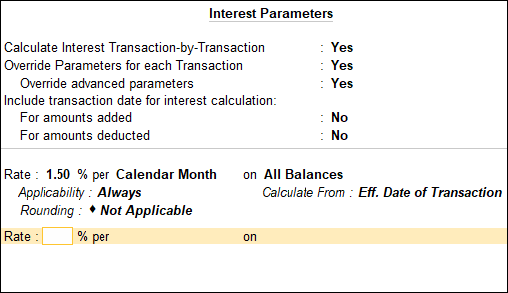
- Set Calculate Interest Transaction-by-Transaction and Override Parameters for each Transaction to Yes.
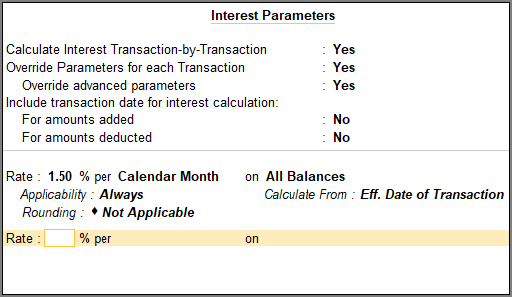
- Enter the required details in the Interest Parameters screen such as Rate, Applicability, Rounding, and the period to Calculate From.
- Set Calculate Interest Transaction-by-Transaction and Override Parameters for each Transaction to Yes.
- Press Ctrl+A to save.
Create the TDS Nature of Payment
Create the TDS Nature of Payment to specify the applicable TDS details for interest.
Create the TDS Ledger for Interest
Create a TDS ledger for recording TDS deducted on interest other than interest on securities.
- Press Alt+G (Go To) > Create Master > Ledger and press Enter.
- Enter the Name of the ledger.
- In Under, select Duties & Taxes.
- In Type of duty/tax, select TDS.
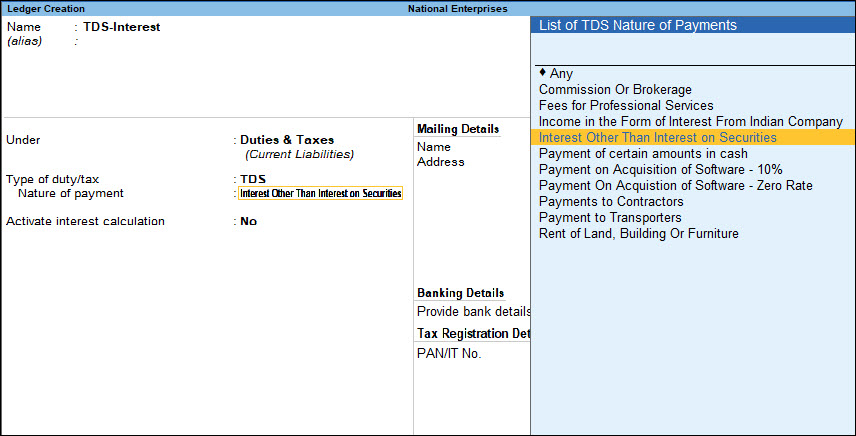
- In Nature of payment, select Interest Other Than Interest on Securities.
- Set Inventory values are affected to No.
- Set Activate interest calculation to No.
- Press Ctrl+A to save.
Create the Expense Ledger for Interest Amount
Create an expense ledger to account for the interest amount and apply TDS to it.
- Press Alt+G (Go To) > Create Master > Ledger and press Enter.
- Enter the Name of the ledger.
- In Under, select Indirect Expenses.
- Set Inventory values are affected to No.
- Set Activate interest calculation to No.
- Set Is TDS applicable to Yes.
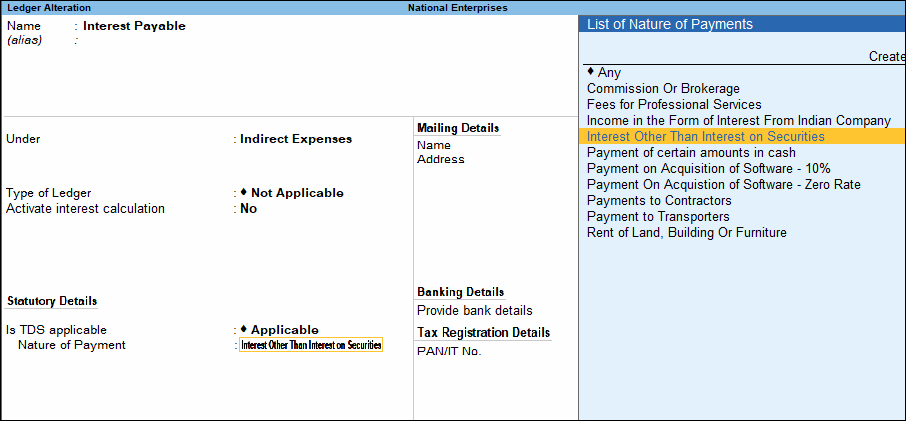
- In Nature of payment, select Interest Other Than Interest on Securities.
- Press Ctrl+A to save.
Once you have configured the TDS details and interest ledgers, you can record TDS on interest paid on overdue payments and loan taken from parties.
Record TDS on Interest on Overdue Payments
In TallyPrime, you can calculate interest on overdue payments, link the interest to your TDS return in Form 26Q, and deduct TDS on the interest payable to the party.
Configure the Credit Note Voucher Class
Create a Credit Note voucher class to calculate interest on overdue payments.
- Press Alt+G (Go To) > Alter Master > Voucher Type > Credit Note and press Enter.
- Specify the Name of Class.

- Set Use Class for Interest Accounting to Yes.
- Press Ctrl+A to save.
Record Interest on the Overdue Payment
Record the interest arising from an overdue payment and link it to the relevant bills.
In the Credit Note:
- Select the required Voucher Class.
- Press F2 (Date) and set the date on which the interest becomes due.
- Select the party.
- In the Interest Details screen, select the required bills and press Enter to return to the voucher.
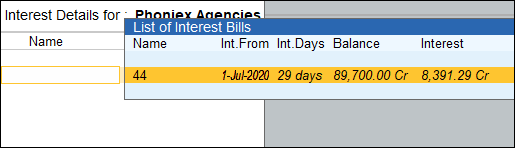
- Press Enter on the Credit field.
The credit amount appears automatically. - Enter the Bill-wise Details.
- Select New Ref as the Method of Adjustment and enter a name for the reference.
- In Interest Parameters, set Rate to zero and press Ctrl+A to save.
- Debit the interest payable ledger.
The amount appears automatically.
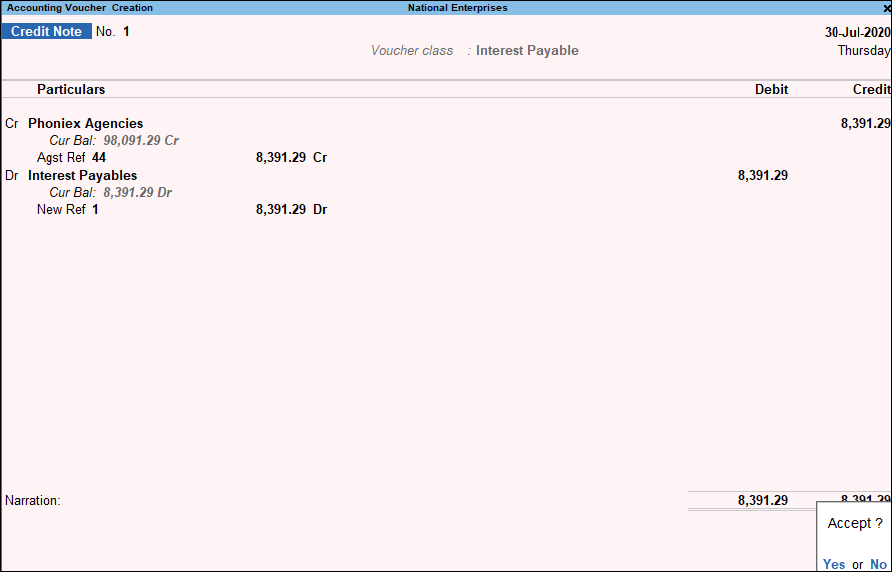
- Press Ctrl+A to save the voucher.
Link the Interest Transaction to TDS Return
Link the interest transaction to Form 26Q so that TallyPrime can identify the amount against which TDS has to be deducted.
In Form 26Q:
- Select Uncertain Transactions (Corrections needed).
- Select No link is available in booking and booking with deduction voucher.
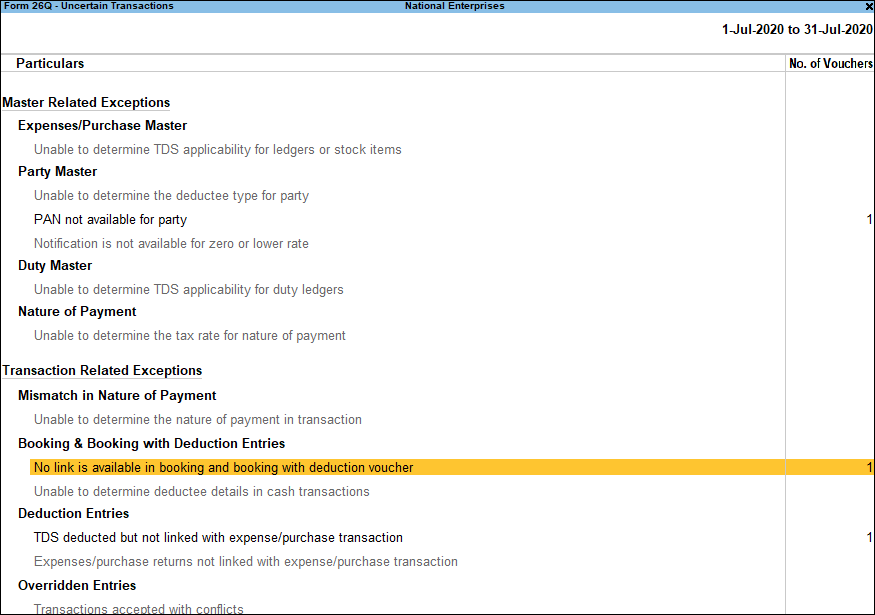
- Press Enter to go to the TDS Booking Not Linked Details screen and then press Alt+L (Link All) to create the link.
- Press Esc to return to Form 26Q.
The deductible amount appears under Balance Deductable.
Deduct TDS on the Interest Payable
Record the TDS deduction against the interest reference generated in Form 26Q.
In the Journal voucher:
- Press Ctrl+F (Autofill) and fill the details.
- Select the Type of transaction as TDS Deduction.
- Entert Till Date.
- Select the Party to whom interest is paid.
- Select the Nature of Payment as Interest Other than Interest on Securities.
- Select the TDS duty ledger created for interest.
The TDS amount is filled automatically.
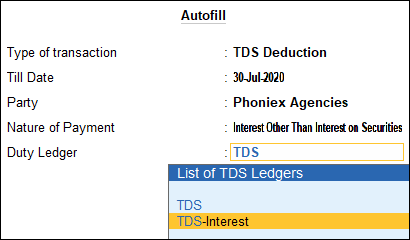
- Press Enter on the Amount field.
- In Bill-wise Details, under Type of Ref select Agst Ref.
- Select the reference for the interest amount.
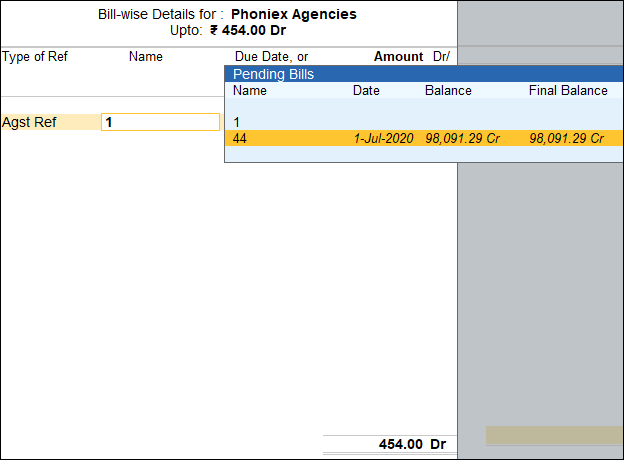
- Press Enter to return to voucher screen and then press Ctrl+A to save the voucher.
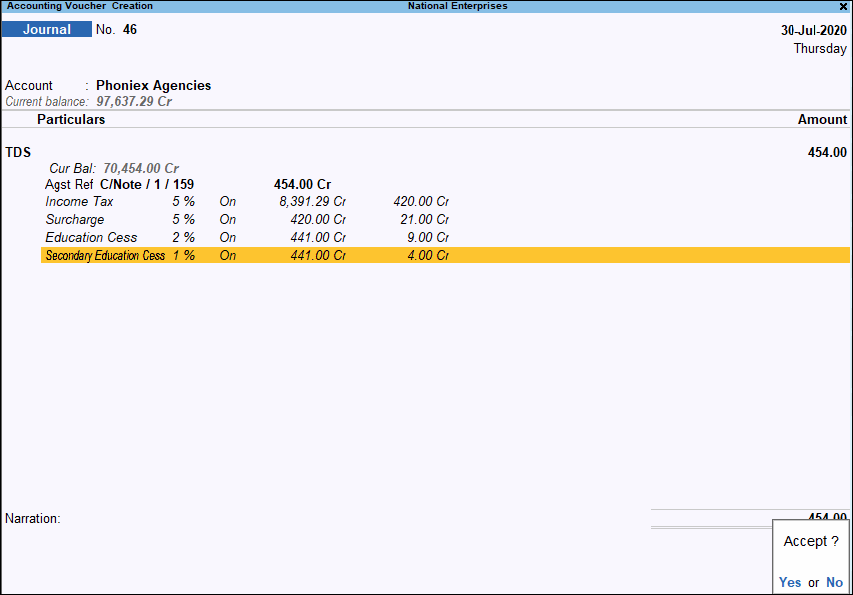
Pay Interest Amount to the Party
Record the payment of the interest and the related bill amount to the party after deducting TDS.
In the Payment voucher:
- Under Account, select the bank ledger.
- Under Particulars, select the party ledger.
- Enter the bill amount plus interest in Amount.
- In Bill-wise Details, select the references for the bill amount and interest, and press Ctrl+A to save. Select only the interest reference when paying only the interest.
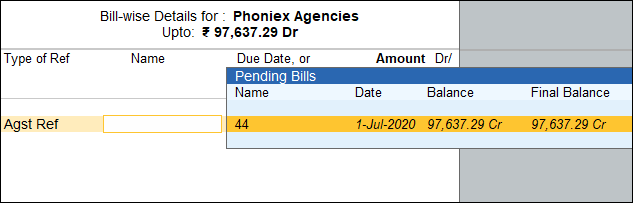
- Press Ctrl+A to save to voucher.
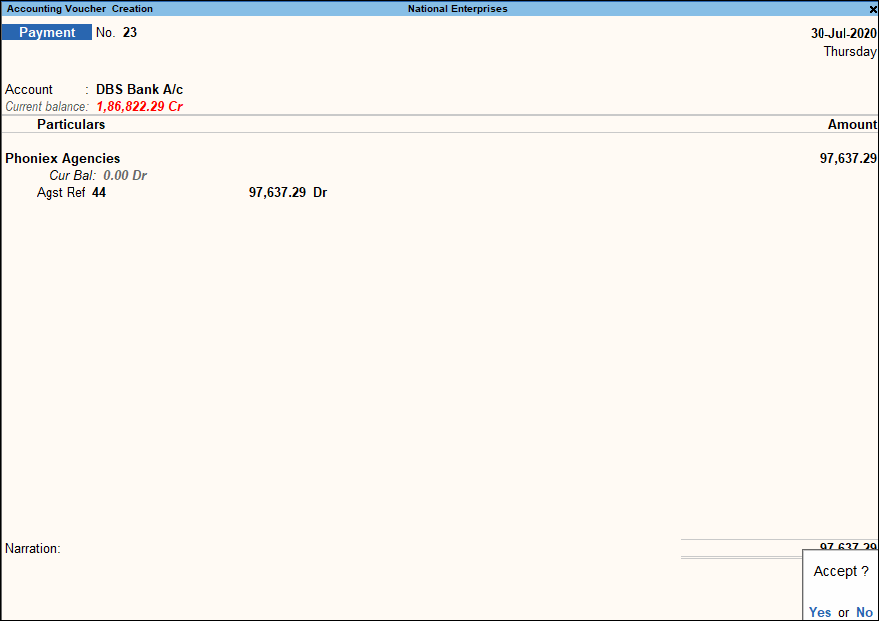
Record TDS on Interest on Loans Taken from Parties
You can calculate interest on loans taken from parties and deduct TDS on the interest payable.
Record Interest Payable on the Loan
Record the interest payable on the loan received from the party and apply the configured TDS details.
In the Journal voucher:
- Debit the interest expense ledger and enter the interest amount.
- Credit the party ledger and press Enter.
- In Bill-wise Details, enter the required details .
- Enter the Interest Parameters or alter them, as required, and press Ctrl+A to save.
- Select the TDS ledger.
The amount appears automatically. - Press Ctrl+A to save the voucher.
Once you have recorded the interest payable on the loan, you can link the interest transaction to your TDS return, deduct TDS on the interest payable to the party, and then pay interest amount to the party.


