
Record TDS on Benefits under Section 194R in TallyPrime
Under Section 194R, TDS is applicable on benefits or perquisites provided to a resident in connection with business or profession. In TallyPrime, you can record the purchase of the benefit or perquisite, deduct TDS for the business associate, and account for the TDS amount separately.

Ensure that:
- You have enabled TDS in TallyPrime.
- You have created the required TDS masters.
- You have PAN details of the business associate to whom the benefit or perquisite is provided.
Configure TDS Masters for Section 194R
Configure the Nature of Payment and ledgers required to record TDS on benefits or perquisites.
Create the Nature of Payment for Section 194R
Create a Nature of Payment for benefits or perquisites under Section 194R.
While creating the TDS Nature of Payment:
- Specify Section as 194R.
- Set the Rate of Tax as 10% for the applicable deductee types.
- Specify the Threshold/exemption limit as applicable.
- Press Ctrl+A to save.
Configure the Business Associate Ledger
Configure the party ledger for the resident business associate who receives the benefit or perquisite.
While creating the TDS party ledger,
- Under Statutory Details, set Is TDS Deductable to Yes.
- Select the applicable Deductee Type.
- Under Tax Registration Details, enter the valid PAN/IT No.
- Press Ctrl+A to save.
Create the Expense and TDS Ledgers
Create an expense ledger to account for the benefit or perquisite and a TDS ledger for Section 194R.
Expense ledger: Create the TDS Expense ledger under Indirect Expenses and set Is TDS Applicable to Applicable. Select the Nature of Payment configured for Section 194R.
TDS ledger: Create the TDS duty ledger under Duties & Taxes, select TDS as the Type of duty/tax. Select the Nature of Payment configured for Section 194R.
Record TDS on Benefits or Perquisites
Record the benefit or perquisite purchase, book the TDS deduction for the business associate, and account for the TDS amount received from the business associate.
Record the Purchase of the Benefit or Perquisite
Record the purchase of the benefit or perquisite that will be provided to the business associate.
In the Purchase voucher:
- In Party A/c name, select the supplier of the benefit or perquisite.
- Under Particulars, select the expense ledger created for the benefit or perquisite and enter the amount.
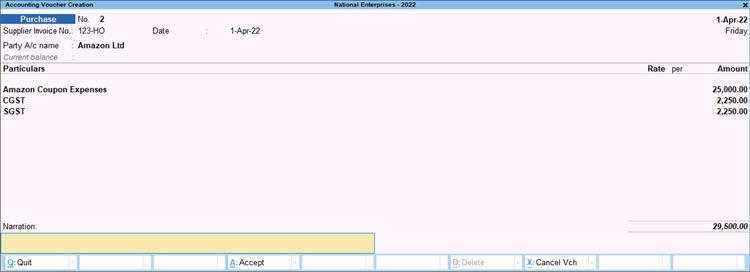
- Select the GST ledgers, if applicable.
- Press Ctrl+A to save the voucher.
Record TDS Deduction for the Business Associate
Record the TDS deduction on the benefit or perquisite so that it is reported in the TDS return.
In the Journal voucher:
- Press F12 (Configure) and set Use Cr/Dr instead of To/By during voucher entry to Yes, if required.
- Debit the expense ledger created for the TDS return with the total value of the benefit or perquisite.
- Credit the business associate ledger.
The amount payable to the business associate is reduced by the TDS amount. - In Bill-wise Details, use the same reference for the benefit or perquisite amount and the TDS amount.
- Credit the TDS ledger.
The TDS amount is calculated automatically based on the configured rate.
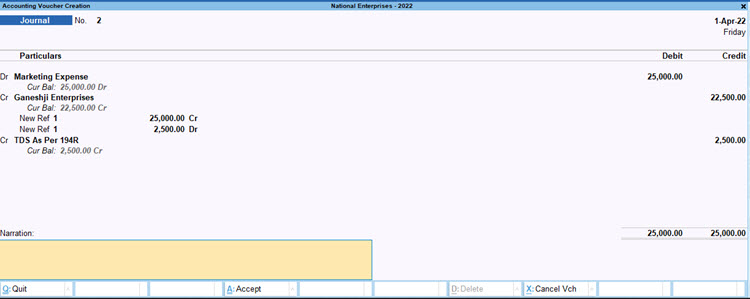
- Press Ctrl+A to save the voucher.
The TDS deduction will be included in the TDS return.
Nullify the TDS Booking
Nullify the accounting impact of the TDS booking while retaining the TDS transaction for reporting.
For example, you can nullify a TDS booking when:
- The original accounting entry is no longer required or has been reversed, but the TDS transaction needs to be retained for reporting.
- The accounting impact needs to be removed without deleting the TDS transaction and its statutory details.
In the Journal voucher:
- Debit the business associate ledger with the total value of the benefit or perquisite.
- In Bill-wise Details:
- Set off the amount against the reference created while recording the TDS deduction.
- Use New Ref to record the TDS amount.
- Credit the expense ledger with the total value of the benefit or perquisite.
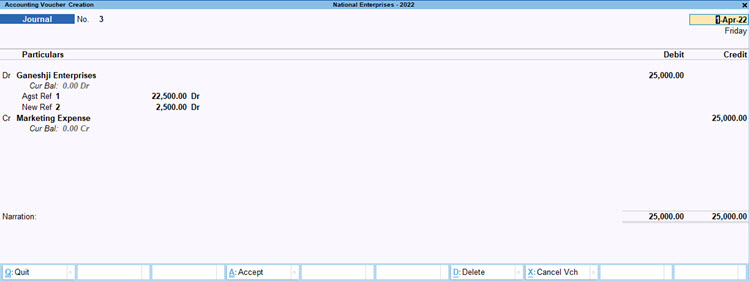
- Press Ctrl+A to save the voucher.
Record Receipt of the TDS Amount
Record the TDS amount received from the business associate.
In the Journal voucher:
- Debit the Cash or Bank ledger with the TDS amount.
- Credit the business associate ledger with the same amount.
- In Bill-wise Details, select Agst Ref and select the reference created for the TDS amount while nullifying the TDS booking.
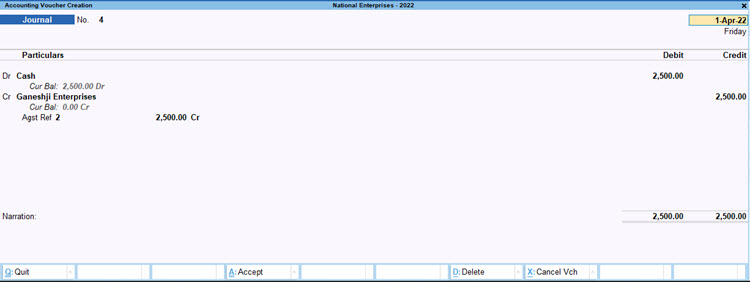
- Press Ctrl+A to save the voucher.
The TDS amount will be accounted for in the books while the deduction will be available for reporting in the TDS return.
Record TDS When the Benefit or Perquisite Is Paid Directly
When the benefit or perquisite is paid directly to the business associate after deducting TDS, you can use the regular TDS deduction process while recording the payment. For more information, refer to Record TDS on Expenses.
Questions and Answers
- Where can I verify the TDS calculated under Section 194R?
You can verify the transaction and TDS details in the applicable TDS return report, such as Form 26Q for resident deductees or Form 27Q for non-resident deductees.


