
Renew WhatsApp Subscription
Your WhatsApp subscription must remain active to continue sending business communications through TallyPrime. The subscription will be aligned with your TSS expiry date and will include a wallet balance to help you get started. You can renew your WhatsApp subscription anytime within 30 days before the subscription end date to continue sharing documents and business communications.
For any queries or help, contact your Tally Partner.
- In TallyPrime, press Alt+M (Share) > Manage > Renew Subscription.
Alternatively, log in to Customer Portal. - Under Control Centre > Account Management > License Management, select the Serial Number.
- In the Site information page, under the WhatsApp Subscription Details section, click (…) under Actions, and select Renew Subscription.
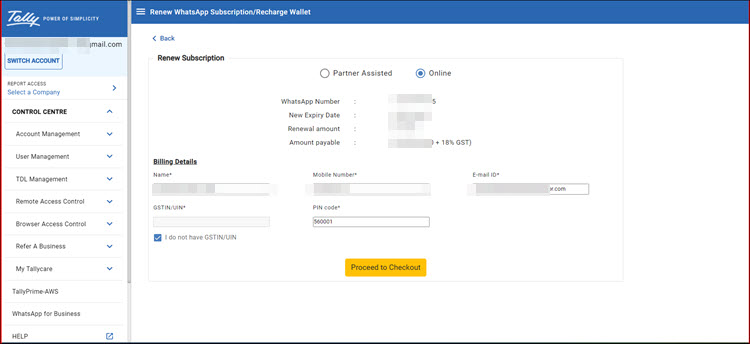
- In the Renew WhatsApp Subscription/Recharge Wallet screen, under Renew Subscription, select Online and click Proceed to Checkout to open the ONLINEBUY screen.
If you wish to get the renewal done by your Tally Partner, select Partner Assisted. The Partner will receive a notification and take it forward.
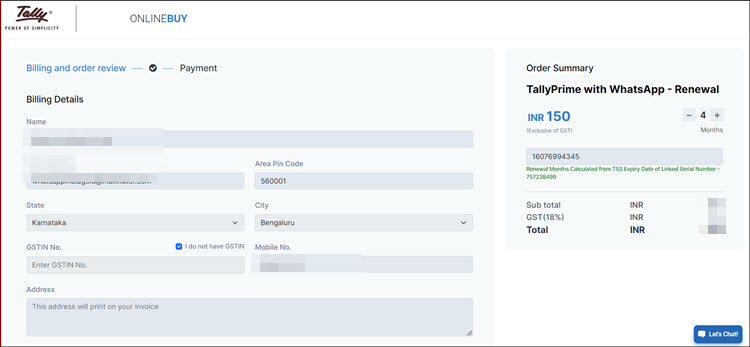
- In the ONLINEBUY screen, verify the Order Summary and update your Billing Details for TallyPrime with WhatsApp – Renewal, as needed.
- Select I agree with the Delivery policy, Cancellation policy, Refund policy and the Privacy policy, and click Proceed to Payment.
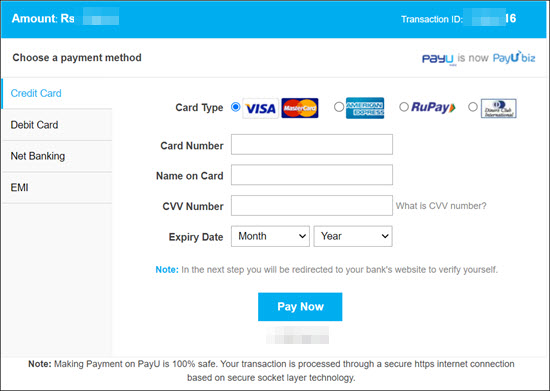
- Select your preferred payment mode and ensure that the payment for renewal is successful.
On successful payment, your WhatsApp subscription is renewed, and a confirmation email is sent to your registered email address. To continue sharing documents and business communications through TallyPrime with WhatsApp without interruption, ensure that you renew your subscription on time.


