
Cancel e-Way Bill & e-Invoice and Cancel or Delete Voucher in TallyPrime
If you’ve generated e-Invoice and e-Way Bill for a transaction, you can cancel or delete the voucher in TallyPrime quickly after cancelling both documents, or cancel them individually if needed.
You can perform these actions using the familiar shortcuts: Alt+X to cancel and Alt+D to delete a voucher. TallyPrime will handle the rest intelligently.
In addition to this, you can just cancel the e-Way Bill and e-Invoice and retain the voucher in TallyPrime.
Cancel e-Way Bill, e-Invoice, & Voucher
- Open the voucher in alteration mode and press Alt+X (Cancel).
You will come across one of the three scenarios:
Scenario 1: The 24-hours time limit has not exceeded for e-Way Bill and e-Invoice.


- Press I (Cancel e-Way Bill, e-Invoice & Voucher).
- Fill the Cancellation Details of e-Way bill and e-Invoice.
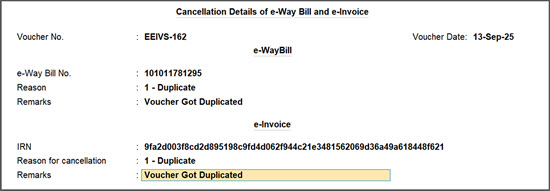
- Press Ctrl+A to save the cancellation details.
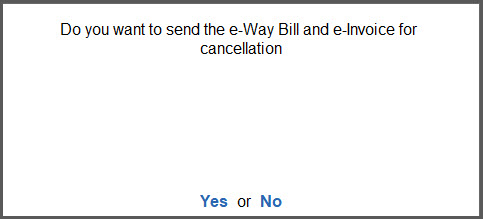
A message appears asking confirmation to send details for cancellation.
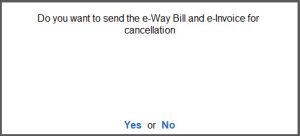
- Press Yes to exchange the e-Way Bill and e-Invoice cancellation details with the portal.
You will see a confirmation message indicating that the e-Way Bill, e-Invoice, and voucher have been cancelled successfully.
Scenario 2: The 24-hours time limit has exceeded for e-Way Bill and e-Invoice
A message appears indicating that the time limit for cancellation has exceeded.
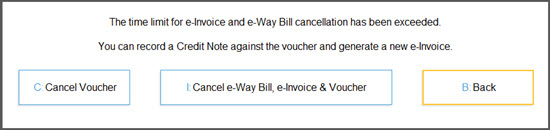
- Press B (Back) to return to the Voucher alteration screen without proceeding further.
- Press C to cancel the voucher in TallyPrime. However, this will only cancel the voucher in TallyPrime and will not impact the e-Invoice or e-Way Bill.
- If you press I (Cancel e-Way Bill, e-Invoice & Voucher), you will see the message about rejection of cancellation of e-Way Bill by the portal and failure to cancel the voucher.
If your e-Way Bill has no Part B details, you can cancel the e-Way Bill and pass a credit note for the voucher and generate a new e-Invoice for the same.
Scenario 3: The 24-hours time limit has exceeded for e-Invoice and not for e-Way Bill
Here, only e-Way Bill will get cancelled and you will not be able to cancel the e-Invoice. Therefore, you will have to pass a credit note against the voucher and generate a new e-Invoice.
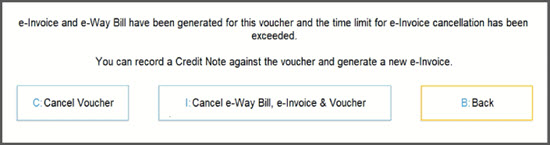
- Press C to cancel the voucher.
- Press I to cancel e-Way Bill, e-Invoice, & voucher. However, the request for cancellation of e-Invoice will be rejected.
- Press B (Back) to go back to the voucher alteration screen without proceeding further.
Since the e-Invoice cannot be cancelled, you may record a credit note for the voucher and generate a new e-Invoice for the same.
Cancel e-Way Bill, e-Invoice, & Delete Voucher
- Open the voucher in alteration mode, and press Alt+D (Delete).
You will come across one of the three scenarios:
Scenario 1: The 24-hours time limit has not exceeded for e-Way Bill and e-Invoice.

- Press I (Cancel e-Way Bill, e-Invoice & Delete Voucher).
- Fill the Cancellation Details of e-Way bill and e-Invoice.
- Press Ctrl+A to save the cancellation details.
A message appears asking confirmation to send details for cancellation.
- Press Yes to exchange the e-Way Bill and e-Invoice cancellation details with the portal.
You will see a confirmation message indicating that the e-Way Bill, e-Invoice, and voucher have been cancelled successfully.
Scenario 2: The 24-hours time limit has exceeded for e-Way Bill and e-Invoice
A message appears indicating that the time limit for cancellation has exceeded.
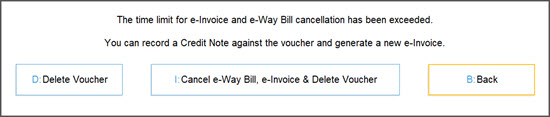
- Press B (Back) to return to the Voucher alteration screen without proceeding further.
- Press D to delete the voucher in TallyPrime. However, this will only delete the voucher in TallyPrime and will not impact the e-Invoice or e-Way Bill.
- If you press I (Cancel e-Way Bill, e-Invoice & Delete Voucher), you will see the message about rejection of cancellation of e-Way Bill by the portal and failure to delete the voucher.
If your e-Way Bill has no Part B details, you can cancel the e-Way Bill and pass a credit note for the voucher and generate a new e-Invoice for the same.
Scenario 3: The 24-hours time limit has exceeded for e-Invoice and not for e-Way Bill
Here, only e-Way Bill will get cancelled and you will not be able to cancel the e-Invoice. Therefore, you will have to pass a credit note against the voucher and generate a new e-Invoice.
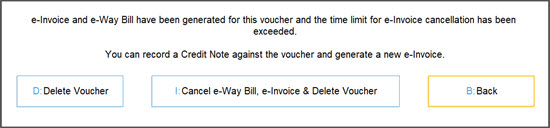
- Press D to cancel the voucher.
- Press I to cancel e-Way Bill, e-Invoice, & delete the voucher. However, the request for cancellation of e-Invoice will be rejected.
- Press B (Back) to go back to the voucher alteration screen without proceeding further.
Since the e-Invoice cannot be cancelled, you may record a credit note for the voucher and generate a new e-Invoice for the same.
Cancel e-Way Bill & e-Invoice and Retain the Voucher Using More Details
- Open the voucher in alteration mode.
- Press Ctrl+I (More Details) and press Show More.
- Select e-Way Bill Cancellation Details and fill in the details and save.
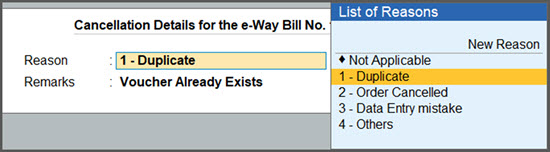
- Select e-Invoice Cancellation Details and fill in the details and save.
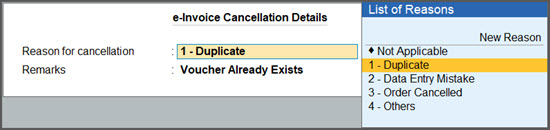
- Select e-Way Bill Cancellation Details and fill in the details and save.
- Press Ctrl+A to save the cancellation details for e-Way Bill and e-Invoice in the voucher.
You will come across one of the three scenarios.
Scenario 1: The 24-hours time limit has not exceeded for e-Way Bill and e-Invoice.
You will see a message that the invoice has the cancellation details.
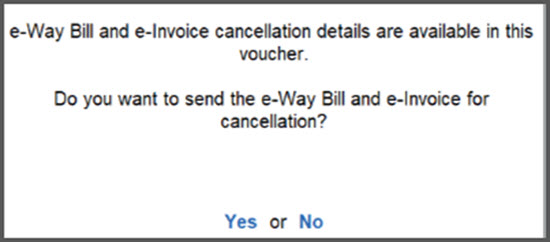
- Select Yes to send the cancellation Details of e-Way Bill and e-Invoice to the portal.
If you select No, the cancellation details will be saved.
You can see these vouchers appearing under the section:
- For IRN Cancellation of the e-Invoice report.
- For EWB Cancellation of the e-Way Bill report.
From either of these reports, you can send such e-Way Bills and e-Invoices for cancellation.
If the e-Way Bill and e-Invoice are not cancelled and you reopen the voucher, a message will appear when you try to save it—asking if you want to send the cancellation request.
Scenario 2: The 24-hours time limit has exceeded for e-Way Bill and e-Invoice.
You will see a message with the information that the invoice has the cancellation details but the allowed time limit has exceeded.
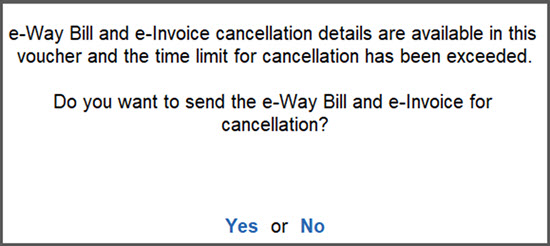
- If you attempt to cancel by selecting Yes the cancellation requests will be rejected by the portal.
- If you select No, the cancellation details will remain in the voucher but you cannot proceed with the cancellation of e-Invoice and e-Way Bill.
If the e-Way Bill doesn’t have Part B details, then cancellation request for e-Way Bill will be sent, but e-Invoice cannot be cancelled.
Scenario 3: The 24-hours time limit has exceeded for e-Invoice and not for e-Way Bill.
Here, only e-Way Bill will get cancelled and you will not be able to cancel the e-Invoice. Therefore, you will have to pass a credit note against the voucher and generate a new e-Invoice.
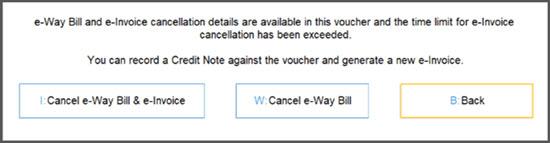
- Press I to cancel the e-Way Bill and e-Invoice. However, the request for cancellation of e-Invoice will be rejected.
- Press W to cancel the e-Way Bill.
- Press B (Back) to go back to the voucher alteration screen without proceeding further.
Since the e-Invoice cannot be cancelled, you may record a credit note for the voucher and generate a new e-Invoice for the same.
Alternatively, you can update cancellation details for e-Invoice and e-Way Bill from the e-Invoice or the e-Way Bill reports, using the F10 (Cancel IRN/Cancel EWB) option and send the cancellation requests to portal.
In all the above scenarios, the vouchers will not get cancelled or deleted in TallyPrime.
You can use the sample data to test this feature in TallyPrime, without affecting your company data. On downloading the Data folder, you will have the Sample data and the ReadMe file.
The ReadMe file has the instructions on using the sample data.
Q&A
- Why am I not able to cancel e-Way Bill and e-Invoice from TallyPrime, though the cancellation details are available in the voucher?
You can cancel e-Way Bill and e-Invoice from TallyPrime, only if those are generated in TallyPrime. If you have generated them from anywhere else, you can proceed for cancellation from the portal. - Why can’t I proceed with the cancellation of the e-Way Bill and e-Invoice when I press Alt+X for a transaction for which both have been generated in TallyPrime?
You need to check whether the the cancellation details are already exchanged with the portal. If it has already been done, then you will not see the options to cancel e-Way Bill and e-Invoice again in TallyPrime. - I entered the cancellation details for e-Way Bill and e-Invoice and accepted them, instead of sending it for cancellation, I selected No. Will the cancellation details be saved?
Yes, the cancellation details for both the e-Way Bill and e-Invoice will be saved even if you pressed No while exchanging the cancellation details with the portal. - While cancelling both e-Way Bill and e-Invoice, why am I not able to see the e-Invoice cancellation details?
If you are in TallyPrime Release 7.0 or later and generated e-Invoice with TallyPrime, you will be able to verify the IRN Generation Date & Time from the e-Invoice report. Depending on the time limit of 24-hours, you will be able to see the cancellation details for the e-Invoice.
If the 24-hours time limit has not exceeded, you will be able to see the cancellation details and proceed for the cancellation of e-Invoice. If the time-limit of 24-hours has not exceeded, you will be able to see the cancellation details but will not able to cancel the e-Invoice. In such a case, you will have to pass a Credit Note against the e-Invoice.
This is applicable for e-Way Bills generated with Part B details, as well. - I have canceled the e-Way Bill and e-Invoice from the portal. Can I now cancel or delete the voucher in my Company books in TallyPrime?
Yes, it is possible to cancel or delete the voucher in your Company Books. Press Alt+X or Alt+D, and then proceed accordingly.
For any further queries, refer to e-Way Bill & e-Invoice – FAQ.


