
Set Up Expense Ledgers for e-Invoicing in TallyPrime (KSA)
Before recording expenses with VAT in e-Invoices, ensure that your expense ledgers are configured with the required Arabic names, taxability, VAT treatment, and supply details as per ZATCA requirements.
- Create Expense ledger under Direct Expenses or Indirect Expenses.
- Press F12 (Configure) > enable Provide language aliases or Name and enter the name of the ledger in Arabic.
- Type of Ledger and Type of Charges: Not Applicable.
- Update statutory details.
- Select the Nature of transaction or select Not Applicable for the system to decide or select the required Nature of transaction.
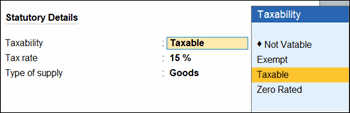
- Update the Taxability to Taxable, Not Vatable, Exempt, or Zero Rated, as required.
- Update the Reason for tax exemption/zero rate, if you have set Taxability as Not Vatable, Exempt, or Zero Rated.
For Taxability as Not Vatable, update the reason in local language.
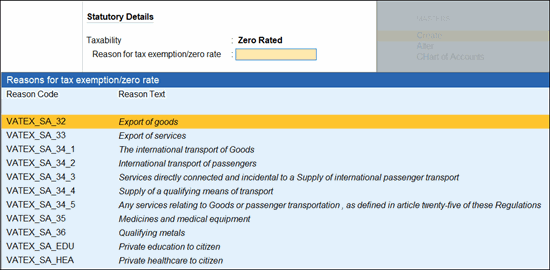
- Ensure that Tax rate is updated as per the Taxability.
- 15%, if you have set Taxability as Taxable.
- 0%, if you have set Taxability as Not Vatable, Exempt, or Zero Rated.
- Type of Supply: Goods or Services, as needed.
- Goods: To include the expense or income value in the stock item cost.
- Services: To include the expense or income value in the service value.
- Set Include in Assessable Value Calculation as VAT.
This option only appears if you have set Taxability as Not Vatable. - Enter other necessary details as needed, and press Ctrl+A to save.
Similarly, you can create Income ledgers with VAT.
Is this information useful?
YesNo


