
Record Supply of Works Contract Services
You can record material in or a receipt note voucher if you have received the material for the works contract. Thereafter, you can record a sales invoice when you render the service. Under GST, you need to report only the sales invoice for the works contract. Once you have recorded a supply, you can see the transaction in GSTR-3B and GSTR-1.

- GST is enabled for the Company.
- Service ledger for works contract is created
- Configured for GST applicability.
- Updated with the tax rate and HSN/SAC details as applicable for the services.
- Required Tax ledger – CGST & SGST for local sales; IGST for interstate sales – are created.
- Open the sales voucher in the Accounting Invoice mode.
- Press Alt+G (Go To) > Create Voucher > press F8 (Sales).
- Press Ctrl+H (Change Mode) > select Accounting Invoice.
- In the Party A/c name, select the party ledger.
- Select the service ledger configured for GST applicability.
- Select the required tax ledgers. CGST and SGST for local sales; IGST for interstate sales.
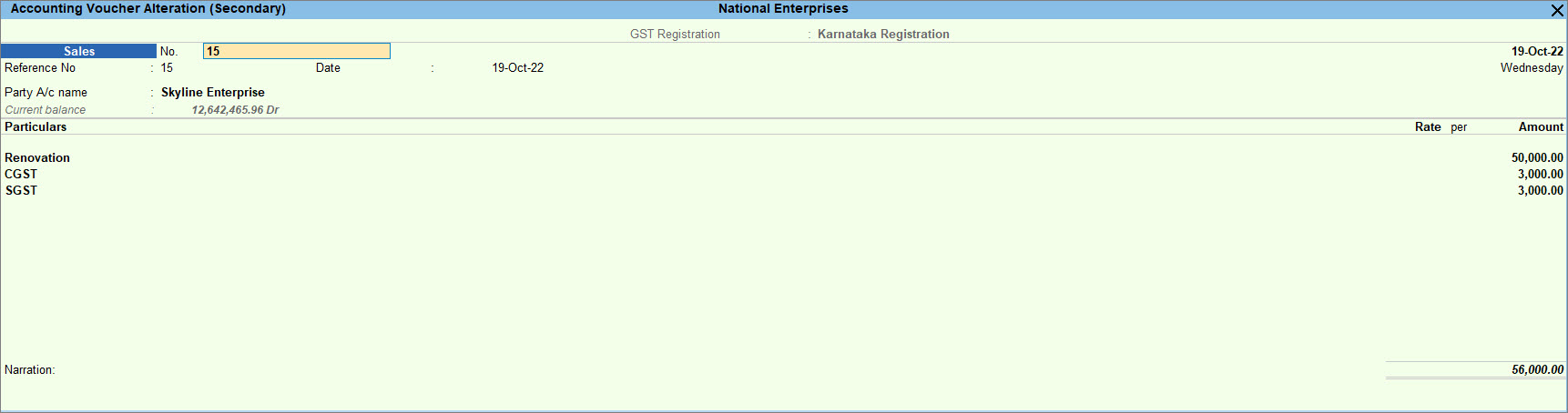
- Provide other necessary details and press Ctrl+A to save.
Is this information useful?
YesNo


