
Set Up Service Ledgers for GST
Your business might be dealing with services (for example, Transport Services), or service as part of the composite supply. Configure the service ledger accordingly with the required GST details, as per the requirements.

Ensure that:
- Your company has the required GST Registration details.
- You have created a service ledger under Direct Incomes/Indirect Incomes – say, Transportation Services or Packaging Services.
Set Up Service Ledger for Regular Supply under GST
In the service ledger created for transportation:
- Set Include in Assessable Value calculation to Not Applicable.
- Configure the service ledger for GST.
- Set GST applicability to Applicable.
- Specify the SAC and GST Rate details for the service.
- Configure the service ledge for RCM.
- Press F12 (Configure) > set Enable Reverse Charge calculation to Yes.
- Set Applicable for Reverse Charge to Yes.
For TallyPrime 2.1 & earlier, set Is reverse charge applicable to Yes.
- Select Type of Supply as Services.
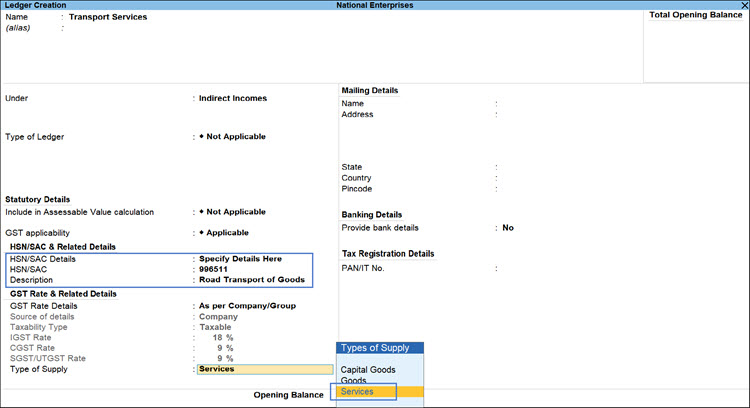
- Enter the remaining details and press Ctrl+A to save the ledger.
Set Up Service Ledger for Composite Supply under GST
Let’s consider goods (Electronics) as principal and services (Packaging) as secondary, as part of the composite supply.
In the service ledger created for packaging:
- Set Include in assessable value calculation for to GST.
- Appropriate to: Select Goods, as the principal supply.
- Select the Method of calculation from the following:
- Based on Quantity: Apportions the expense value based on the quantity of each stock item.
- Based on Value: Apportions the expense value based on the value of each stock item or service ledger.
- Set GST applicability to Not Applicable, as the GST on this service will be applied as part of the principal supply (goods).
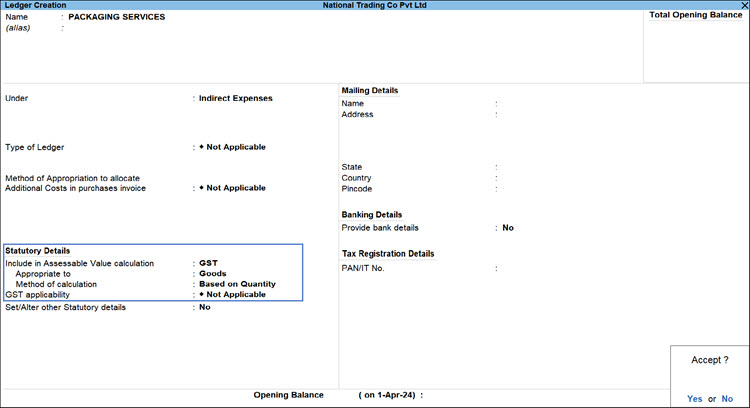
- Press Ctrl+A to accept the ledger creation screen.
The service ledger will now be considered while computing the assessable value for GST on the goods, instead of attracting separate GST as an independent service.
Is this information useful?
YesNo


