
Set Up Discount Ledger for GST
Whether your business is into Goods or Services, you might be providing discounts on sales to your parties, as part of your business practices. Therefore, you must set up your discount ledger accordingly for GST computation on the sale value.

Ensure that:
- Your company has the required GST Registration details.
- You have created a ledger under Direct Expenses or Indirect Expenses, as needed – say, Discount on Goods.
Discount ledger for sale of goods under GST
In the Discount ledger:
- Set Type of Ledger as Discount.
In this case GST applicability will be set to Not Applicable.
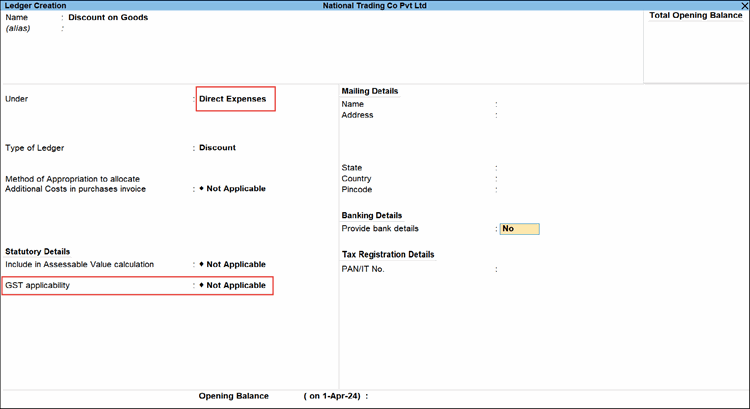
- Provide any other necessary details, and press Ctrl+A to save the discount ledger for goods.
Discount ledger for sale of services under GST
In the Discount ledger:
- Set Type of Ledger as Not Applicable.
- Set Include in Assessable Value calculation to GST.
This will ensure that GST is computed after deducting discount from the Amount of service in a transaction.
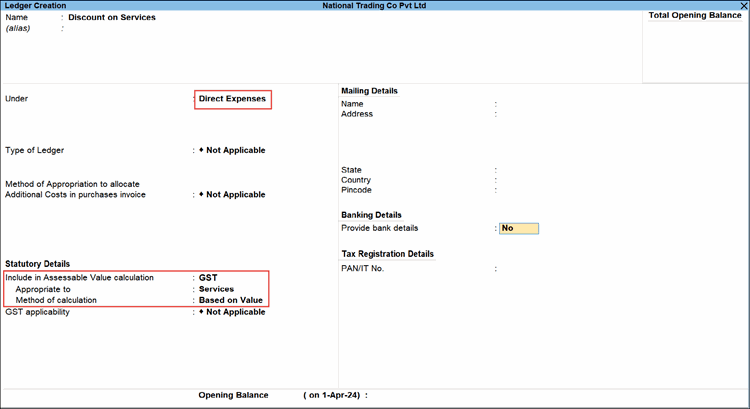
In this case, GST applicability will be set to Not Applicable. - Provide any other necessary details, and press Ctrl+A to save the discount ledger for services.
Is this information useful?
YesNo


