
Provide Ledger Opening Balance in Foreign Currency
For customers who transact in a currency other than your base currency, you can enter their ledger opening balance in foreign currency. TallyPrime gives you the flexibility to specify the opening balance in the customer’s preferred currency or the one they commonly used for transactions.
National Handicrafts exports woven carpets. All their transactions are in USD.
Before you begin | Prerequisites
- Create the currency you use for your business and identify its exchange rate.
To specify Opening Balance in a ledger:
- Press Alt+G (Go To) > Alter Master > select the ledger and press Enter.
- In the Ledger Alteration screen, place the cursor on the Opening Balance field and press Enter.
- In the Bill-wise Breakup screen, provide the applicable details.
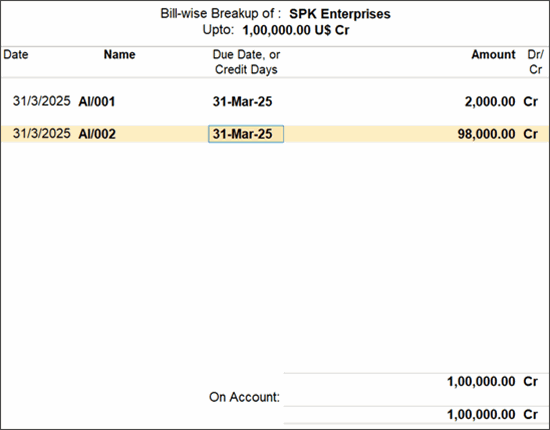
- Press Ctrl+A to save the Bill-wise Breakup screen.
- Press Ctrl+A to save the ledger.
Questions & Answers
- Why do I see Unadjusted Forex Gain/Loss in the Balance Sheet?
This happens when the Rate of Exchange specified in the Opening Balance is not equal to the Rate of Exchange as on the last date of the previous financial year, as specified in the Currency master. To know more, watch the video.
Changing currency details in opening balances or transactions can affect forex gain/loss calculations. To avoid discrepancies, always take a data backup before making any changes.
Is this information useful?
YesNo


