
Set Up Unique Values in Mapping Templates for Importing Data into TallyPrime
When importing masters or transactions from Excel, TallyPrime creates masters or transactions based on unique values. You can specify additional options to define how TallyPrime identifies unique values during import.
By default, TallyPrime creates masters based on each unique Name. For transactions, it uses each unique combination of Voucher Type Name, Voucher Date, and Voucher Number.
To set up unique values, in the Mapping Template for Masters or Transactions screen:
- Map the fields in Field (TallyPrime) with the corresponding Column Header (Excel) or Column (Excel).
- Unique values for creating masters, select the required option:
- Name: To create masters based on each unique Name.
- Every Blank Row: To identify each set of data separated by a blank row.
- Every Nth Row: To identify data at regular row intervals.
- Specify Columns: To define unique values based on selected columns.
- Specify Column Headers: To define unique values based on selected column headers.
- Set Exclude rows in Excel to Yes, if you want to exclude rows from the Excel file during import.
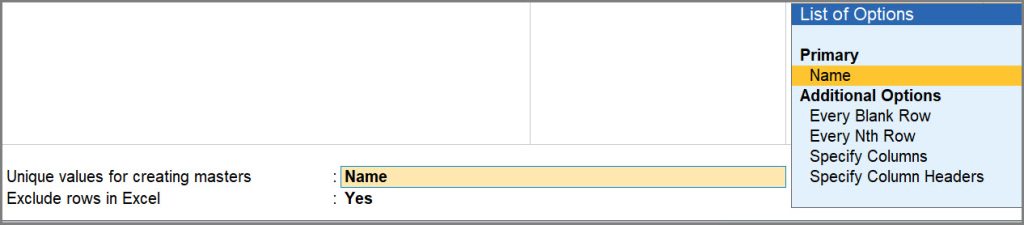
If you do not see the additional options, press F12 (Configure) and set Show Additional Options for creating Masters to Yes. - Press Ctrl+A to save the mapping template and import the data using the saved template.
Is this information useful?
YesNo


