
Generate Sales e-Invoice for Generation Phase in TallyPrime (KSA)
Once you have set up your company and masters in TallyPrime according to ZATCA regulations, you can generate e-Invoices in offline mode for single or multiple vouchers at the end of the day.
In TallyPrime, you can record B2B transactions (sales to VAT-registered businesses such as wholesalers or distributors) and B2C transactions (retail sales to unregistered customers).
Based on the transaction type, TallyPrime helps you generate e-Invoices and comply with the applicable e-Invoicing requirements.

Ensure that you have:
- Configured the VAT details for your Company.
- Created the party ledger with the required VAT details.
- Created the stock items with the required VAT details.
- Created the required tax ledger for VAT applicability.
- In the sales voucher, select the VAT ledger.
To View the tax analysis, press Alt+A (Tax Analysis).
Press Alt+F5 (Detailed) to view the detailed breakdown of the tax. - Enable Show e-Invoice details and verify the details related to e-Invoice.
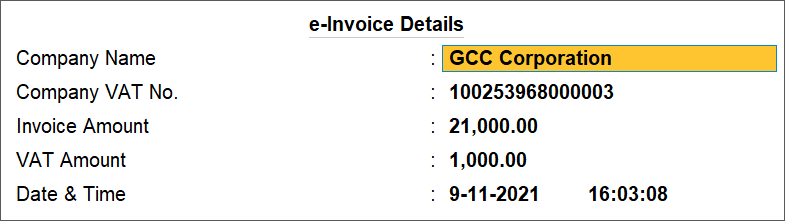
The fields in the e-Invoice Details screen cannot be modified. You can only verify them before saving the voucher.
- Press Ctrl+A to save the voucher.
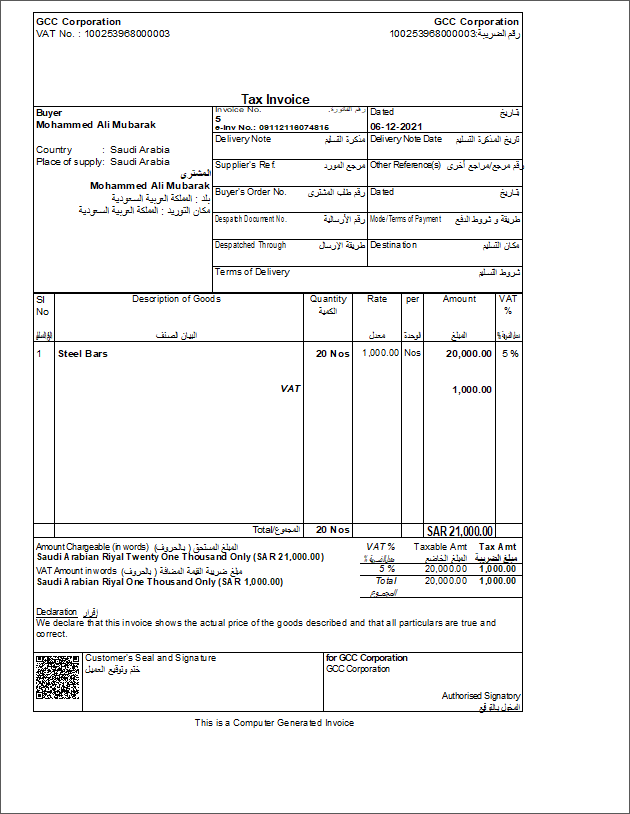
After generating the e-invoice, you can check the PDF A3 format file embedded with XML in the archived location of e-Invoices.


