
Print Professional Tax Statement in TallyPrime (Payroll)
The Professional Tax (PT) Monthly Statement is an MIS report that displays employee-wise PT contribution details for the selected month.
- Gateway of Tally > Display More Reports > Payroll Reports > Statutory Reports > Professional Tax > Monthly Statement.
- Select Professional Tax Ledger and press Enter.
- Press C (Configure) for print configurations.
- Specify the Period in the respective From and To fields.
- Select the required Employee Category, Employee/Group, Sorting Method, and Display name for Employees, and press Enter.
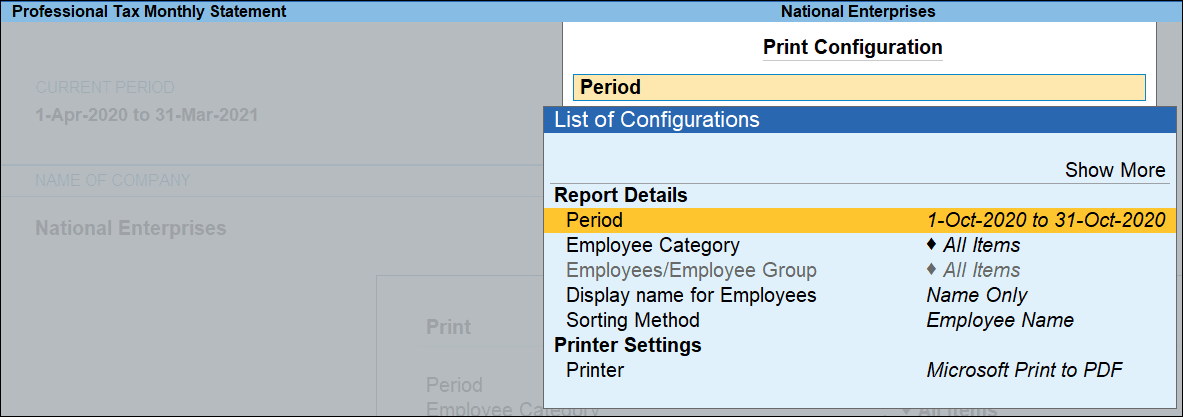
- Press I (Preview) or P (Print).
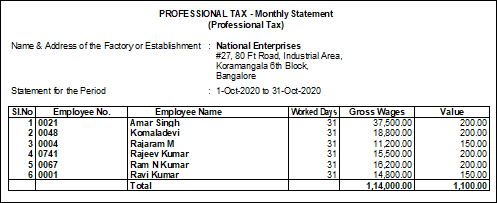
Column details:
-
Employee No.: Displays the employee number as defined in the Employee Master.
-
Employee Name: Displays the names of employees liable to pay Professional Tax.
-
Worked Days: Displays the total number of days each employee worked during the month.
-
Gross Wages: Displays the gross salary considered for PT calculation for each employee during the period.
-
Value: Displays the Professional Tax deducted and paid for each employee.
Is this information useful?
YesNo


